
Expanded Iron Bundles
Bundles with more storage space, and new functionalities in the future.
Screenshots
About this Mod
Expanded Iron Bundles
Small mod that provides bundles with more storage space, and new functionalities in the future.
Warning
The version 0.0.1 and 0.0.2 of the mod have an issue where inserting more than 127 of a single item type will cause it to "disapears" from the bundle.
The version 0.0.3 of the mod fixes this issue and may bring back some items bugged bundles.
Features
Current
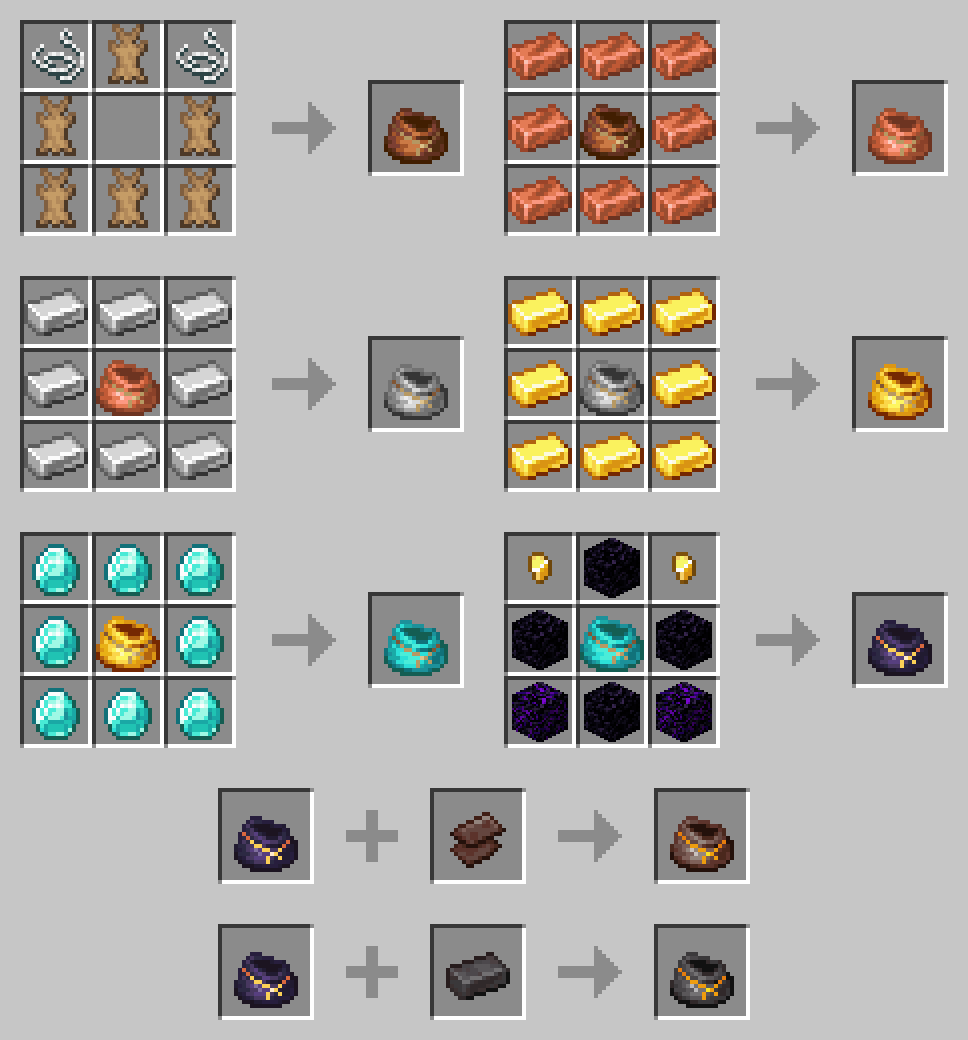
- Recipe for the vanilla bundle with rabbit hide
- Multiple variants with more storage space and special properties
- Copper Bundle (128 slots / 2 stacks)
- Iron Bundle (256 slots / 4 stacks)
- Gold Bundle (384 slots / 6 stacks)
- Diamond Bundle (512 slots / 8 stacks)
- Ancient Scraps Bundle (896 slots / 14 stacks)
- Netherite Bundle (1024 slots / 16 stacks & Immune to fire and lava)
Planned
- Versions for Forge and previous versions of Minecraft
- A config file to enable/disable specific bundles, change capacity
- Better visuals for the occupancy bar
- More bundles with special mecanics (i.e.: Ender Bundle, ...)
- Bundle modifiers (i.e.: Piston to throw items further, ...)
- Imrpoved bundle mecanics (i.e.: Swapping last inserted item, Thrown single stack, ...)
Versions
Fabric
✖️ 1.18 and earlier - Should be comming soon...
✔️ 1.19 & 1.19.1 - Actively supported
Forge
✖️ 1.18 and earlier - Should be comming soon...
✖️ 1.19 & 1.19.1 - Will come once Forge supports it
Requirements
Fabric
- Fabric API
- NBT Crafting
Forge
N/A
Known Issues
- The original bundle is not showing in the creative menu
- Recipes aren't unlocked when picking up one of the ingredients
- The bundle's inventory preview shows a cross when the occupancy reaches 64 or more
License
Apache V2
Available Versions
How to Install Expanded Iron Bundles on Your Server
Order Server
Order a Minecraft Java server with at least 3 GB RAM (4 GB recommended).
Set fabric Loader
In the panel under "Egg", select the fabric loader and matching Minecraft version (1.19.1).
Install Mod
Open the mod browser in the dashboard and search for "Expanded Iron Bundles". Click "Install" – done! Alternatively, upload the .jar via SFTP to the /mods folder.
Compatibility
Mod Loaders
Minecraft Versions
1.19.1, 1.19
Server-side
✓ RequiredRecommended RAM
4 GB(min. 3 GB)Frequently Asked Questions
Expanded Iron Bundles server crashes on startup – what to do?
Most common cause: wrong fabric version or insufficient RAM. Check the server log (latest.log) for "OutOfMemoryError" or "Mixin" errors. With Mado Hosting: ensure at least 3 GB RAM is allocated and the loader matches the mod version (1.19.1). You can switch loaders with one click in the panel.
Is Expanded Iron Bundles compatible with fabric?
Expanded Iron Bundles officially supports fabric for Minecraft 1.19.1, 1.19. The Mado dashboard automatically detects incompatible loader combinations.
Server lagging with Expanded Iron Bundles – how to optimize performance?
Recommended RAM: 4 GB (per 8 players). Use /spark profiler to check if Expanded Iron Bundles consumes the most tick time. Common fixes: reduce server view-distance to 8-10, install "performant" or "starlight" as supplementary mods on Forge. With Mado Hosting, your server runs on NVMe SSDs with dedicated CPU cores for minimal latency.
Similar Mods




Rent Modded Server
Install Expanded Iron Bundles with just one click on your server.