
Expanded World
Expanded World enhances your Minecraft experience by extending the world height, introducing custom caves, structures, and vegetation. Explore new depths and heights in your Minecraft worlds with this mod/datapack!
Screenshots
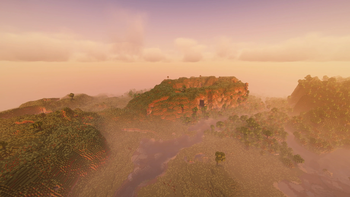




About this Mod
Notice
Please be advised that there is currently an issue affecting ore generation across all versions, resulting in fewer ores than intended. A fix is actively being worked on and will be implemented as soon as possible. Thank you for your patience and understanding.




Expanded World Mod/Datapack
Compatibility
not compatible with
- Terralith
Description
Expanded World is a Minecraft Mod and Datapack that extends the world's vertical limit from 384 to 640 blocks (-128 to 512) and introduces bespoke cave systems across multiple biomes. Alongside, it integrates custom vanilla-style structures and enhances the game's generation and vegetation mechanics.
Installation
Datapack Installation
Installing the datapack follows the standard procedure. Prior to installation or updating, it's advisable to create backups of your worlds.
Mod Installation
Expanded World can also function as a mod for Forge, NeoForge, and Fabric. Refer to the specific installation guidelines provided for each respective mod loader.
Features
- Elevates the world height to a minimum of Y: -128 and maximum of Y: 512
- Introduces tailored cave systems across various biomes, including ice, snow, desert, jungle, swamp, and badlands
- Augments vegetation in swamp and birch forests, and introduces fallen trees within forests and taigas
- Expands vanilla village and pillager outpost placements across diverse biomes
- Introduces new village variants in badlands, swamp, dark forest, and jungle
- Adds a novel structure: small camps featuring tents and campfires
Available Versions
How to Install Expanded World on Your Server
Order Server
Order a Minecraft Java server with at least 4 GB RAM (6 GB recommended).
Set datapack Loader
In the panel under "Egg", select the datapack loader and matching Minecraft version (1.21.4).
Install Mod
Open the mod browser in the dashboard and search for "Expanded World". Click "Install" – done! Alternatively, upload the .jar via SFTP to the /mods folder.
Compatibility
Mod Loaders
Minecraft Versions
1.21.4, 1.21.3, 1.21.2 (+10 more)
Server-side
✓ RequiredRecommended RAM
6 GB(min. 4 GB)Frequently Asked Questions
Expanded World server crashes on startup – what to do?
Most common cause: wrong datapack version or insufficient RAM. Check the server log (latest.log) for "OutOfMemoryError" or "Mixin" errors. With Mado Hosting: ensure at least 4 GB RAM is allocated and the loader matches the mod version (1.21.4). You can switch loaders with one click in the panel.
Is Expanded World compatible with datapack and fabric and forge and neoforge and quilt?
Expanded World officially supports datapack, fabric, forge, neoforge, quilt for Minecraft 1.21.4, 1.21.3, 1.21.2. Note: Forge and Fabric mods are NOT cross-compatible – pick one loader and stick with it. The Mado dashboard automatically detects incompatible loader combinations.
Server lagging with Expanded World – how to optimize performance?
Recommended RAM: 6 GB (per 5 players). Use /spark profiler to check if Expanded World consumes the most tick time. Common fixes: reduce server view-distance to 8-10, install "performant" or "starlight" as supplementary mods on Forge. With Mado Hosting, your server runs on NVMe SSDs with dedicated CPU cores for minimal latency.
Similar Mods




Rent Modded Server
Install Expanded World with just one click on your server.