
Experience Bottler
Add a block that can be used to bottle any quantity of experience points. The bottled experience points can be drunk like a potion, giving the experience points to user.
About this Mod
Experience Bottler - Minecraft Mod for Fabric
Add a block that can be used to bottle any quantity of experience points. The bottled experience points can be drunk like a potion, giving the experience points to user.
How to install
As with other mods, there is nothing special to do, just place the mod files in the mods folder of the environment where Fabric is installed. Also, don't forget about the Fabric API.
How to use
Experience values can be bottled in any quantity from 1 to 2147483647 into an empty bottle by using the GUI. Up to 64 bottled experience values can be stacked. However, this requires that the quantity of bottled experience must be the same.
A working demo has been uploaded to YouTube.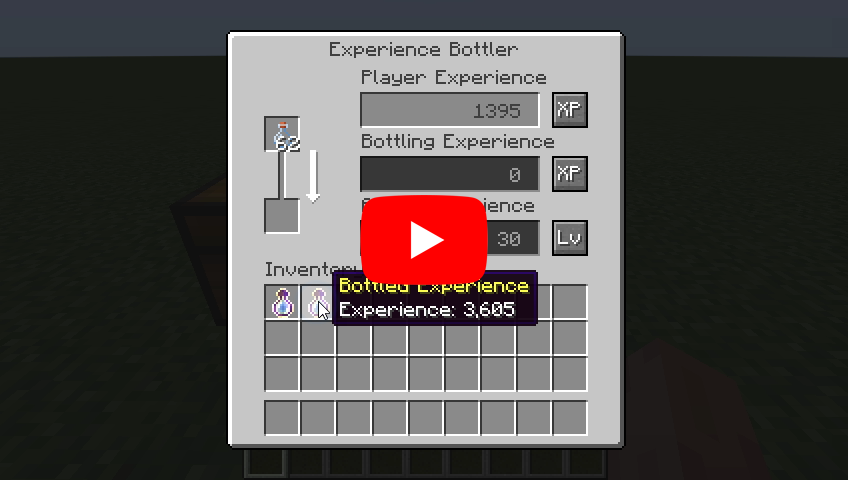
About rare case bugs
If a player's level is abnormally high, the experience calculation logic may not work correctly. This does not occur unless the player's level exceeds 21863, so it generally doesn't matter to most players, but keep it in the back of your mind.
Recipes
Experience Bottler: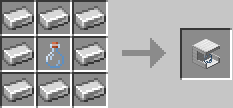
Languages
| Language | Translators | Status |
|---|---|---|
| en_us | Translation Tools | 100% |
| ja_jp | EideeHi | 100% |
| fr_fr | ɪѕнɪ_ѕαʍα | 100% |
| es_es | Bruno Collazo | 100% |
Contacts

Only bug reports are accepted under Issues.

Questions, suggestions and comments are welcome on the Discord Server.
Credits
- Dependencies:
- Translators:
- ɪѕнɪ_ѕαʍα (ishi_sama)
- Bruno Collazo (BrunoCollazo)
- Contributors:
- Kyle Foley (kFo)
License
Experience Bottler is developed and released under the MIT license. For the full text of the license, please see the LICENSE file.
Available Versions
How to Install Experience Bottler on Your Server
Order Server
Order a Minecraft Java server with at least 3 GB RAM (4 GB recommended).
Set fabric Loader
In the panel under "Egg", select the fabric loader and matching Minecraft version (26.1).
Install Mod
Open the mod browser in the dashboard and search for "Experience Bottler". Click "Install" – done! Alternatively, upload the .jar via SFTP to the /mods folder.
Compatibility
Mod Loaders
Minecraft Versions
26.1, 1.21.11, 1.21.10 (+13 more)
Server-side
✓ RequiredRecommended RAM
4 GB(min. 3 GB)Frequently Asked Questions
Experience Bottler server crashes on startup – what to do?
Most common cause: wrong fabric version or insufficient RAM. Check the server log (latest.log) for "OutOfMemoryError" or "Mixin" errors. With Mado Hosting: ensure at least 3 GB RAM is allocated and the loader matches the mod version (26.1). You can switch loaders with one click in the panel.
Is Experience Bottler compatible with fabric?
Experience Bottler officially supports fabric for Minecraft 26.1, 1.21.11, 1.21.10. The Mado dashboard automatically detects incompatible loader combinations.
Server lagging with Experience Bottler – how to optimize performance?
Recommended RAM: 4 GB (per 8 players). Use /spark profiler to check if Experience Bottler consumes the most tick time. Common fixes: reduce server view-distance to 8-10, install "performant" or "starlight" as supplementary mods on Forge. With Mado Hosting, your server runs on NVMe SSDs with dedicated CPU cores for minimal latency.
Similar Mods


Rent Modded Server
Install Experience Bottler with just one click on your server.