
Experience Nuggets
Adds Experience Nuggets for item-based XP storage and transfer!
Screenshots
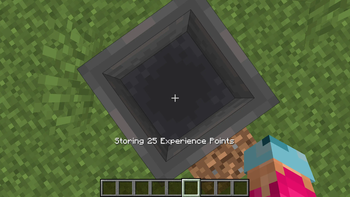
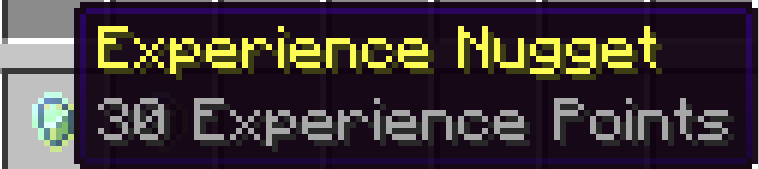
About this Mod
⚠️ IMPORTANT: USAGE GUIDELINES
If you're planning to use this on a server or modpack,
please refer to:
https://gamedash43.github.io/dash-mcl-licenses/#usage

Experience Nuggets adds the ability to store and transport experience points as items.
📜 How to Use
1. Creating Experience Nuggets
- Via Hopper Conversion:
- Lead experience orbs into a vanilla hopper.
- The hopper converts the orbs into experience nuggets based on their value.
- Manual Collection:
- Stand on a hopper, shift, and look down.
- Hold until the hopper absorbs the desired amount of experience, converting it into an item.
- Item Movement:
- Once created, experience nuggets can be moved around like any other item.
2. Using Experience Nuggets
- Placing Nuggets:
- Right-click an experience nugget to place it, which releases an experience orb containing its stored value.
- Using in Dispensers:
- Experience nuggets can also be loaded into dispensers to dispense the stored experience when activated.
❓ FAQ
Why is there no experience merging feature?
I developed a script for merging experience, but it resulted in over nine different experience orb values per automatic farm, complicating filtering and storage.How optimized is this add-on?
This datapack is a proof of concept and not fully optimized. It will continue to receive updates, but unless it gains popularity, a completely optimized version may not be released.How do I report a bug?
Join the Discord and either DM me or post a message in the reports channel.How do I uninstall this add-on?
Just run the command "/function dash.exp:uninstall"Available Versions
How to Install Experience Nuggets on Your Server
Order Server
Order a Minecraft Java server with at least 3 GB RAM (4 GB recommended).
Set datapack Loader
In the panel under "Egg", select the datapack loader and matching Minecraft version (1.21.5).
Install Mod
Open the mod browser in the dashboard and search for "Experience Nuggets". Click "Install" – done! Alternatively, upload the .jar via SFTP to the /mods folder.
Compatibility
Mod Loaders
Minecraft Versions
1.21.5
Server-side
✓ RequiredRecommended RAM
4 GB(min. 3 GB)Frequently Asked Questions
Experience Nuggets server crashes on startup – what to do?
Most common cause: wrong datapack version or insufficient RAM. Check the server log (latest.log) for "OutOfMemoryError" or "Mixin" errors. With Mado Hosting: ensure at least 3 GB RAM is allocated and the loader matches the mod version (1.21.5). You can switch loaders with one click in the panel.
Is Experience Nuggets compatible with datapack and fabric and forge and neoforge and quilt?
Experience Nuggets officially supports datapack, fabric, forge, neoforge, quilt for Minecraft 1.21.5. Note: Forge and Fabric mods are NOT cross-compatible – pick one loader and stick with it. The Mado dashboard automatically detects incompatible loader combinations.
Server lagging with Experience Nuggets – how to optimize performance?
Recommended RAM: 4 GB (per 8 players). Use /spark profiler to check if Experience Nuggets consumes the most tick time. Common fixes: reduce server view-distance to 8-10, install "performant" or "starlight" as supplementary mods on Forge. With Mado Hosting, your server runs on NVMe SSDs with dedicated CPU cores for minimal latency.
Similar Mods


Rent Modded Server
Install Experience Nuggets with just one click on your server.