
ExpireNoMore
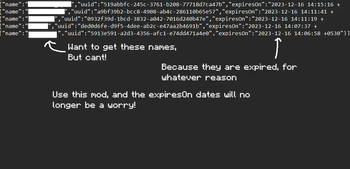
A Minecraft mod that increases the expiration time of each user in the Minecraft server's usercache.json file.
Screenshots
About this Mod
ExpireNoMore

A Minecraft mod that increases the expiration time in a Minecraft server's usercache.json file.
More specifically, this mod makes it so that, every time the server is started or someone joins the server, the usercache.json file of the server is updated, so that whichever user's expireson date is less than 50 years away, will have their value increase by another 100 years.
Don't use the mod if you need the name to expire for whatever reason.
Warning: Make a backup of your usercache.json before running this mod
Note: This mod cannot recover previously removed/expired usercache. It can only save what currently exists.
Reason for this mod:
I wanted to see and compare the player statistics of the players on my server, and found a great project to do just that: https://github.com/pdinklag/MinecraftStats
It worked well, except for one part. It didn't show all the players stats.
Searching around, I found that this was because the player statistics are stored with the player's uuid as the filename.
Now, this would usually be fine, as the player's uuid can be easily converted into their username if it were an online server.
However, my server was in "offline" mode. So therefore, the uuid's could not be reversed.
Now usually, the names and uuids are stored in a file called usercache.json. Except, for some reason, every cache has an expiry time on it.
It had so happened that a few server members had not logged in for a long while, so their names weren't cached in that file. So the stats project could not display their names.
So to finally fix that, I decided to make this mod. I don't know if there is any reason for the expiration of names in the file. If you have a need for the expiry, do not use this mod.
About the mod
The 1.1.0 version of the mod should work on most fabric version(from 1.14.4 to the 1.21.8), and the 1.2.0 version working for 1.21.9-1.21.11, with atleast the fabric loader version being above 0.15.1
The minimum java requirement is java 8, although any higher version will work.
When you run the mod the first time, every username's expire time will increase by 100 years (as long as its not already more than 50 years away).
Available Versions
How to Install ExpireNoMore on Your Server
Order Server
Order a Minecraft Java server with at least 3 GB RAM (4 GB recommended).
Set fabric Loader
In the panel under "Egg", select the fabric loader and matching Minecraft version (1.21.11).
Install Mod
Open the mod browser in the dashboard and search for "ExpireNoMore". Click "Install" – done! Alternatively, upload the .jar via SFTP to the /mods folder.
Compatibility
Mod Loaders
Minecraft Versions
1.21.11, 1.21.10, 1.21.9 (+36 more)
Server-side
✓ RequiredRecommended RAM
4 GB(min. 3 GB)Frequently Asked Questions
ExpireNoMore server crashes on startup – what to do?
Most common cause: wrong fabric version or insufficient RAM. Check the server log (latest.log) for "OutOfMemoryError" or "Mixin" errors. With Mado Hosting: ensure at least 3 GB RAM is allocated and the loader matches the mod version (1.21.11). You can switch loaders with one click in the panel.
Is ExpireNoMore compatible with fabric?
ExpireNoMore officially supports fabric for Minecraft 1.21.11, 1.21.10, 1.21.9. The Mado dashboard automatically detects incompatible loader combinations.
Server lagging with ExpireNoMore – how to optimize performance?
Recommended RAM: 4 GB (per 8 players). Use /spark profiler to check if ExpireNoMore consumes the most tick time. Common fixes: reduce server view-distance to 8-10, install "performant" or "starlight" as supplementary mods on Forge. With Mado Hosting, your server runs on NVMe SSDs with dedicated CPU cores for minimal latency.
Similar Mods






Rent Modded Server
Install ExpireNoMore with just one click on your server.