
Exploration MC
A mod that enhances the exploration aspect of Minecraft with new block breaking mechanics
Screenshots



About this Mod
ExplorationMC
ExplorationMC is a Minecraft mod that transforms the early game experience, making survival more challenging and exploration more rewarding. This mod is designed for players seeking a fresh, more difficult start to their Minecraft journey, emphasizing strategic resource gathering and careful progression.
Key Features
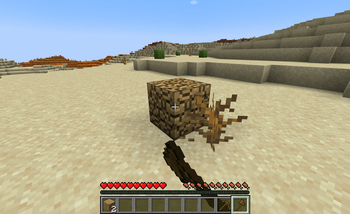
1. Overhauled Block Breaking Mechanics
- Stone-type blocks (including ores) require pickaxes
- Wood and plant-based blocks require axes
- Dirt and sand-like blocks require shovels
- Most blocks are unbreakable by hand, forcing tool crafting
- Specific blocks (e.g., leaves, cobwebs) require shears
2. Enhanced Mob Difficulty
- Zombies and Skeletons spawn with better equipment (up to 35% chance in hard mode)
- Increased probability of iron armor (30% of armored mobs)
- Higher chance of enchanted weapons (up to 60% in hard mode)
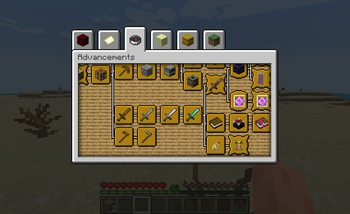
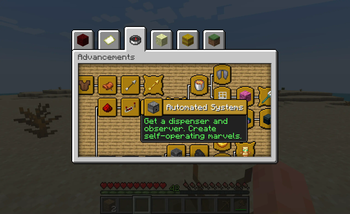
3. Extensive New Advancement System
- "Getting Wood" is now a challenge advancement
- Multiple advancement lines guide players through various aspects of gameplay:
- Redstone Technology: From basic circuits to advanced automation
- Combat: Progressing through different weapon tiers and combat techniques
- Nomadic: Encouraging exploration and survival skills
- Village Interaction: Trading, protection, and villager-related tasks
- Resource Gathering: Tiered goals for obtaining and processing resources
- And many more!
4. Crafting Level Requirements
- Stone items require player level 10
- Iron items require player level 20
- Diamond items require player level 30
- Netherite items require player level 45
- Levels are only required for first time crafting an item
Compatibility
- Minecraft 1.20.1, Fabric Loader 0.14.21 or above
- Compatible with Minecraft Comes Alive: Reborn
Tips for Surviving ExplorationMC
- Trade with villagers to obtain essential tools early on
- Fight mobs at night to gain XP and level up for crafting
- Prioritize finding a village for shelter and resources
- Focus on mining coal and iron as soon as you craft a stone pickaxe
- Be cautious of stronger mobs - retreat if necessary
- Utilize the environment for protection (e.g., dig shelter, use high ground)
- Craft a shield as soon as possible for better defense
- If you are struggling, select "bonus chest" when creating the world
ExplorationMC recreates the challenge of your first Minecraft experience, making every decision crucial and every resource valuable. Whether you're a veteran seeking a fresh challenge or a newcomer desiring an intense survival experience, ExplorationMC offers a unique and engaging way to play Minecraft. Prepare to rediscover the thrill of early game survival and embark on a more rewarding journey of exploration and discovery!
Available Versions
How to Install Exploration MC on Your Server
Order Server
Order a Minecraft Java server with at least 3 GB RAM (4 GB recommended).
Set fabric Loader
In the panel under "Egg", select the fabric loader and matching Minecraft version (1.20.1).
Install Mod
Open the mod browser in the dashboard and search for "Exploration MC". Click "Install" – done! Alternatively, upload the .jar via SFTP to the /mods folder.
Compatibility
Mod Loaders
Minecraft Versions
1.20.1
Server-side
✓ RequiredRecommended RAM
4 GB(min. 3 GB)Frequently Asked Questions
Exploration MC server crashes on startup – what to do?
Most common cause: wrong fabric version or insufficient RAM. Check the server log (latest.log) for "OutOfMemoryError" or "Mixin" errors. With Mado Hosting: ensure at least 3 GB RAM is allocated and the loader matches the mod version (1.20.1). You can switch loaders with one click in the panel.
Is Exploration MC compatible with fabric?
Exploration MC officially supports fabric for Minecraft 1.20.1. The Mado dashboard automatically detects incompatible loader combinations.
Server lagging with Exploration MC – how to optimize performance?
Recommended RAM: 4 GB (per 8 players). Use /spark profiler to check if Exploration MC consumes the most tick time. Common fixes: reduce server view-distance to 8-10, install "performant" or "starlight" as supplementary mods on Forge. With Mado Hosting, your server runs on NVMe SSDs with dedicated CPU cores for minimal latency.
Similar Mods




Rent Modded Server
Install Exploration MC with just one click on your server.