
Explorer's Delight
A set of delightfully nifty tools for exploration
Screenshots
About this Mod
A set of delightfully nifty tools for exploration
Installation



Recall potion
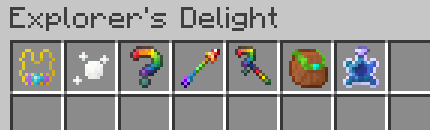
A recreation of recall potion from Terraria in Minecraft. You drink it, and you get teleported to your spawn point.
As simple as that!
Illumination necklace
Both pretty and functional - wear it to place luminous orbs automatically in dark spots wherever you go.
Compatible with Flan & Get Off My Lawn!
Assortment pouch
Adventurers often face a problem that they encounter a lot of unique items in low quantities.
This pouch solves the problem - it has a lot of slots, but each slot can only hold a single item.
Mysteries and Mystery arrows
Ever wondered what lives inside an NPC? The answer is a mystery. Unalive a couple dozen villagers, pillagers,
witches or other NPCs to get your mystery. The primary application of mysteries, apart from being pretty,
is making mystery arrows from plain arrows. Mystery arrows are really quite useful. Shoot one at a block, and it changes.
Shoot one at a creature, and it morphs.
Ownerizer
Mystery arrows respect Flan / GOML claims by default. Among other things, it means that if you put them into
a dispenser, they won't work inside any claim, even your own. (Sadly, that's just a Minecraft limitation)
BUT! There's a solution: Ownerizer! Just shift-click a dispenser (or any other functional block) with it
to mark it as your own property. It won't do anything on its own, but it will hint Mystery arrows that they can
unleash their power inside your claims (and maybe even more!?).
How to configure Mystery arrows
Mystery arrows come opinionated. To configure them, you need to make a datapack.
Look here on what to put where for blocks and for entities.
Additionally, there's a config for the weights (that means relative chances) of some mystery arrow effects.
The config structure is self-explanatory, go check it out

Available Versions
How to Install Explorer's Delight on Your Server
Order Server
Order a Minecraft Java server with at least 3 GB RAM (4 GB recommended).
Set fabric Loader
In the panel under "Egg", select the fabric loader and matching Minecraft version (1.20.4).
Install Mod
Open the mod browser in the dashboard and search for "Explorer's Delight". Click "Install" – done! Alternatively, upload the .jar via SFTP to the /mods folder.
Compatibility
Mod Loaders
Minecraft Versions
1.20.4, 1.20.2, 1.18 (+2 more)
Server-side
✓ RequiredRecommended RAM
4 GB(min. 3 GB)Frequently Asked Questions
Explorer's Delight server crashes on startup – what to do?
Most common cause: wrong fabric version or insufficient RAM. Check the server log (latest.log) for "OutOfMemoryError" or "Mixin" errors. With Mado Hosting: ensure at least 3 GB RAM is allocated and the loader matches the mod version (1.20.4). You can switch loaders with one click in the panel.
Is Explorer's Delight compatible with fabric?
Explorer's Delight officially supports fabric for Minecraft 1.20.4, 1.20.2, 1.18. The Mado dashboard automatically detects incompatible loader combinations.
Server lagging with Explorer's Delight – how to optimize performance?
Recommended RAM: 4 GB (per 8 players). Use /spark profiler to check if Explorer's Delight consumes the most tick time. Common fixes: reduce server view-distance to 8-10, install "performant" or "starlight" as supplementary mods on Forge. With Mado Hosting, your server runs on NVMe SSDs with dedicated CPU cores for minimal latency.
Similar Mods




Rent Modded Server
Install Explorer's Delight with just one click on your server.