
Exquisite Wormhole
Are your legs too weak to walk a thousand blocks? The Wormhole Potion adds an easy way to teleport to your friends.
Screenshots
About this Mod
Exquisite Wormhole: Terraria-style Teleportation
Wormhole brings a familiar and highly requested mechanic from Terraria straight into Minecraft. If you've ever felt that traveling to your friends takes too much time, this mod is the perfect solution for your multiplayer adventures!
Key Features:
Wormhole Potions: A new consumable item that allows for teleportation between players.
Intuitive UI: Simply use right-click potion to open a user-friendly interface showing all online players. Click a name, and you're there!
Vanilla-Friendly Crafting: No overpowered cheats. The potion is integrated into the vanilla brewing system, making it feel like a natural part of the game.
How to get started:
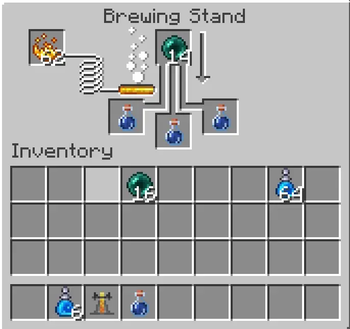
Brewing: Place an Ender Pearl into a Brewing Stand with an Awkward Potion.
Teleporting: Ensure the player you want to teleport to is online.
Usage: Use the potion, select your friend from the list, and bridge the distance in a second!
Enhance your Multiplayer Experience:
This mod is designed specifically for SMP and Co-op play. It removes the tediousness of long treks while maintaining game balance through the brewing cost. Perfect for large maps or modpacks where players are spread far apart.
Available Versions
How to Install Exquisite Wormhole on Your Server
Order Server
Order a Minecraft Java server with at least 3 GB RAM (4 GB recommended).
Set forge Loader
In the panel under "Egg", select the forge loader and matching Minecraft version (1.20.1).
Install Mod
Open the mod browser in the dashboard and search for "Exquisite Wormhole". Click "Install" – done! Alternatively, upload the .jar via SFTP to the /mods folder.
Compatibility
Mod Loaders
Minecraft Versions
1.20.1
Server-side
✓ RequiredRecommended RAM
4 GB(min. 3 GB)Frequently Asked Questions
Exquisite Wormhole server crashes on startup – what to do?
Most common cause: wrong forge version or insufficient RAM. Check the server log (latest.log) for "OutOfMemoryError" or "Mixin" errors. With Mado Hosting: ensure at least 3 GB RAM is allocated and the loader matches the mod version (1.20.1). You can switch loaders with one click in the panel.
Is Exquisite Wormhole compatible with forge?
Exquisite Wormhole officially supports forge for Minecraft 1.20.1. The Mado dashboard automatically detects incompatible loader combinations.
Server lagging with Exquisite Wormhole – how to optimize performance?
Recommended RAM: 4 GB (per 8 players). Use /spark profiler to check if Exquisite Wormhole consumes the most tick time. Common fixes: reduce server view-distance to 8-10, install "performant" or "starlight" as supplementary mods on Forge. With Mado Hosting, your server runs on NVMe SSDs with dedicated CPU cores for minimal latency.
Similar Mods




Rent Modded Server
Install Exquisite Wormhole with just one click on your server.