
Extra food plus
This mod adds a bit of variety to your in‑game diet! It introduces a wide range of foods inspired by different real‑world countries, all within Minecraft’s vanilla setting
Screenshots

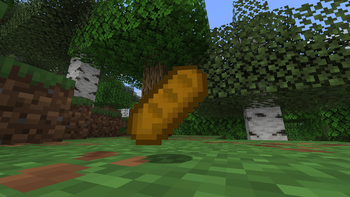
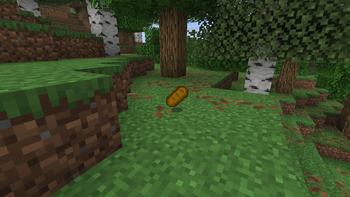

About this Mod

🍽️ What is Extra Food Plus?
Extra Food Plus (also known as Food+) is a cozy, fantasy‑friendly mod that expands your Minecraft diet with delicious new recipes, magical meals, and cultural flavors from around the world 🌍. Whether you're a survivalist, a builder, or a roleplayer, this mod brings warmth and variety to your table!
🥖 What's Included?
New food items like the hearty Baguette, crafted from hay bales for extra saturation
Soups and pies — from Carrot Soup to Apple Pie, each with unique effects and recipes
Balanced gameplay — early game snacks and late game magical feasts
Vanilla-friendly style — everything blends naturally into Minecraft’s original look and feel
✨ Why Use Food+?
Adds depth to farming and cooking
Perfect for fantasy, medieval, or cozy survival worlds
Easy to install and compatible with other mods
Great for modpacks, roleplay servers, and builders who love detail
📦 Future Plans
More regional dishes (Asian, European, Slavic, and more!)
Creative tab support
Magical food with potion effects
Cooking tools and ingredients
Hidden achievements and food lore
🧐 FAQ
A: What is Food+?
B: Food+ is a cozy, fantasy‑friendly mod that adds new recipes, soups, pies, and bread to Minecraft 🍞🥧🥕. It expands the vanilla diet with delicious meals inspired by real cultures.
A: Is Food+ compatible with other mods?
B: Yes ✅. Food+ is designed to be vanilla‑friendly, so it should work well with most other mods.
A: How do I craft the new foods?
B: On the crafting table🫠.
A: Does Food+ add magical food?
B: Not yet ✨, but future versions will include magical meals with potion effects and hidden achievements.
A: Where can I find the new items in Creative Mode?
B: All items are currently organized in the Food and Items creative tab 🍽️.
A: Who made Food+?
B: Food+ was created with love by Zebrar 💻. It’s my first public Minecraft mod, and I’m excited to share it with you! 🎉
🧑🍳 Credits
Created with love by Zebrar.
Available Versions
How to Install Extra food plus on Your Server
Order Server
Order a Minecraft Java server with at least 3 GB RAM (4 GB recommended).
Set fabric Loader
In the panel under "Egg", select the fabric loader and matching Minecraft version (1.21.11).
Install Mod
Open the mod browser in the dashboard and search for "Extra food plus". Click "Install" – done! Alternatively, upload the .jar via SFTP to the /mods folder.
Compatibility
Mod Loaders
Minecraft Versions
1.21.11, 1.21.10
Server-side
✓ RequiredRecommended RAM
4 GB(min. 3 GB)Frequently Asked Questions
Extra food plus server crashes on startup – what to do?
Most common cause: wrong fabric version or insufficient RAM. Check the server log (latest.log) for "OutOfMemoryError" or "Mixin" errors. With Mado Hosting: ensure at least 3 GB RAM is allocated and the loader matches the mod version (1.21.11). You can switch loaders with one click in the panel.
Is Extra food plus compatible with fabric?
Extra food plus officially supports fabric for Minecraft 1.21.11, 1.21.10. The Mado dashboard automatically detects incompatible loader combinations.
Server lagging with Extra food plus – how to optimize performance?
Recommended RAM: 4 GB (per 8 players). Use /spark profiler to check if Extra food plus consumes the most tick time. Common fixes: reduce server view-distance to 8-10, install "performant" or "starlight" as supplementary mods on Forge. With Mado Hosting, your server runs on NVMe SSDs with dedicated CPU cores for minimal latency.
Similar Mods



Rent Modded Server
Install Extra food plus with just one click on your server.