
Extra Hotbar
Fabric client mod that adds dual-hotbar swapping utilities and compact HUD info overlays.
Screenshots
About this Mod
Extra Hotbar
Fabric client mod that adds dual-hotbar swapping utilities and compact HUD info overlays.
Features
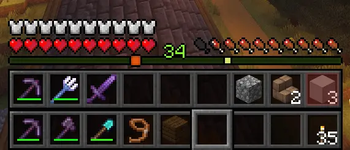
- Dual hotbar swap system:
- Swaps between your visible hotbar and a configurable secondary inventory row.
- Supports full-row swap and single-slot swap logic.
- Hold and tap swap behavior:
- Tap or hold the swap key for different actions (configurable).
- Per-slot double-tap swap:
- Double-tap number keys
1-9to swap only that slot.
- Double-tap number keys
- Slot lock support:
- Lock specific hotbar slots to prevent them from being swapped.
- Active bar indicator:
- Shows whether primary or secondary bar is currently active.
- Panel cycle mode:
- Cycle HUD info display through:
Off -> Armor -> Food -> Both.
- Cycle HUD info display through:
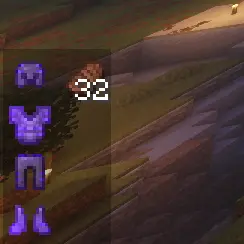
- Armor panel info:
- Shows equipped armor pieces and remaining durability.
- Food panel info:
- Lists edible items currently in inventory with hunger and saturation.
- Persistent client config:
- Settings are saved and reloaded from JSON config.
Controls (Default Keybinds)
R: Swap hotbars.H: Cycle HUD panels (Off -> Armor -> Food -> Both).K: Toggle lock on the currently selected hotbar slot.1-9double-tap: Swap a single corresponding hotbar slot.
You can rebind these in Minecraft controls.
In-Game Behavior
- Spectator mode: swapping logic is skipped.
- Locked slots:
- Full-row swaps skip locked slots.
- Single-slot swaps do not run for locked slots.
Configuration
Config file: config/extar_hotbar.json
Main settings:
secondaryInventoryRow(1-3)showSecondHotbarshowActiveIndicatorsecondHotbarYOffsetactiveIndicatorYOffsetenableDoubleTapSwapdoubleTapWindowMs(100-1000)enableHoldSwapholdSwapMs(100-1200)holdSwapsSingleSlotpanelMode(0-3)0 = Off,1 = Armor,2 = Food,3 = Both
panelXpanelYshowArmorDurabilityPercentlockedSlots(array of slot indices0-8)
Available Versions
How to Install Extra Hotbar on Your Server
Order Server
Order a Minecraft Java server with at least 3 GB RAM (4 GB recommended).
Set fabric Loader
In the panel under "Egg", select the fabric loader and matching Minecraft version (26.1.2).
Install Mod
Open the mod browser in the dashboard and search for "Extra Hotbar". Click "Install" – done! Alternatively, upload the .jar via SFTP to the /mods folder.
Compatibility
Mod Loaders
Minecraft Versions
26.1.2, 26.1.1
Server-side
✗ UnsupportedRecommended RAM
4 GB(min. 3 GB)Frequently Asked Questions
Extra Hotbar server crashes on startup – what to do?
Most common cause: wrong fabric version or insufficient RAM. Check the server log (latest.log) for "OutOfMemoryError" or "Mixin" errors. With Mado Hosting: ensure at least 3 GB RAM is allocated and the loader matches the mod version (26.1.2). You can switch loaders with one click in the panel.
Is Extra Hotbar compatible with fabric?
Extra Hotbar officially supports fabric for Minecraft 26.1.2, 26.1.1. The Mado dashboard automatically detects incompatible loader combinations.
Server lagging with Extra Hotbar – how to optimize performance?
Recommended RAM: 4 GB (per 8 players). Use /spark profiler to check if Extra Hotbar consumes the most tick time. Common fixes: reduce server view-distance to 8-10, install "performant" or "starlight" as supplementary mods on Forge. With Mado Hosting, your server runs on NVMe SSDs with dedicated CPU cores for minimal latency.
Rent Modded Server
Install Extra Hotbar with just one click on your server.