
Extra Discs
Collect all of your favorite songs from the Minecraft Soundtrack using Skeletons!
Screenshots

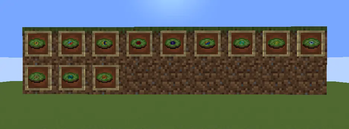


About this Mod
ExtraDiscs is a simple music mod for Minecraft that adds Music Discs for all of the game’s music, allowing the player to listen to it on demand. The songs are divided into separate categories that all have their own methods of being obtained.
To obtain discs in certain categories, the player must get a Skeleton to kill a certain mob. Each category correlates to a specific mob:
Overworld Music Discs
Zombies will drop Overworld Music DiscsCreative Music Discs
Iron Golems will drop Creative Music DiscsUnderground Music Discs
Silverfish will drop Underground Music DiscsUnderwater Music Discs
Guardians will drop Underwater Music DiscsNether Music Discs
Ghasts will drop Nether Music Discs (C418).Piglin Brutes will drop post 1.16 Nether Music Discs (Lena Raine).
End Music Discs
Shulkers will drop End Music DiscsMenu Music Discs
Endermen will drop Menu Music Discs (figure it out.)Deep Dark Music Discs
Wardens will drop Ancestry, the Deep Dark Music Disc.Creator Remix
Strike the Creator Music Disc with Lightning to de-oxidize and enchant it.Each condition is meant to give the player a unique challenge. The pools with less items will have harder conditions, but will inherently guarantee the player has to do it less times than pools with more items in them, and vice versa.
Technical Specifications:
This mod does not contain any of the music in the game, and instead registers sound entries for the songs already in the game.
Any and all assets are purely custom and are not in violation of any copyright laws pertaining to the usage of the game’s music. Please support C418, Lena Raine, Kumi Tanioka and Aaron Cherof.
Additional Credits:
- Ocelot5836 for the Mono Audio Wrapper code
- NoteBlock, Jonny Atma and Dom Palombi for the amazing Creator Remix (used with permission, of course).
Spoiler
...and Huggbees for... Newman-O's?Available Versions
How to Install Extra Discs on Your Server
Order Server
Order a Minecraft Java server with at least 3 GB RAM (4 GB recommended).
Set neoforge Loader
In the panel under "Egg", select the neoforge loader and matching Minecraft version (1.21.1).
Install Mod
Open the mod browser in the dashboard and search for "Extra Discs". Click "Install" – done! Alternatively, upload the .jar via SFTP to the /mods folder.
Compatibility
Mod Loaders
Minecraft Versions
1.21.1
Server-side
✓ RequiredRecommended RAM
4 GB(min. 3 GB)Frequently Asked Questions
Extra Discs server crashes on startup – what to do?
Most common cause: wrong neoforge version or insufficient RAM. Check the server log (latest.log) for "OutOfMemoryError" or "Mixin" errors. With Mado Hosting: ensure at least 3 GB RAM is allocated and the loader matches the mod version (1.21.1). You can switch loaders with one click in the panel.
Is Extra Discs compatible with neoforge?
Extra Discs officially supports neoforge for Minecraft 1.21.1. The Mado dashboard automatically detects incompatible loader combinations.
Server lagging with Extra Discs – how to optimize performance?
Recommended RAM: 4 GB (per 8 players). Use /spark profiler to check if Extra Discs consumes the most tick time. Common fixes: reduce server view-distance to 8-10, install "performant" or "starlight" as supplementary mods on Forge. With Mado Hosting, your server runs on NVMe SSDs with dedicated CPU cores for minimal latency.
Similar Mods




Rent Modded Server
Install Extra Discs with just one click on your server.