
EyeModPhone
Adds a working, realistic, phone to the game
Screenshots
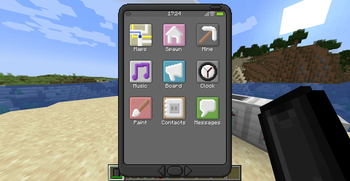
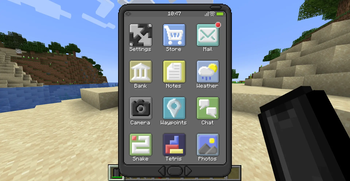
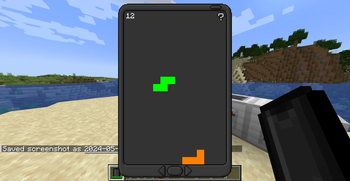
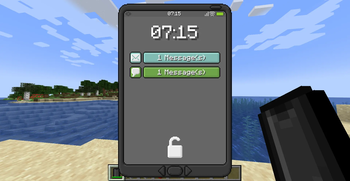
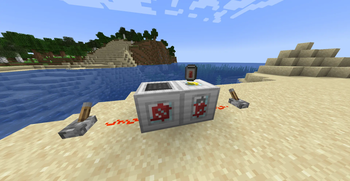
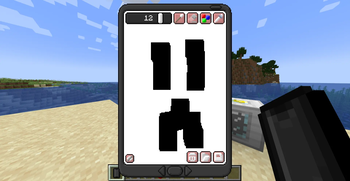
About this Mod
📱 EyeMod — A Fully Functional Phone for Minecraft
Message friends, snap photos, play games, and more — all from inside Minecraft.
EyeMod brings a working, realistic smartphone experience to your world. Whether you're running a bustling SMP or a solo survival world, the EyePhone packs a wide range of apps to keep you connected and entertained.
💡 Tip: Keep a Powerbank in your inventory to extend your battery life!
✨ Features
- 💬 Messaging — Chat with other players directly through the phone
- 🎮 Mini-games — Play games right on your EyePhone
- 📸 Camera & Photo Editing — Take and edit in-game pictures
- 🗺️ Maps, Notes, Shops, Spawns — A full suite of utility apps
- ⚙️ Highly configurable — Tailor almost everything to your server or world
1.20+ Note: OP/cheat apps (like the TNT app) have been removed from the default app selection to make server installs safer out of the box. These will return as a separate companion mod in a future update.
⚙️ Configuration
The config file lives in your .minecraft/config/ folder (or your server directory). Most of the mod's behavior can be tweaked there.
App IDs
Many config options require an app ID, which follows this format:
<modid>:<appname>
The mod ID is eyemod, and the app name is usually the app's display name with spaces replaced by underscores. For example, the Maps app ID is eyemod:maps.
💡 Pro tip: Run
/data get entity @p SelectedItemwhile holding an EyePhone to inspect all installed app IDs directly from the NBT data.
🛒 Shops
Shops are disabled by default. To enable them:
- Open your config file
- Set
allowShopAppstotrue
This unlocks the Food Shop and Util Shop apps on the EyePhone. You can customize the items sold in each shop via the foodShop and utilShop lists, and change the accepted currency using the currency property (default: Emeralds).
🏠 Spawn Locations
The Spawn app lets you list predefined teleport destinations — perfect for a spawn hub, nether portal, or end gateway. Add them in the config like this:
["Spawn=1/2/3/minecraft:overworld", "Nether=1/2/3/minecraft:the_nether"]
Players can also set a personal Home location. Teleportation is disabled by default — enable it with:
allowHome— lets players teleport to their homeallowSpawns— lets players teleport to predefined spawn points
🔒 App Access Control
Control which apps are available and to whom using the access config list:
| Value | Behavior |
|---|---|
0 |
Enabled for all players (default) |
1 |
Enabled for OPs only |
2 |
Completely disabled |
Example:
["eyemod:maps=1", "eyemod:notes=2"]
To disable all cheat-tagged apps at once, set disableCheatApps to true.
💰 App Pricing
App prices work the same way as access control — just use the price instead of an access level:
["eyemod:maps=100", "eyemod:notes=0"]
💾 Storage
EyePhone data is stored as NBT, so there's a per-phone character cap to keep things performant. If the cap is hit, data is automatically cleared.
- Adjust the cap with the
maxStorageproperty - For large servers, consider lowering this value
- Players can manually clear app data from the Settings app
Storage is calculated at ~2 bytes per character.
🖥️ Server Setup
EyeMod is fully server-compatible. Here's what server owners and operators should know:
🚫 Banning Players
Since the EyePhone allows free player-to-player communication, abuse can happen. Operators can ban a player from using the EyePhone directly through the Settings app by entering their username. Banned players lose access to all communication features.
📂 Data Storage
Player data is stored per world and includes:
- 💳 Account info (money, purchased apps)
- 💬 Messages (up to 64 per player, per app)
- 🚫 Ban list
- 📋 Board and chat messages
⚠️ Warning: Deleting the world data file removes all of the above permanently.
Available Versions
How to Install EyeModPhone on Your Server
Order Server
Order a Minecraft Java server with at least 3 GB RAM (4 GB recommended).
Set forge Loader
In the panel under "Egg", select the forge loader and matching Minecraft version (1.20.6).
Install Mod
Open the mod browser in the dashboard and search for "EyeModPhone". Click "Install" – done! Alternatively, upload the .jar via SFTP to the /mods folder.
Compatibility
Mod Loaders
Minecraft Versions
1.20.6, 1.20.5, 1.20.4 (+8 more)
Server-side
✓ RequiredRecommended RAM
4 GB(min. 3 GB)Frequently Asked Questions
EyeModPhone server crashes on startup – what to do?
Most common cause: wrong forge version or insufficient RAM. Check the server log (latest.log) for "OutOfMemoryError" or "Mixin" errors. With Mado Hosting: ensure at least 3 GB RAM is allocated and the loader matches the mod version (1.20.6). You can switch loaders with one click in the panel.
Is EyeModPhone compatible with forge?
EyeModPhone officially supports forge for Minecraft 1.20.6, 1.20.5, 1.20.4. The Mado dashboard automatically detects incompatible loader combinations.
Server lagging with EyeModPhone – how to optimize performance?
Recommended RAM: 4 GB (per 8 players). Use /spark profiler to check if EyeModPhone consumes the most tick time. Common fixes: reduce server view-distance to 8-10, install "performant" or "starlight" as supplementary mods on Forge. With Mado Hosting, your server runs on NVMe SSDs with dedicated CPU cores for minimal latency.
Rent Modded Server
Install EyeModPhone with just one click on your server.