
Ez Backpacks
Wearable vanilla-style backpacks with custom slots, portable storage, seasonal events, and colorful upgrades!
Screenshots
About this Mod
Ez Backpacks
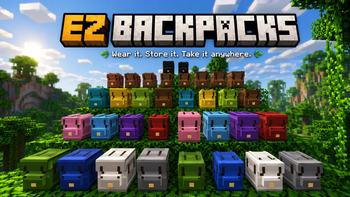
Ez Backpacks adds colorful wearable backpacks with portable storage, custom inventory slots, seasonal events, and immersive vanilla-style mechanics to Minecraft!
Designed to feel like a natural part of Minecraft survival, Ez Backpacks gives players early-game portable storage before shulker boxes, while keeping balanced progression and fun quality-of-life features.
Features
Wearable Backpacks
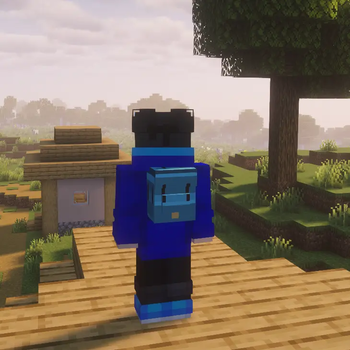
- Equip backpacks in a dedicated backpack slot
- Backpacks appear on the player’s back
- Open backpacks directly with the B key
- Shift-click support for quick equipping
Portable Storage
- Normal backpacks with 27 slots
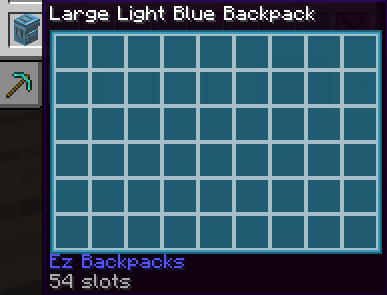
- Large backpacks with 54 slots
- Keep stored items when broken, similar to shulker boxes
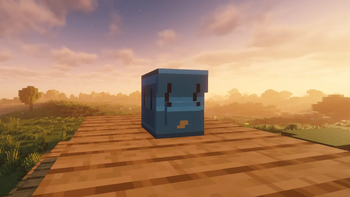
- Place backpacks in the world with Shift + Right Click
- Open backpacks from your hand or while placed
Color Variants
- Backpacks available in all Minecraft colors
- Colored backpack inventories and tooltips
- Separate textures and models for normal and large variants
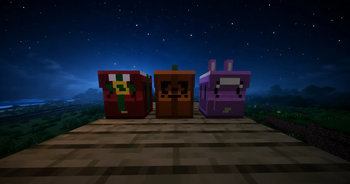
Seasonal Easter Eggs
- Christmas backpacks during December 25–31
- Easter bunny backpacks during Easter
- Halloween pumpkin backpacks during Halloween
- Seasonal variants work as items, blocks, and worn backpacks
Backpack Upgrades
- Special backpack upgrades with unique mechanics
- Redstone backpacks can interact with redstone-powered blocks
Survival-Friendly
- Recipe unlocking support
- Advancement: Packed and Ready!
- Prevents backpacks and shulker boxes from being stored inside backpacks
- Balanced for survival gameplay
Full Language Support
- Fully translated into every Minecraft language
- Includes LOLCAT and Pirate Speak
Ez Backpacks focuses on polish, immersion, and vanilla-style gameplay while expanding Minecraft’s storage system in a fun and creative way.
Available Versions
How to Install Ez Backpacks on Your Server
Order Server
Order a Minecraft Java server with at least 3 GB RAM (4 GB recommended).
Set fabric Loader
In the panel under "Egg", select the fabric loader and matching Minecraft version (26.1.2).
Install Mod
Open the mod browser in the dashboard and search for "Ez Backpacks". Click "Install" – done! Alternatively, upload the .jar via SFTP to the /mods folder.
Compatibility
Mod Loaders
Minecraft Versions
26.1.2
Server-side
✓ RequiredRecommended RAM
4 GB(min. 3 GB)Frequently Asked Questions
Ez Backpacks server crashes on startup – what to do?
Most common cause: wrong fabric version or insufficient RAM. Check the server log (latest.log) for "OutOfMemoryError" or "Mixin" errors. With Mado Hosting: ensure at least 3 GB RAM is allocated and the loader matches the mod version (26.1.2). You can switch loaders with one click in the panel.
Is Ez Backpacks compatible with fabric?
Ez Backpacks officially supports fabric for Minecraft 26.1.2. The Mado dashboard automatically detects incompatible loader combinations.
Server lagging with Ez Backpacks – how to optimize performance?
Recommended RAM: 4 GB (per 8 players). Use /spark profiler to check if Ez Backpacks consumes the most tick time. Common fixes: reduce server view-distance to 8-10, install "performant" or "starlight" as supplementary mods on Forge. With Mado Hosting, your server runs on NVMe SSDs with dedicated CPU cores for minimal latency.
Similar Mods




Rent Modded Server
Install Ez Backpacks with just one click on your server.