
EZ Emerald Pouch
Stores emeralds infinitely. Keeps it simple, works alongside any mod(pack).
About this Mod

The mod is simple, so I'll keep it short.
If you've tried currency mods before (Lightman's, Numismatic, etc), you'll usually run into the same problem: they don't work with all of your mods. Or they add a lot of extra systems, blocks, GUIs, and mechanics you don't actually want.
Hence, EZ Emerald Pouch.
No currencies.
No economy overhaul.
Just emeralds, done cleanly.
How it works:
-
Craft an Emerald Pouch
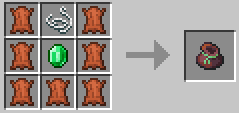
2. Store emeralds into your pouch:
- Picking up emeralds automatically stores them
- SHIFT + Right Click an Emerald or Emerald Block in your inventory to deposit it
The pouch stores an infinite amount of emeralds. Game logic, who cares. 🤷♀️
3. While trading (or whenever your inventory is open), click the Withdraw button to take out emeralds.
SHIFT + Click withdraws multiple stacks.
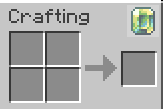
4. Press O to edit the GUI elements:
- Move the emerald counter
- Move the withdraw button
- Resize elements
- Hide or show elements
- Reset everything to defaults
All settings are client-side only.
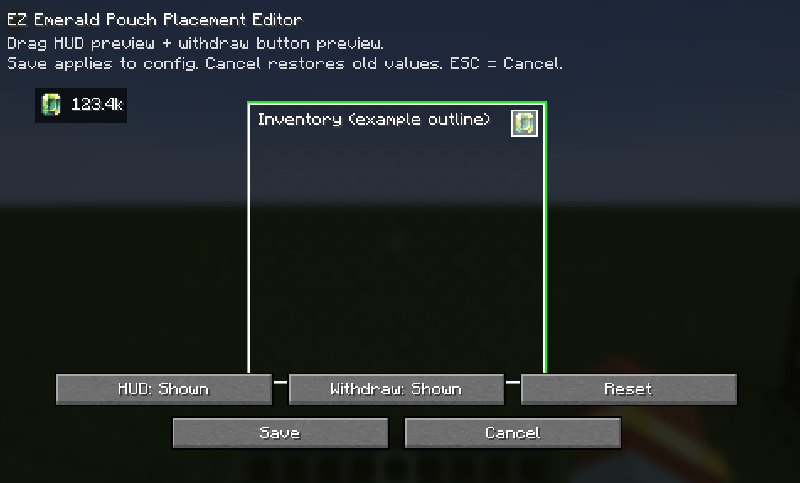
Extra notes:
- Fully server-authoritative (no client-side emerald cheating)
- Optional Curios support (custom pouch slot)
- Designed to work alongside any mod that uses emeralds
That's it.
EZ Emerald Pouch does one thing — and stays out of your way.
Assets are made & owned by Glionox.
Available Versions
How to Install EZ Emerald Pouch on Your Server
Order Server
Order a Minecraft Java server with at least 3 GB RAM (4 GB recommended).
Set neoforge Loader
In the panel under "Egg", select the neoforge loader and matching Minecraft version (1.21.1).
Install Mod
Open the mod browser in the dashboard and search for "EZ Emerald Pouch". Click "Install" – done! Alternatively, upload the .jar via SFTP to the /mods folder.
Compatibility
Mod Loaders
Minecraft Versions
1.21.1
Server-side
✓ RequiredRecommended RAM
4 GB(min. 3 GB)Frequently Asked Questions
EZ Emerald Pouch server crashes on startup – what to do?
Most common cause: wrong neoforge version or insufficient RAM. Check the server log (latest.log) for "OutOfMemoryError" or "Mixin" errors. With Mado Hosting: ensure at least 3 GB RAM is allocated and the loader matches the mod version (1.21.1). You can switch loaders with one click in the panel.
Is EZ Emerald Pouch compatible with neoforge?
EZ Emerald Pouch officially supports neoforge for Minecraft 1.21.1. The Mado dashboard automatically detects incompatible loader combinations.
Server lagging with EZ Emerald Pouch – how to optimize performance?
Recommended RAM: 4 GB (per 8 players). Use /spark profiler to check if EZ Emerald Pouch consumes the most tick time. Common fixes: reduce server view-distance to 8-10, install "performant" or "starlight" as supplementary mods on Forge. With Mado Hosting, your server runs on NVMe SSDs with dedicated CPU cores for minimal latency.
Similar Mods


Rent Modded Server
Install EZ Emerald Pouch with just one click on your server.