
Fabis Chatfilter
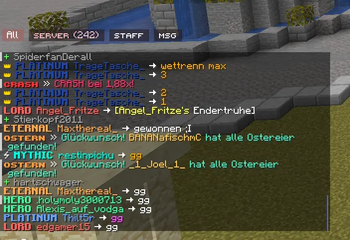
ChatFilter organizes your Minecraft chat into custom, rule-based tabs. Sort messages by sender, content, or origin to keep your chat clean, organized, and clutter-free.
Screenshots
About this Mod
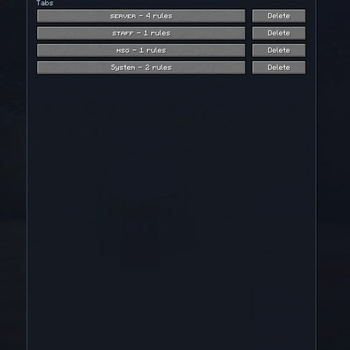
My ChatFilter automatically organizes incoming messages into dedicated tabs (e.g., Server, Private, Staff) instead of cluttering the default chat. Messages are saved in their respective tab histories and can be customized using specific filtering rules.
Key Features
- Multiple Chat Tabs: Create custom tabs with individual rule sets.
- Filter Types:
- CONTAINS: Matches specific keywords.
- STARTS WITH: Matches messages beginning with specific text.
- SENDER: Filters based on the player's name.
- REGEX: Advanced filtering using regular expressions.
- ORIGIN: Filter by source (Player / Private / Server).
- Unread Indicators: Notification counters for each tab.
Customization:
Set unique tab colors.
Toggle tab-specific notifications (disabled by default).
Flexible UI: Position tabs at the top or bottom; align them left, center, or right.
Profile Management: Save, load, import, and export your configurations.
Quick Start Guide:
F10 Opens the settings menu.
Tab Menu: Edit rules individually for each tab.
Navigation: Simply click a tab to switch views.
Rearrange: Right-click and drag the tab bar to move it horizontally.
Configuration & Profiles
On Windows, you can find your exported profiles and settings in the Minecraft config folder:
%APPDATA%\.minecraft\config\chatfilter_mailboxes_export.json
%APPDATA%\.minecraft\config\chatfilter_profile_export.json
Individual profile files are stored in:
%APPDATA%\.minecraft\config\chatfilter_profiles\
Available Versions
How to Install Fabis Chatfilter on Your Server
Order Server
Order a Minecraft Java server with at least 3 GB RAM (4 GB recommended).
Set fabric Loader
In the panel under "Egg", select the fabric loader and matching Minecraft version (1.21.11).
Install Mod
Open the mod browser in the dashboard and search for "Fabis Chatfilter". Click "Install" – done! Alternatively, upload the .jar via SFTP to the /mods folder.
Compatibility
Mod Loaders
Minecraft Versions
1.21.11
Server-side
✗ UnsupportedRecommended RAM
4 GB(min. 3 GB)Frequently Asked Questions
Fabis Chatfilter server crashes on startup – what to do?
Most common cause: wrong fabric version or insufficient RAM. Check the server log (latest.log) for "OutOfMemoryError" or "Mixin" errors. With Mado Hosting: ensure at least 3 GB RAM is allocated and the loader matches the mod version (1.21.11). You can switch loaders with one click in the panel.
Is Fabis Chatfilter compatible with fabric?
Fabis Chatfilter officially supports fabric for Minecraft 1.21.11. The Mado dashboard automatically detects incompatible loader combinations.
Server lagging with Fabis Chatfilter – how to optimize performance?
Recommended RAM: 4 GB (per 8 players). Use /spark profiler to check if Fabis Chatfilter consumes the most tick time. Common fixes: reduce server view-distance to 8-10, install "performant" or "starlight" as supplementary mods on Forge. With Mado Hosting, your server runs on NVMe SSDs with dedicated CPU cores for minimal latency.
Similar Mods






Rent Modded Server
Install Fabis Chatfilter with just one click on your server.