
FableCraft
FableCraft adds magical blocks and tracking tools to Minecraft, letting you bounce higher, grow crops instantly, and keep tabs on anything that moves (along with other things!)
Screenshots
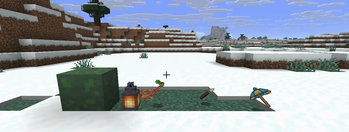
About this Mod
FableCraft
A Minecraft mod that adds a handful of quirky, magical items and blocks to spice up your adventures.
Built for Fabric 1.21.10.
Features
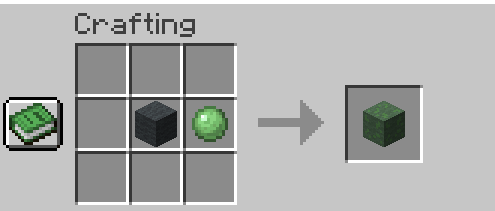
Bouncy Wool
Ever wanted to turn your base into a trampoline park? This wool block launches you skyward when you land on it. The harder you fall, the higher you bounce. Perfect for parkour courses or just messing around with friends.
Crafting Recipe
Glimmer Lantern
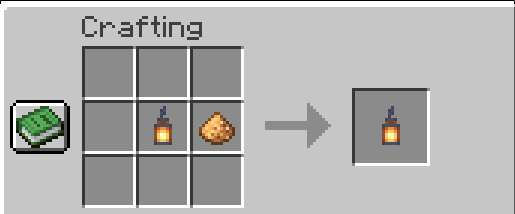
A mystical lantern that does more than just light up the night. Every few seconds, it pulses out a wave that makes nearby creatures glow for a bit, so you can spot that creeper lurking in the shadows. Hang it from the ceiling or place it on the ground - your choice.
Crafting Recipe
Seed Bomb
Tired of waiting for your crops to grow? Toss one of these bad boys and watch your wheat, carrots, and potatoes instantly ripen in a 5-block radius. Works on pretty much any vanilla crop. Your inner farmer will thank you.
Crafting Recipe
Tracker
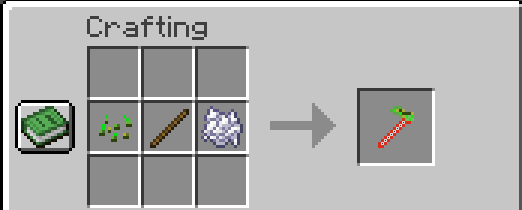
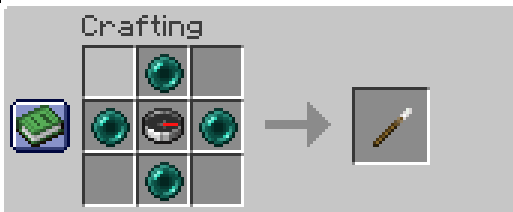
Right-click any mob or player with this item to start tracking them. You'll see their distance and exact location in your action bar, plus they'll glow periodically so you never lose sight of them. Great for keeping tabs on your pet wolf or that friend who keeps wandering off.
Crafting Recipe
Umbrella
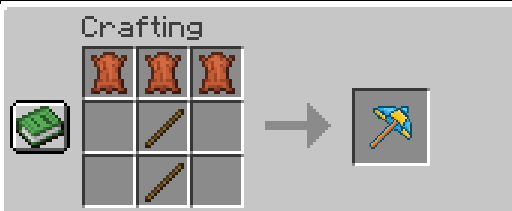
Hold this in either hand while falling and you'll drift down slowly like Mary Poppins. No fall damage, plenty of style. Jump off cliffs with confidence.
Crafting Recipe
Installation
- Install Fabric Loader for Minecraft 1.21.10
- Download Fabric API
- Drop both Fabric API and FableCraft into your
modsfolder - Launch the game and you're good to go
Technical Stuff
- Minecraft Version: 1.21.10
- Loader: Fabric 0.17.2+
- Dependencies: Fabric API 0.135.0+
- Java Version: 21
Available Versions
How to Install FableCraft on Your Server
Order Server
Order a Minecraft Java server with at least 3 GB RAM (4 GB recommended).
Set fabric Loader
In the panel under "Egg", select the fabric loader and matching Minecraft version (1.21.10).
Install Mod
Open the mod browser in the dashboard and search for "FableCraft". Click "Install" – done! Alternatively, upload the .jar via SFTP to the /mods folder.
Compatibility
Mod Loaders
Minecraft Versions
1.21.10, 1.21.9, 1.21.8
Server-side
✓ RequiredRecommended RAM
4 GB(min. 3 GB)Frequently Asked Questions
FableCraft server crashes on startup – what to do?
Most common cause: wrong fabric version or insufficient RAM. Check the server log (latest.log) for "OutOfMemoryError" or "Mixin" errors. With Mado Hosting: ensure at least 3 GB RAM is allocated and the loader matches the mod version (1.21.10). You can switch loaders with one click in the panel.
Is FableCraft compatible with fabric?
FableCraft officially supports fabric for Minecraft 1.21.10, 1.21.9, 1.21.8. The Mado dashboard automatically detects incompatible loader combinations.
Server lagging with FableCraft – how to optimize performance?
Recommended RAM: 4 GB (per 8 players). Use /spark profiler to check if FableCraft consumes the most tick time. Common fixes: reduce server view-distance to 8-10, install "performant" or "starlight" as supplementary mods on Forge. With Mado Hosting, your server runs on NVMe SSDs with dedicated CPU cores for minimal latency.
Similar Mods




![[TaCZ] Timeless and Classics Zero](https://cdn.modrinth.com/data/SzzJttH8/fd27766d2bb8390d284696b1dbd358f87e081439_96.webp)

Rent Modded Server
Install FableCraft with just one click on your server.