
Aliases
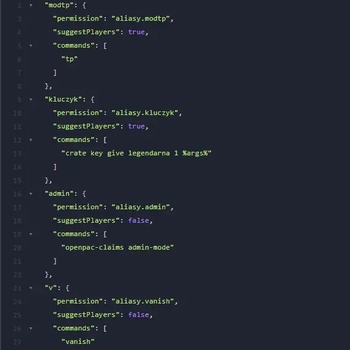
Custom Command Aliases (Fabric) A lightweight and powerful Fabric mod that allows server administrators to create custom command aliases with support for multiple sub-commands, player name suggestions, and dynamic arguments.
Screenshots
About this Mod
🚀 Initial Release - Version 1.0.0
Fabric-aliases. This mod provides a lightweight and flexible way to manage server commands and shortcuts.
✨ Key Features:
Powerful Alias System: Create custom shortcuts for any command or chain of commands.
Dynamic Arguments: Use the %args% placeholder to pass user input into the middle or end of your commands.
Multi-Command Support: Execute multiple commands sequentially using the ; separator (e.g., /heal ; /feed).
Smart Tab-Completion: Optional player name suggestions for aliases that require target selection.
Permissions Ready: Integrated with LuckPerms (Fabric Permissions API) for granular control over who can use which alias.
Real-time Management: Create, remove, and list aliases directly from the game or console without restarts.
Hot-Reload: Use /commandaliases reload to instantly apply changes made to the aliases.json config file.
🔧 Technical Details:
Optimized Performance: Uses Minecraft's native Brigadier system (no overhead during gameplay).
Compatible with 1.21.1: Fully tested on Fabric 1.21.1.
Lightweight: Tiny file size and minimal memory footprint.
Available Versions
How to Install Aliases on Your Server
Order Server
Order a Minecraft Java server with at least 3 GB RAM (4 GB recommended).
Set fabric Loader
In the panel under "Egg", select the fabric loader and matching Minecraft version (1.21.1).
Install Mod
Open the mod browser in the dashboard and search for "Aliases". Click "Install" – done! Alternatively, upload the .jar via SFTP to the /mods folder.
Compatibility
Mod Loaders
Minecraft Versions
1.21.1
Server-side
✓ RequiredRecommended RAM
4 GB(min. 3 GB)Frequently Asked Questions
Aliases server crashes on startup – what to do?
Most common cause: wrong fabric version or insufficient RAM. Check the server log (latest.log) for "OutOfMemoryError" or "Mixin" errors. With Mado Hosting: ensure at least 3 GB RAM is allocated and the loader matches the mod version (1.21.1). You can switch loaders with one click in the panel.
Is Aliases compatible with fabric?
Aliases officially supports fabric for Minecraft 1.21.1. The Mado dashboard automatically detects incompatible loader combinations.
Server lagging with Aliases – how to optimize performance?
Recommended RAM: 4 GB (per 8 players). Use /spark profiler to check if Aliases consumes the most tick time. Common fixes: reduce server view-distance to 8-10, install "performant" or "starlight" as supplementary mods on Forge. With Mado Hosting, your server runs on NVMe SSDs with dedicated CPU cores for minimal latency.
Similar Mods






Rent Modded Server
Install Aliases with just one click on your server.