
Fabric Server Essentials
Essential features for any Minecraft server, including command scheduling!
Screenshots

About this Mod
Fabric-Server-Essentials
Essential features for any Minecraft server, including command scheduling and server restarting!
Listed below are all the features of the mod currently
- Requires Fabric API
- Now has Permission mod support (such as Luckperms)
Command scheduling
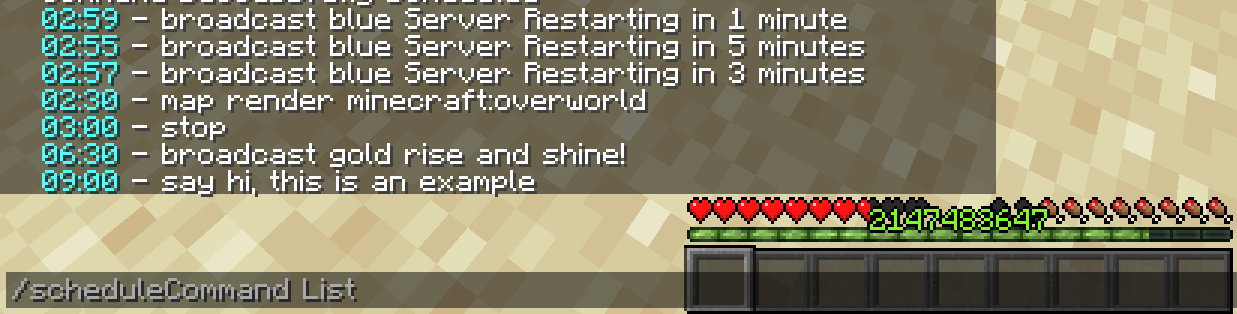
/scheduleCommand list to list scheduled commands
/scheduleCommand remove
/scheduleCommand add
/scheduleCommand reload to reload the command scheduler
The schedule command allows you to schedule certain commands to happen at any time in the day, allowing you to schedule things like restarting the server overnight. Please note that the remove command does not apply until after reloading the scheduler, or after restarting the server. The scheduled commands are also saved in the config, so the schedule can be edited there. Any command works with this, even ones from other mods. Additionally, if you make
Item flex command
/flexItem
this command sends a message in chat to the specified recipients displaying the item you are holding. Useful for flexing your op gear! If you do not specify anyone, it will send it to everyone on the server.
Server restarting
/restart
/restart on shutdown true/false
This restarts the Minecraft server, but there is also an option to make the server restart whenever it stops (apart from using the /stop command), preventing the server being down unintendedly. This can also be edited in the config
Info command
/info
This command allows players to see information about the server. To change the information displayed, edit it in the config.
Coords command
/coords or /c to send to everyone
/coords
players on the server can type /c or /coords to send their coords to everyone on the server, or they can instead specify the players they want to send their coords to with /coords
Broadcast command
/broadcast
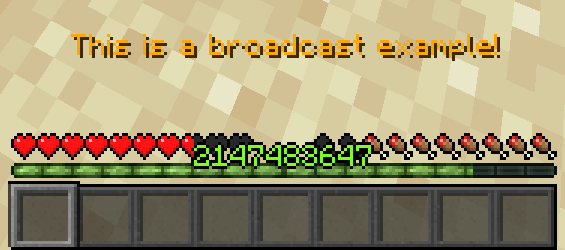
This command allows you to broadcast messages to everyone online on the server, which is useful for warning them about things such as server restarts. When paired with the schedule command, it is quite useful.
Ping command
/ping
This command allows players to see their ping with the minecraft server.
I am not planning to add too many features, but that is mostly because there is nothing else that I feel like is needed. If you find any bugs or want any new features, feel free to open an issue on the github page and I will work on it when I can.
Available Versions
How to Install Fabric Server Essentials on Your Server
Order Server
Order a Minecraft Java server with at least 3 GB RAM (4 GB recommended).
Set fabric Loader
In the panel under "Egg", select the fabric loader and matching Minecraft version (1.21.4).
Install Mod
Open the mod browser in the dashboard and search for "Fabric Server Essentials". Click "Install" – done! Alternatively, upload the .jar via SFTP to the /mods folder.
Compatibility
Mod Loaders
Minecraft Versions
1.21.4, 1.20.2, 1.20.1
Server-side
✓ RequiredRecommended RAM
4 GB(min. 3 GB)Frequently Asked Questions
Fabric Server Essentials server crashes on startup – what to do?
Most common cause: wrong fabric version or insufficient RAM. Check the server log (latest.log) for "OutOfMemoryError" or "Mixin" errors. With Mado Hosting: ensure at least 3 GB RAM is allocated and the loader matches the mod version (1.21.4). You can switch loaders with one click in the panel.
Is Fabric Server Essentials compatible with fabric?
Fabric Server Essentials officially supports fabric for Minecraft 1.21.4, 1.20.2, 1.20.1. The Mado dashboard automatically detects incompatible loader combinations.
Server lagging with Fabric Server Essentials – how to optimize performance?
Recommended RAM: 4 GB (per 8 players). Use /spark profiler to check if Fabric Server Essentials consumes the most tick time. Common fixes: reduce server view-distance to 8-10, install "performant" or "starlight" as supplementary mods on Forge. With Mado Hosting, your server runs on NVMe SSDs with dedicated CPU cores for minimal latency.
Similar Mods






Rent Modded Server
Install Fabric Server Essentials with just one click on your server.