
Faga's Discord Bridge
MC Discord Bridge is a server-side NeoForge mod that links Minecraft 1.21.x and Discord with event logs, /mc chat relay, account linking, and leaderboards.
Screenshots
About this Mod
Features
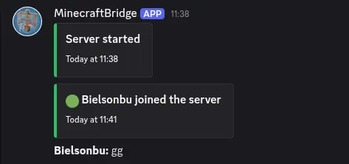
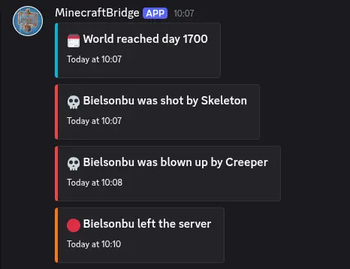
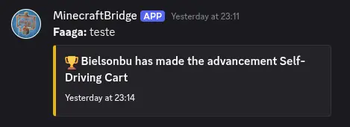
- Minecraft -> Discord bridge for server lifecycle, player join/leave, deaths, advancements, and day milestone announcements
- Discord -> Minecraft chat relay via
/mcslash command in the configured channel (with mention sanitization) /mcrelays to Minecraft and echoes plain text back to Discord (**name:** message)/mcuses linked Minecraft nickname when the Discord user is linked- Rich Discord embeds with per-event colors, timestamps, optional player head thumbnails, and plain-text fallback
- Bot activity rotation with configurable activity list, interval, and type (
PLAYING,WATCHING,LISTENING,COMPETING) - Admin logging channel with command redaction and structured admin embeds
- Discord config slash command for admins:
/configto update chat/admin channels and whitelist guild - Discord/Minecraft account linking via
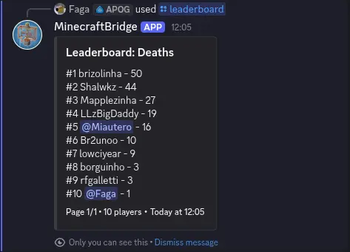
/link(ephemeral one-time code) and in-game/bridge link <code> /leaderboardslash command with categories, pagination, and visibility (privatedefault, optionalpublic)- Leaderboards include online and offline players with saved stats
- Linked players are shown as Discord mentions (
<@discordUserId>) in leaderboard and embeds - Bot activity rotation includes a built-in online/max players status entry
- Resilient startup/runtime behavior: Discord failures are logged, startup messages are queued until JDA is ready
Discord Bot Permissions
Bot permissions:
- Read Messages / View Channels
- Send Messages
- Read Message History
Configuration
First run creates config/mcdiscordbridge-common.toml.
# Discord bot token or env:DISCORD_BOT_TOKEN
discordApiKey = "env:DISCORD_BOT_TOKEN"

# Only messages from this guild are accepted
whitelistGuildId = "123456789012345678"

# Discord channel for chat bridge
chatChannelId = "123456789012345678"

# Discord channel for admin logs
adminLogChannelId = "123456789012345678"

# Legacy toggle for text-message relay mode (slash command `/mc` does not require this)
enableMessageContentIntent = false

# Send Discord embeds for richer event logs
enableEmbeds = true

# Hex color for embeds, for example #57A5FF
embedColorHex = "#57A5FF"

# Include player head thumbnail in embeds when UUID is available
includePlayerHeadInEmbeds = true

# URL template with %uuid% placeholder
playerHeadUrlTemplate = "https://crafatar.com/avatars/%uuid%?size=128&overlay"

# Rotate bot activity text from botActivities
enableBotActivityRotation = true
botActivities = ["Watching the server", "Bridging chat", "Tracking events"]
botActivityRotateSeconds = 20

# PLAYING, WATCHING, LISTENING, COMPETING
botActivityType = "WATCHING"

# Send day milestone message every N minecraft days (0 disables)
dayMilestoneGap = 10

# Enable Discord account linking to Minecraft players
enableAccountLinking = true

# How long link codes remain valid
linkCodeExpirySeconds = 600

# Length of one-time account link code
linkCodeLength = 6
Token via environment variable
Set:
export DISCORD_BOT_TOKEN="your_token"
Then set in config:
discordApiKey = "env:DISCORD_BOT_TOKEN"
Setup
In your whitelisted Discord server, run /config with one or more of:
chat_channel_idadmin_channel_idwhitelist_guild_id
Only Discord admins can run /config.
Account Linking
- On Discord, run slash command:
/link - The bot replies ephemerally with a one-time code
- In Minecraft, run:
/bridge link <code> linkCodeExpirySecondscontrols how long the code remains valid
Discord to Minecraft Relay
- On Discord in the configured chat channel, run:
/mc <message> - The message is relayed to Minecraft chat as
[Discord] <name> message - The same message is echoed in Discord as plain text:
**name:** message - If the Discord account is linked,
nameuses the linked Minecraft nickname
Leaderboard
- On Discord, run:
/leaderboard <category> - Optional page:
/leaderboard <category> <page> - Optional visibility:
/leaderboard <category> <page> <visibility>wherevisibilityisprivate(default) orpublic - Linked players are shown with Discord mention tags (
<@discordUserId>) - Categories:
playtime,deaths,player_kills,mob_kills,mined_blocks,distance_walked - Leaderboard responses are ephemeral by default
Notes
- This is server-only. Do not install on clients.
- Discord failures are logged and do not intentionally crash server startup.
- Avoid logging secrets in command usage; redaction is enabled by default.
Available Versions
How to Install Faga's Discord Bridge on Your Server
Order Server
Order a Minecraft Java server with at least 3 GB RAM (4 GB recommended).
Set neoforge Loader
In the panel under "Egg", select the neoforge loader and matching Minecraft version (1.21.11).
Install Mod
Open the mod browser in the dashboard and search for "Faga's Discord Bridge". Click "Install" – done! Alternatively, upload the .jar via SFTP to the /mods folder.
Compatibility
Mod Loaders
Minecraft Versions
1.21.11, 1.21.10, 1.21.9 (+9 more)
Server-side
✓ RequiredRecommended RAM
4 GB(min. 3 GB)Frequently Asked Questions
Faga's Discord Bridge server crashes on startup – what to do?
Most common cause: wrong neoforge version or insufficient RAM. Check the server log (latest.log) for "OutOfMemoryError" or "Mixin" errors. With Mado Hosting: ensure at least 3 GB RAM is allocated and the loader matches the mod version (1.21.11). You can switch loaders with one click in the panel.
Is Faga's Discord Bridge compatible with neoforge?
Faga's Discord Bridge officially supports neoforge for Minecraft 1.21.11, 1.21.10, 1.21.9. The Mado dashboard automatically detects incompatible loader combinations.
Server lagging with Faga's Discord Bridge – how to optimize performance?
Recommended RAM: 4 GB (per 8 players). Use /spark profiler to check if Faga's Discord Bridge consumes the most tick time. Common fixes: reduce server view-distance to 8-10, install "performant" or "starlight" as supplementary mods on Forge. With Mado Hosting, your server runs on NVMe SSDs with dedicated CPU cores for minimal latency.
Similar Mods






Rent Modded Server
Install Faga's Discord Bridge with just one click on your server.