
Fairy End
Embrace the Flora Windora world by trying to escape it! Endless possibilities await you inside this dimension.
Screenshots
About this Mod
Fairy's End
Mod Features:
- Villager Trading
- New Biomes & Dimensions
- More Blocks & Tools
- New Structures
- New Crops & Plants
- New Ores & Resources
Villager Trading
Once you escape from the Flora Dimension, find a village and some villagers may trade some items from this mod for emeralds.
New Biomes/Dimensions
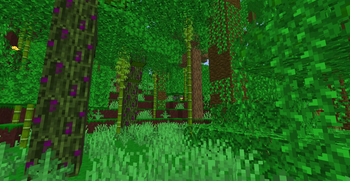
As of v1.4 there is only 1 Biome & Dimension, even so there is still a lot to see. There are new exotic plants & resources to gather.
More Blocks/Tools
There are tons of new blocks you can either find or craft with this mod. Some of them are natural blocks you can just dig out like Flora Dirt.
New Structures
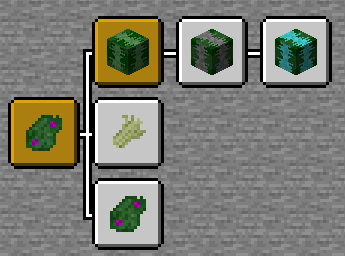
This mod adds a few new structures that only generate in the Flora Windora Dimension. Some of these structures can be useful for getting building materials, while some even offer a small bit of loot that can help you on your travels.
New Crops & Plants
There are a few plants and crops added with this mod. Some of them give harmful effects to any player or entity that collides with it. For example, Kurai Kusa is a grass-type plant that only grows on Flora Dirt and causes blindness. Lumin Grass causes slowness but if you break it you get Ambrosia Seeds. When you plant the Ambrosia Seeds and use bonemeal on it, you get Ambrosia. Ambrosia is a fruit that restores most of your hunger bar with little saturation.
New Ores & Resources
As of v1.4 there are only 3 Ores you can find. Lifeforce Ore gives the player a few seconds of regeneration when broken with any shovel. Flora Ore is the main Ore which allows players to either craft tools that are similar to iron, or they can use the Flora Ingots which is the smelted result to make a portal key. The portal key is used to escape the Flora Windora Dimension.
Old Versions
How Do I Escape The Flora Windora Dimension?
When you create a new world, the game will check if you have obtained the first of this mod's advancements. The first advancement you get is finding the Flora Windora Biome. By default when you create a new world you do not have this advancement. If you do not have this advancement, you will be transported into the Flora Dimension.
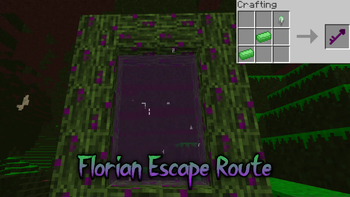
Once you find yourself within the Flora Dimension, you need to create a Flora Portal to escape back to the overworld(the surface). To do this, you will need to obtain the following items: Flora Logs, Flora Key. Finding Flora Logs is the easy part, but getting the Flora Key can take some time as you need Flora Ingots and a Flora Stone to craft it. Flora Ingots are the smelting result of Flora Ore which generates near the surface layer of the Flora Biome. You need a Stone Pickaxe/Shovel to receive the ore, If you try using wood then it will not drop any ore.
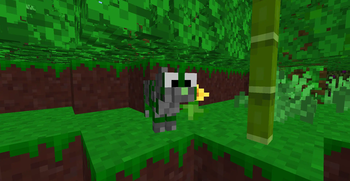
You will also sometimes find patches of cobblestone sprinkled on the top surface layer of the Flora Biome, this will allow you to obtain Stone Tools. After you have obtained at least 2 Flora Ore, craft a furnace and smelt the ore. Flora Stone can be used as fuel but don't forget you also need it to craft a Flora Key. Some structures in the area have chests which may contain Flora Stone. The other way you can get Flora Stone is by killing Flora Cats which roam around the area.
The portal is the same shape as a Nether portal. Flora Logs are the frame and the Flora Key acts as the "flint and steel" all you need to do is right click the portal frame and the portal will be lit. After the portal is lit you can finally go back to the overworld. Don't worry this does not mean it's the end of the mod's content though. You can always go back and explore as much as you want.
Available Versions
How to Install Fairy End on Your Server
Order Server
Order a Minecraft Java server with at least 4 GB RAM (6 GB recommended).
Set forge Loader
In the panel under "Egg", select the forge loader and matching Minecraft version (1.20.4).
Install Mod
Open the mod browser in the dashboard and search for "Fairy End". Click "Install" – done! Alternatively, upload the .jar via SFTP to the /mods folder.
Compatibility
Mod Loaders
Minecraft Versions
1.20.4, 1.20.1
Server-side
✓ RequiredRecommended RAM
6 GB(min. 4 GB)Frequently Asked Questions
Fairy End server crashes on startup – what to do?
Most common cause: wrong forge version or insufficient RAM. Check the server log (latest.log) for "OutOfMemoryError" or "Mixin" errors. With Mado Hosting: ensure at least 4 GB RAM is allocated and the loader matches the mod version (1.20.4). You can switch loaders with one click in the panel.
Is Fairy End compatible with forge and neoforge?
Fairy End officially supports forge, neoforge for Minecraft 1.20.4, 1.20.1. The Mado dashboard automatically detects incompatible loader combinations.
Server lagging with Fairy End – how to optimize performance?
Recommended RAM: 6 GB (per 5 players). Use /spark profiler to check if Fairy End consumes the most tick time. Common fixes: reduce server view-distance to 8-10, install "performant" or "starlight" as supplementary mods on Forge. With Mado Hosting, your server runs on NVMe SSDs with dedicated CPU cores for minimal latency.
Similar Mods




Rent Modded Server
Install Fairy End with just one click on your server.