
Fake Blocks Mod
FakeBlocks adds phantom versions of vanilla blocks that look identical but have no collision, letting you walk right through them — perfect for secret passages, traps or fooling friends.
Screenshots

About this Mod
FakeBlocks brings a brand new layer of creativity and deception to your Minecraft world. Ever wanted a secret passage hidden behind a bookshelf? A trap disguised as a diamond block floor? FakeBlocks makes it possible.
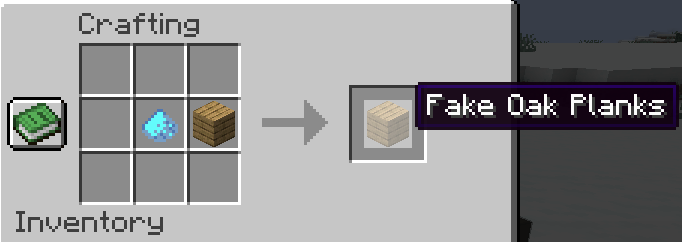
What does it do? FakeBlocks adds phantom versions of vanilla blocks that look completely identical to their real counterparts — but have no collision, meaning players and mobs can walk straight through them. From dirt to netherite blocks, every fake variant is craftable and fully survival-friendly.
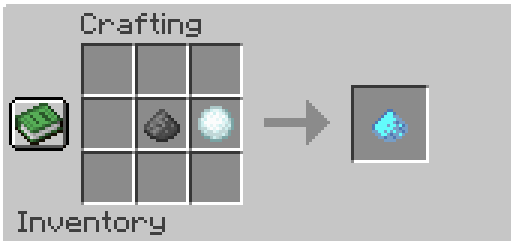
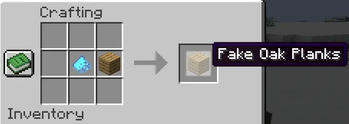
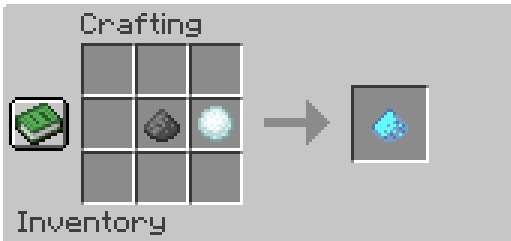
How do you craft them? Simply combine any supported vanilla block with No-Collision Dust in a crafting table to get its fake variant.
Features
🧱 Over 150 fake block variants
👁️ Visually identical to real blocks — no way to tell them apart
🔧 Survival-friendly crafting recipe for every block
Supported Blocks
Stone & Terrain: Dirt, Grass Block, Stone, Granite, Diorite, Andesite, Polished Granite, Polished Diorite, Polished Andesite, Cobblestone, Mossy Cobblestone, Gravel, Sand, Red Sand, Sandstone, Smooth Sandstone, Red Sandstone, Smooth Red Sandstone, Smooth Stone, Bedrock, Obsidian, Crying Obsidian, Clay, Tuff, Polished Tuff, Tuff Bricks, Calcite
Deepslate: Deepslate, Cobbled Deepslate, Polished Deepslate, Deepslate Bricks, Deepslate Tiles, Reinforced Deepslate
Bricks & Masonry: Bricks, Stone Bricks, Mossy Stone Bricks, Chiseled Stone Bricks, Cracked Stone Bricks, Nether Bricks, Red Nether Bricks, Chiseled Nether Bricks, Cracked Nether Bricks, End Stone Bricks, Mud Bricks
Nether & End: Netherrack, Soul Sand, Soul Soil, Magma Block, Blackstone, Polished Blackstone, Gilded Blackstone, Chiseled Polished Blackstone, Polished Blackstone Bricks, Cracked Polished Blackstone Bricks, Basalt, Polished Basalt, Smooth Basalt, End Stone
Wood & Planks: Oak, Spruce, Birch, Jungle, Acacia, Dark Oak, Mangrove, Cherry, Bamboo, Crimson, Warped Planks
Ore Blocks: Coal Ore, Iron Ore, Copper Ore, Gold Ore, Nether Gold Ore, Diamond Ore, Emerald Ore, Lapis Ore, Redstone Ore, Nether Quartz Ore — plus all Deepslate ore variants
Mineral Blocks: Coal, Iron, Copper, Gold, Diamond, Emerald, Netherite, Redstone, Lapis, Amethyst, Ancient Debris
Ice & Snow: Ice, Packed Ice, Blue Ice
Wool (all 16 colors), Terracotta (all 16 colors), Concrete (all 16 colors)
Misc: Bookshelf, TNT, Hay Block, Bone Block, Honeycomb Block, Nether Wart Block, Warped Wart Block, Mud, Packed Mud, Sea Lantern, Glowstone, Shroomlight, Quartz Block, Smooth Quartz, Quartz Pillar, Chiseled Quartz Block, Purpur Block, Purpur Pillar, Prismarine, Prismarine Bricks, Dark Prismarine, Magma Block
Feedback and suggestions are welcome!
Requirements
NeoForge 1.21.1
Available Versions
How to Install Fake Blocks Mod on Your Server
Order Server
Order a Minecraft Java server with at least 3 GB RAM (4 GB recommended).
Set neoforge Loader
In the panel under "Egg", select the neoforge loader and matching Minecraft version (1.21.1).
Install Mod
Open the mod browser in the dashboard and search for "Fake Blocks Mod". Click "Install" – done! Alternatively, upload the .jar via SFTP to the /mods folder.
Compatibility
Mod Loaders
Minecraft Versions
1.21.1
Server-side
✓ RequiredRecommended RAM
4 GB(min. 3 GB)Frequently Asked Questions
Fake Blocks Mod server crashes on startup – what to do?
Most common cause: wrong neoforge version or insufficient RAM. Check the server log (latest.log) for "OutOfMemoryError" or "Mixin" errors. With Mado Hosting: ensure at least 3 GB RAM is allocated and the loader matches the mod version (1.21.1). You can switch loaders with one click in the panel.
Is Fake Blocks Mod compatible with neoforge?
Fake Blocks Mod officially supports neoforge for Minecraft 1.21.1. The Mado dashboard automatically detects incompatible loader combinations.
Server lagging with Fake Blocks Mod – how to optimize performance?
Recommended RAM: 4 GB (per 8 players). Use /spark profiler to check if Fake Blocks Mod consumes the most tick time. Common fixes: reduce server view-distance to 8-10, install "performant" or "starlight" as supplementary mods on Forge. With Mado Hosting, your server runs on NVMe SSDs with dedicated CPU cores for minimal latency.
Rent Modded Server
Install Fake Blocks Mod with just one click on your server.