
Fake Players
Adds fake player entities with auto-updating skins and item functionality.
Screenshots
About this Mod
Fake Players Mod
A Forge/Fabric mod aimed at adding fake players to the game.




Features
Fake Player Mob
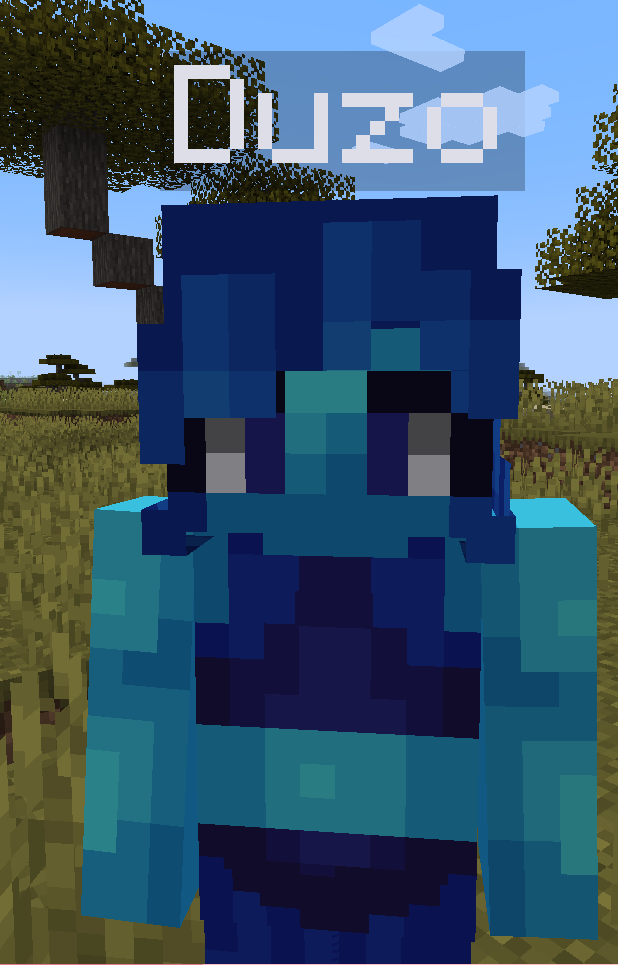
These mobs look exactly like regular players.
What can they do?
- Send chat messages
- Change skin
- Wander around
- Attack when hurt
- Change username from name tag
- Wear armour
- Hold items
- Utilise inventory space
And much more!
Interactions
An interaction is when the player right clicks the mob with an item
- Chest: Open the management GUI (see below)
- Shift + Right-click (any item): Also opens the management GUI
- Observer: Toggle the fake player's AI
- Name Tag: Change the fake player's name + skin
- Stairs: Make the fake player sit
- Beds: Make the fake player sleep
- Slabs: Toggle slim skin
- Eye of Ender: Toggle name tag visibility
- Paper: Send a chat message
Management GUI
Right-click a fake player with a chest, or shift + right-click them with anything, to open a full management screen.
Inventory (left and bottom)
The screen mirrors the vanilla player layout:
- 4 armor slots top-left (helmet, chestplate, leggings, boots) — accept matching armor only
- 1 offhand slot at the vanilla offhand position
- 27-slot main storage (3 rows of 9)
- 9 hotbar slots — the first hotbar slot is bound to the fake player's main-hand item; the other 8 are extra storage
- The player's own inventory sits below for shift-click transfers
The 27 storage slots and 8 extra hotbar slots are saved on the entity and drop when it's killed. Armor and held items follow vanilla equipment-drop rules.
Controls (top-right panel)
| Control | Effect |
|---|---|
| Name edit box | Live-updates the fake player's display name. Skin is not touched until you press Apply Skin. |
| Apply Skin | Re-fetches and applies the skin matching whatever is currently typed. |
| Skin Selector | Opens the trending-skins gallery, where you can also upload a local PNG. |
| Pose | Cycles the fake player's pose: standing → sitting → laying. |
| AI / SL / TG toggles | Three small toggle buttons. Green = on, red = off. |
| ↳ AI | When off, the fake player stops moving, looking around, and attacking. |
| ↳ SL (Slim) | Switches between the slim (Alex) and classic (Steve) model. |
| ↳ TG (Tag) | Toggles whether the floating name tag is visible above the entity. |
Hold Shift while hovering any control to see a longer description in the tooltip.
How do I get one?
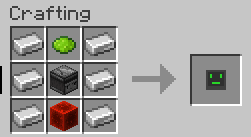
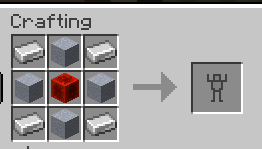
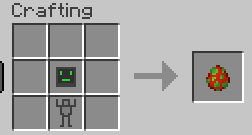
You need to craft a Robot Shell and a Robot AI and combine them in a crafting table
Recipes are on the gallery
Skin Grabbing!
This mod is able to get the skin of a player.
This means that the fake player will always have the correct and matching skin to its given username.
To do this you name the fake player with the username of the player.
Image of this in gallery!
Skin from URL
You can also set the skin of a fake player to a skin from a URL.
To do this, you run the command /players url <entity> <url>
Trending Skins
The mod provides a list of trending skins that you can use for your fake players.
Open the management GUI (chest or shift + right-click) and press the Skin Selector button to browse them.
Upload a Local Skin
You can apply a PNG straight from your computer to the targeted fake player.
Open the Skin Selector and press UPLOAD. A native file picker opens; pick a 64x64 or 64x32 skin PNG up to 32 KB. The skin is sent to the server, persisted under ./fakeplayer/local-skins/, and streamed to other clients on demand. By default this is op-only; set allowLocalSkinUploadOpOnly to false in config/players.json to let everyone upload.
Slim Skin Support!
This mod supports both slim skins and regular skins.
Thanks
- Jeryn - for his API and Skin Downloading code.
Why am I crashing on dedicated forge servers?
This is a known issue and is being worked on.
It's because forge ( nightmare modloader of doom and despair ) by default tries to load client-only code in server.
Try setting advertiseDedicatedServerToLan to false in your server config.
Handy Dandy Links
Showcase
Curseforge
Modrinth
Discord
Available Versions
How to Install Fake Players on Your Server
Order Server
Order a Minecraft Java server with at least 3 GB RAM (4 GB recommended).
Set fabric Loader
In the panel under "Egg", select the fabric loader and matching Minecraft version (1.21.11).
Install Mod
Open the mod browser in the dashboard and search for "Fake Players". Click "Install" – done! Alternatively, upload the .jar via SFTP to the /mods folder.
Compatibility
Mod Loaders
Minecraft Versions
1.21.11, 1.21.8, 1.21.5 (+11 more)
Server-side
✓ RequiredRecommended RAM
4 GB(min. 3 GB)Frequently Asked Questions
Fake Players server crashes on startup – what to do?
Most common cause: wrong fabric version or insufficient RAM. Check the server log (latest.log) for "OutOfMemoryError" or "Mixin" errors. With Mado Hosting: ensure at least 3 GB RAM is allocated and the loader matches the mod version (1.21.11). You can switch loaders with one click in the panel.
Is Fake Players compatible with fabric and forge and neoforge?
Fake Players officially supports fabric, forge, neoforge for Minecraft 1.21.11, 1.21.8, 1.21.5. Note: Forge and Fabric mods are NOT cross-compatible – pick one loader and stick with it. The Mado dashboard automatically detects incompatible loader combinations.
Server lagging with Fake Players – how to optimize performance?
Recommended RAM: 4 GB (per 8 players). Use /spark profiler to check if Fake Players consumes the most tick time. Common fixes: reduce server view-distance to 8-10, install "performant" or "starlight" as supplementary mods on Forge. With Mado Hosting, your server runs on NVMe SSDs with dedicated CPU cores for minimal latency.
Similar Mods





Rent Modded Server
Install Fake Players with just one click on your server.