
Fancy Balloons
Fancy Flying Balloons to help you flying!
Screenshots


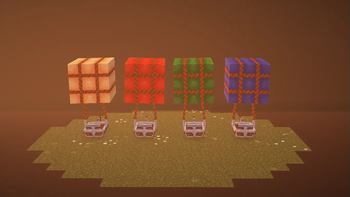

About this Mod
Fancy Balloons
A silly datapack that adds flying balloons controllable by the player
Spawner Item
The item model for the balloon spawner!
Recipe
Here is the balloon recipe:
Usage
Control the balloon with WASD, Space and Ctrl!
- W/S increase or decrease the target speed of the balloon
- A/D rotate the balloon at 5 degrees per tick
- Space/Ctrl increase or decrease the target vertical speed of the balloon
- Sneak and Click to dye your balloons!
Do have in mind that the balloons only work if there is a player seated on them.
They will not move, or change speed, if empty.
Colorful Balloons!
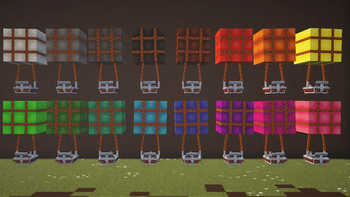
As of v0.0.8 and up if you interact with the balloons with dyes in hand, they will be colored
Available colors are:
| color | ingame | item | version |
|---|---|---|---|
| base |  |
water bucket | v0.0.8+ |
| brown |  |
brown dye | v0.1.1-alpha+ |
| red |  |
red dye | v0.0.8+ |
| orange |  |
orange dye | v0.1.1-alpha+ |
| yellow |  |
yellow dye | v0.1.1-alpha+ |
| green |  |
green dye | v0.0.8+ |
| lime |  |
lime dye | v0.1.1-alpha+ |
| cyan |  |
cyan dye | v0.1.1-alpha+ |
| light blue |  |
light blue dye | v0.1.1-alpha+ |
| blue |  |
blue dye | v0.0.8+ |
| purple |  |
purple dye | v0.1.1-alpha+ |
| magenta |  |
magenta dye | v0.1.1-alpha+ |
| pink |  |
pink dye | v0.1.1-alpha+ |
| white |  |
white dye | v0.1.1-alpha+ |
| light gray |  |
light gray dye | v0.1.1-alpha+ |
| gray |  |
gray dye | v0.1.1-alpha+ |
| black |  |
black dye | v0.1.1-alpha+ |
Keep in mind that if you break a balloon, it's color will reset. I still haven't found a way to change this without having an item for every color.
NOTES!
The datapack version file works as both a datapack and resourcepack.
Put the same file on both folders
The mod version works globaly just like any other mod.
ALERT!
The version 0.2.0-alpha is not compatible with the other versions since so many functions got refactored to work with the WASD system, and to improve performance.
Available Versions
How to Install Fancy Balloons on Your Server
Order Server
Order a Minecraft Java server with at least 3 GB RAM (4 GB recommended).
Set datapack Loader
In the panel under "Egg", select the datapack loader and matching Minecraft version (1.21.5).
Install Mod
Open the mod browser in the dashboard and search for "Fancy Balloons". Click "Install" – done! Alternatively, upload the .jar via SFTP to the /mods folder.
Compatibility
Mod Loaders
Minecraft Versions
1.21.5, 1.21.3, 1.21.2 (+1 more)
Server-side
✓ RequiredRecommended RAM
4 GB(min. 3 GB)Frequently Asked Questions
Fancy Balloons server crashes on startup – what to do?
Most common cause: wrong datapack version or insufficient RAM. Check the server log (latest.log) for "OutOfMemoryError" or "Mixin" errors. With Mado Hosting: ensure at least 3 GB RAM is allocated and the loader matches the mod version (1.21.5). You can switch loaders with one click in the panel.
Is Fancy Balloons compatible with datapack and fabric and forge and minecraft and neoforge and quilt?
Fancy Balloons officially supports datapack, fabric, forge, minecraft, neoforge, quilt for Minecraft 1.21.5, 1.21.3, 1.21.2. Note: Forge and Fabric mods are NOT cross-compatible – pick one loader and stick with it. The Mado dashboard automatically detects incompatible loader combinations.
Server lagging with Fancy Balloons – how to optimize performance?
Recommended RAM: 4 GB (per 8 players). Use /spark profiler to check if Fancy Balloons consumes the most tick time. Common fixes: reduce server view-distance to 8-10, install "performant" or "starlight" as supplementary mods on Forge. With Mado Hosting, your server runs on NVMe SSDs with dedicated CPU cores for minimal latency.
Similar Mods




Rent Modded Server
Install Fancy Balloons with just one click on your server.