
Fast Pot
Fast Pots is a client-side Fabric mod that lets you quickly move splash and lingering potions into your hotbar with a simple key press. No more dragging – just hold shift and hover over the potions you want, and they'll automatically fill the hotbar slots
Screenshots
About this Mod
✨ Fast Pots Features
Select which hotbar slots – Choose exactly which slots (1‑9) should receive potions. Customize it to your playstyle.
Filter by potion type – Pick between healing potions, buffs (Speed, Fire Resistance, Regeneration, Strength), or both. Only the potions you want will be moved.
Auto‑replace items – If a configured hotbar slot contains a non‑potion item, Fast Pots can automatically replace it with a potion from your inventory (optional, toggleable).
Simple activation – Just hold Shift and hover over any potion in your inventory. It will instantly move to the next available hotbar slot you've selected.
Adjustable delay – Set a delay between moves (10‑100 ms) to prevent accidental rapid transfers.
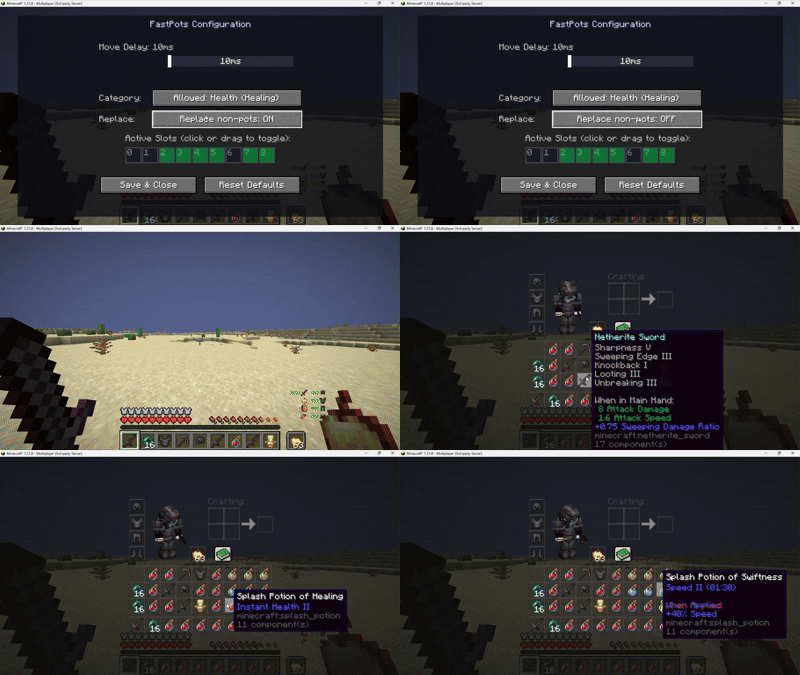
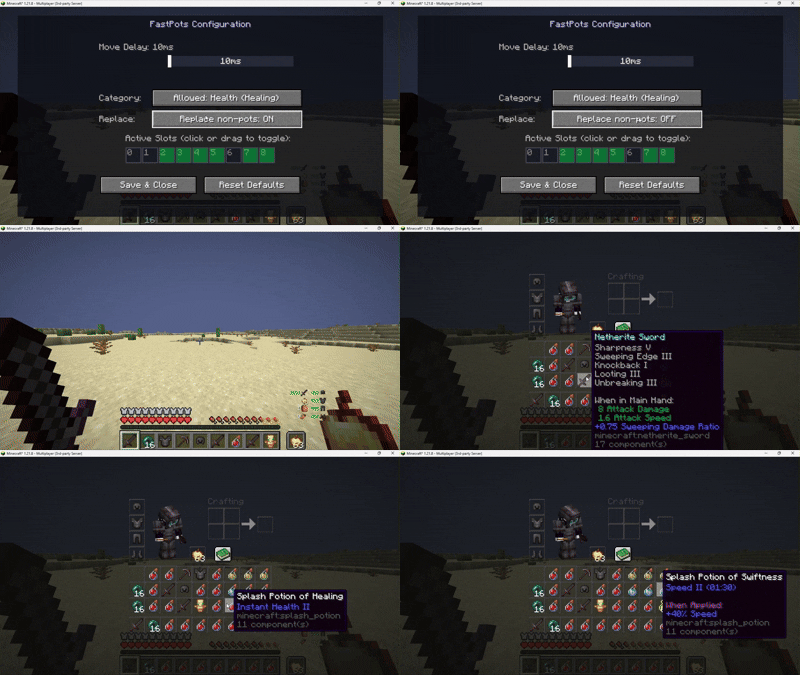
Visual configuration screen – Uses Minecraft's native textures to display a grid of your hotbar and inventory. Click or drag to select slots and tweak the delay – all with a clean, intuitive interface.
Persistent config – Your settings are saved in a JSON file and reloaded automatically.
📸 Screenshots
Config screen – Hotbar grid with green overlays for selected slots, delay slider, potion type toggles.
In‑game – Moving potions by shift‑hovering, with auto‑replace active.
🔧 Requirements
Minecraft
Fabric Loader ≥0.18.4
Fabric API
Java 21
🎮 How to use
Install the mod and launch Minecraft.
Open the config screen with F6 (default key, changeable in Controls).
Select the hotbar slots where you want potions to go (click or drag).
Choose the potion types you want to move: Healing, Buffs, or Both.
Optionally enable "Replace non‑potion items" to automatically overwrite unwanted items in your configured hotbar slots.
Adjust the delay if needed.
In‑game, hold Shift and hover over any eligible potion in your inventory – it will instantly move to the next free hotbar slot you've selected.
⚠️ Disclaimer
This mod is client-side only and does not modify game files or network packets. However, some servers may consider automated inventory management (such as quick potion moving) as an unfair advantage and therefore forbidden by their rules.
Use this mod at your own risk. I am not responsible for any bans or other sanctions applied by server administrators. Always check the rules of the servers you play on before using any client-side modifications.
🐛 Bug reports & suggestions
Send me dm discord:
marcellesa
Available Versions
How to Install Fast Pot on Your Server
Order Server
Order a Minecraft Java server with at least 3 GB RAM (4 GB recommended).
Set fabric Loader
In the panel under "Egg", select the fabric loader and matching Minecraft version (1.21.11).
Install Mod
Open the mod browser in the dashboard and search for "Fast Pot". Click "Install" – done! Alternatively, upload the .jar via SFTP to the /mods folder.
Compatibility
Mod Loaders
Minecraft Versions
1.21.11, 1.21.8, 1.21.4 (+4 more)
Server-side
✗ UnsupportedRecommended RAM
4 GB(min. 3 GB)Frequently Asked Questions
Fast Pot server crashes on startup – what to do?
Most common cause: wrong fabric version or insufficient RAM. Check the server log (latest.log) for "OutOfMemoryError" or "Mixin" errors. With Mado Hosting: ensure at least 3 GB RAM is allocated and the loader matches the mod version (1.21.11). You can switch loaders with one click in the panel.
Is Fast Pot compatible with fabric?
Fast Pot officially supports fabric for Minecraft 1.21.11, 1.21.8, 1.21.4. The Mado dashboard automatically detects incompatible loader combinations.
Server lagging with Fast Pot – how to optimize performance?
Recommended RAM: 4 GB (per 8 players). Use /spark profiler to check if Fast Pot consumes the most tick time. Common fixes: reduce server view-distance to 8-10, install "performant" or "starlight" as supplementary mods on Forge. With Mado Hosting, your server runs on NVMe SSDs with dedicated CPU cores for minimal latency.
Similar Mods




![[TaCZ] Timeless and Classics Zero](https://cdn.modrinth.com/data/SzzJttH8/fd27766d2bb8390d284696b1dbd358f87e081439_96.webp)

Rent Modded Server
Install Fast Pot with just one click on your server.