
Fast Sleep
FastSleep is a Minecraft modification that turns the boring night-skipping process into a dynamic experience. Instead of instant teleportation to the morning, the mod accelerates time, allowing farms to grow and mobs to move faster right before your eyes.
Screenshots
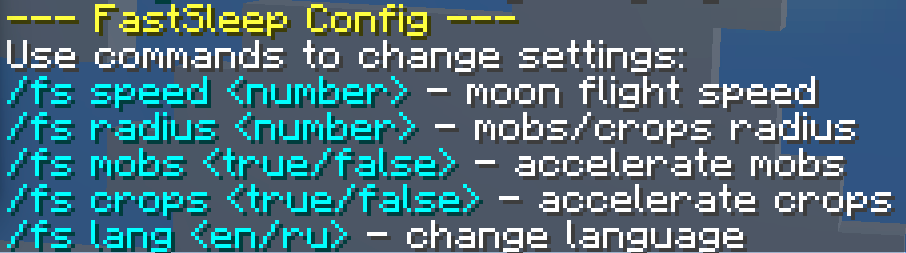


About this Mod
FastSleep — is a Minecraft modification that turns the boring night-skipping process into a dynamic experience. Instead of an instant teleportation to morning, the mod speeds up time, allowing crops to grow and mobs to move faster right before your eyes.
Main Features:
Dynamic Time Warp: Time in the world begins to fly faster as soon as you go to bed. You can see the moon setting and the sun rising in real-time.
Local Acceleration: While you sleep, the mod "boosts" game ticks within a specified radius around the player. This means your crops grow and mobs perform more actions while the world is accelerated.
Full In-Game Configuration: Forget about endlessly editing config files. Manage all mod parameters using the /fs command.
Bilingual Interface: Support for Russian and English languages with instant switching.
Control Commands
All mod management is handled via the /fs command.
- /fs Opens the help menu and a list of available parameters.
- /fs speed
Sets the time warp speed (1-1000). - /fs radius
Sets the acceleration radius for crops/mobs (1-100 blocks). - /fs mobs <true/false> Enables or disables mob acceleration within the radius.
- /fs crops <true/false> Enables or disables crop growth acceleration within the radius.
- /fs lang <ru/en> Switches the language for mod commands and responses.
Available Versions
How to Install Fast Sleep on Your Server
Order Server
Order a Minecraft Java server with at least 3 GB RAM (4 GB recommended).
Set fabric Loader
In the panel under "Egg", select the fabric loader and matching Minecraft version (26.1.2).
Install Mod
Open the mod browser in the dashboard and search for "Fast Sleep". Click "Install" – done! Alternatively, upload the .jar via SFTP to the /mods folder.
Compatibility
Mod Loaders
Minecraft Versions
26.1.2
Server-side
✓ RequiredRecommended RAM
4 GB(min. 3 GB)Frequently Asked Questions
Fast Sleep server crashes on startup – what to do?
Most common cause: wrong fabric version or insufficient RAM. Check the server log (latest.log) for "OutOfMemoryError" or "Mixin" errors. With Mado Hosting: ensure at least 3 GB RAM is allocated and the loader matches the mod version (26.1.2). You can switch loaders with one click in the panel.
Is Fast Sleep compatible with fabric?
Fast Sleep officially supports fabric for Minecraft 26.1.2. The Mado dashboard automatically detects incompatible loader combinations.
Server lagging with Fast Sleep – how to optimize performance?
Recommended RAM: 4 GB (per 8 players). Use /spark profiler to check if Fast Sleep consumes the most tick time. Common fixes: reduce server view-distance to 8-10, install "performant" or "starlight" as supplementary mods on Forge. With Mado Hosting, your server runs on NVMe SSDs with dedicated CPU cores for minimal latency.
Similar Mods




Rent Modded Server
Install Fast Sleep with just one click on your server.