
Fateful
Private server client which extends the capabilities of server-side plugins by adding synchronization with the client using packets.
Screenshots
About this Mod
Ukrainian
ЗАСТЕРЕЖЕННЯ: Цей мод спеціально розроблений під сервер Fateful! Він не буде працювати з іншими серверами!
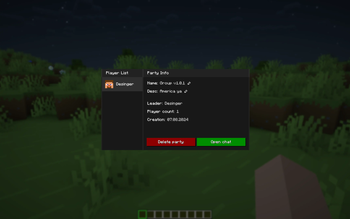
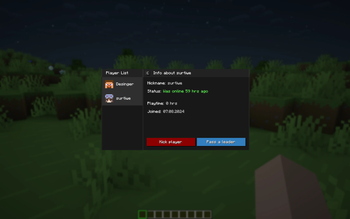
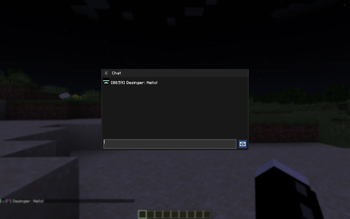
Цей мод додає можливість створювати групи на сервері Fateful. Групи дозволяють спілкуватись у чаті зі своїми друзями за допомогою сучасного інтерфейсу у стилі Essential. Ти з легікістю зможеш керувати учасниками, перейменовувати групу, змінювати опис групи для того, щоб покращити свої враження від гри на сервері! Дуже скоро ми будемо додавати нові функції. Але коли? Та хто його знає...
Якщо ти хочеш приєднатись до сервера, тоді ти мусиш встановити цей мод та зайти у Діскорд сервер.
English
DISCLAIMER: This is a dedicated mod for a Fateful Minecraft Server! It will not work on other servers or in singleplayer
This mod adds the ability to create parties on the Minecraft Server called Fateful. This will allow you to chat with your group in a modern, Essential-style interface. You can easily manage members, rename your party, modify the description in order to enhance your server experience! Stay tuned, we will be releasing new features soon. But when? Who knows...
If you want to join the server, you need to download this mod and join the Discord server.
Available Versions
How to Install Fateful on Your Server
Order Server
Order a Minecraft Java server with at least 3 GB RAM (4 GB recommended).
Set fabric Loader
In the panel under "Egg", select the fabric loader and matching Minecraft version (1.21.1).
Install Mod
Open the mod browser in the dashboard and search for "Fateful". Click "Install" – done! Alternatively, upload the .jar via SFTP to the /mods folder.
Compatibility
Mod Loaders
Minecraft Versions
1.21.1, 1.21
Server-side
✗ UnsupportedRecommended RAM
4 GB(min. 3 GB)Frequently Asked Questions
Fateful server crashes on startup – what to do?
Most common cause: wrong fabric version or insufficient RAM. Check the server log (latest.log) for "OutOfMemoryError" or "Mixin" errors. With Mado Hosting: ensure at least 3 GB RAM is allocated and the loader matches the mod version (1.21.1). You can switch loaders with one click in the panel.
Is Fateful compatible with fabric?
Fateful officially supports fabric for Minecraft 1.21.1, 1.21. The Mado dashboard automatically detects incompatible loader combinations.
Server lagging with Fateful – how to optimize performance?
Recommended RAM: 4 GB (per 8 players). Use /spark profiler to check if Fateful consumes the most tick time. Common fixes: reduce server view-distance to 8-10, install "performant" or "starlight" as supplementary mods on Forge. With Mado Hosting, your server runs on NVMe SSDs with dedicated CPU cores for minimal latency.
Similar Mods




Rent Modded Server
Install Fateful with just one click on your server.