
Faucets and Filters
Adds redstone faucets, filters, and pipes.
Screenshots
About this Mod
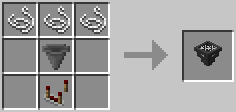
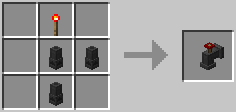
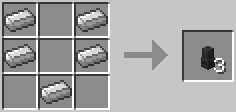
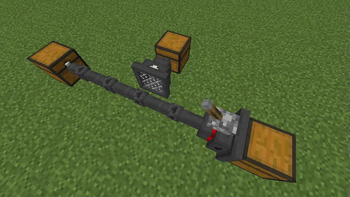
This mod adds 3 new blocks to the game.
Hopper Pipes
Hopper Pipes can be faced any direction, and will simply push their items into the block they're facing.
The side of the pipe has a black arrow indicating which way it's facing.
When placing hopper pipes, by default they will face toward you. Or, you can hold shift and they will face the block you place them against. Filter Hoppers are placed in the same manner.
Filter Hoppers
Filter Hoppers can be faced in any direction. They will pull items from the block behind them and push items into the block in front of them.
Filter Hoppers have two inventories. The top inventory is the regular inventory, and the lower inventory is the filter inventory. One side of the block has a filter on it, and items will only be allowed through this side if they match the filter.
When the filter hopper is powered by redstone it will enter blacklist mode. This means items matching the filter will not be allowed through, but all other items will.
Can be configured to capture item entities only when facing downward (because gravity), or when facing any direction.
Faucets
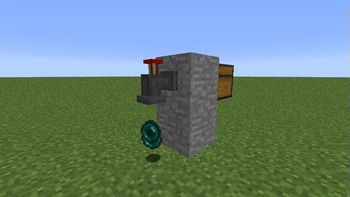
Faucets will pull items from inventories up to two blocks behind them. They will automatically spew items in their inventory onto the ground, unless powered by redstone. There is a switch on top of the faucet that when pushed will reverse the behavior, only spewing items when powered.
When there is a solid block blocking the faucet, it will not spew items but will continue to pull items from inventories behind it.
Available Versions
How to Install Faucets and Filters on Your Server
Order Server
Order a Minecraft Java server with at least 3 GB RAM (4 GB recommended).
Set forge Loader
In the panel under "Egg", select the forge loader and matching Minecraft version (1.12).
Install Mod
Open the mod browser in the dashboard and search for "Faucets and Filters". Click "Install" – done! Alternatively, upload the .jar via SFTP to the /mods folder.
Compatibility
Mod Loaders
Minecraft Versions
1.12, 1.11.2, 1.10.2
Server-side
✓ RequiredRecommended RAM
4 GB(min. 3 GB)Frequently Asked Questions
Faucets and Filters server crashes on startup – what to do?
Most common cause: wrong forge version or insufficient RAM. Check the server log (latest.log) for "OutOfMemoryError" or "Mixin" errors. With Mado Hosting: ensure at least 3 GB RAM is allocated and the loader matches the mod version (1.12). You can switch loaders with one click in the panel.
Is Faucets and Filters compatible with forge?
Faucets and Filters officially supports forge for Minecraft 1.12, 1.11.2, 1.10.2. The Mado dashboard automatically detects incompatible loader combinations.
Server lagging with Faucets and Filters – how to optimize performance?
Recommended RAM: 4 GB (per 8 players). Use /spark profiler to check if Faucets and Filters consumes the most tick time. Common fixes: reduce server view-distance to 8-10, install "performant" or "starlight" as supplementary mods on Forge. With Mado Hosting, your server runs on NVMe SSDs with dedicated CPU cores for minimal latency.
Similar Mods


Rent Modded Server
Install Faucets and Filters with just one click on your server.
Details
- License
- Creative Commons Attribution Non Commercial 4.0 International
- Server-side
- Required