
FeaturedBefore
Adds items and blocks that doesn't have an item form (as an item), used to exist and has been seen in the files.
Screenshots
![[REMAKE] Main menu](https://cdn.modrinth.com/data/fJTaa0zH/images/37ac0045ff597c8fd593e6d3b0135854a7b01534_350.webp)
![[REMAKE] Block page](https://cdn.modrinth.com/data/fJTaa0zH/images/3bc77aa908126e6512bc92ee37798f91748937d9_350.webp)
About this Mod
Ever wondered about Minecraft's lost and forgotten blocks and items? The ones that were axed in early days or only available through glitches? Now, with this mod, you can bring them back to life!
This mod restores removed and glitched blocks and items so that you can experience part of Minecraft's lost past. From old blocks that never got to see the light of survival, beta-era oddities, or hidden items from past updates, you can now collect, set, and use them just like any other item in the game.
Reignite nostalgia, experiment with forgotten features, and infuse a new sense of imagination into your work. If you've ever wanted to have fun with forgotten Minecraft content, then this mod is definitely for you!
The data pack version 1.0.0 of the mod requires the resource pack with the said version for data pack to work. For any versions after that the data pack and the resource pack is in the same download.
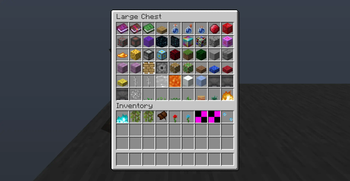
Adds a custom menu where you can get the items below that you can access by pressing your offhand key while not holding anything in either hand and being in creative
- Ruby
- Ruby Block
- Ruby Ore
- Nether portal block as an item
- End portal block as an item
- End gateway block as an item
- Debug1 block
- Debug2 block
- Generic Dead coral block
- Crystallized Honey food item
- Old stonecutter block
- Nether Reactor Core block (which actually works)
- Glowing Obsidian block
- Block253 (Glitch Grass/grass_carried) from old versions of pocket edition
- Block254 (Glitch Leaves/leaves_carried) from old versions of pocket edition
- Reserved6 from old versions of pocket edition
- Smooth Stone Bricks from MCBE
- Chiseled Purpur Block from MCBE
- Smooth Purpur Block from MCBE
- Moving Block from MCBE as an item
- Piston Head as an item
- Powder Snow block as an item
- Different amount of layers of snow layers as items
- Water and lava blocks as an item
- Cogs/Gears
- Every single farmable crop as an item
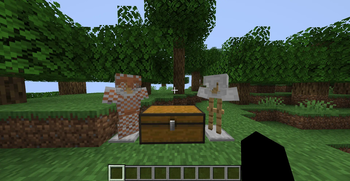
- Studded Armor set
- Plate Armor set
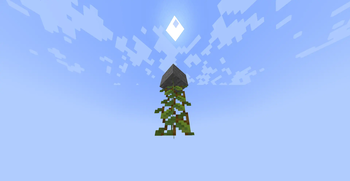
- Cave vines as an item
- Cave vines plant as an item
- An invalid/blank written book
- A blank enchanted book
- Knowledge book
- Potions used in the cauldron brewing system
- [Unused Bedrock Edition Potions]
(https://minecraft.wiki/w/Unused_textures#Unused_potions) - Uncraftable potion, splash-, lingering potion and tipped arrows
- Quiver
- Horse saddle that works like a normal saddle but only for horses and stacks up to 32
- Rose (both from je and pe)
- Paeonia
- Air as an item
- An item form of the lit furnace, blast furnace and smoker.
- Water Spawner and Lava Spawner
- Redstone Wire Tile
- Tripwire tile
- XOR Block from Minecraft 4k
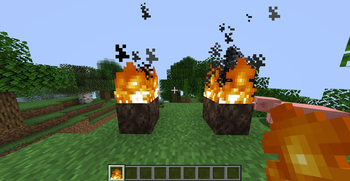
- Lit redstone ore, lit deepslate redstone ore and lit redstone lamp
- Debug Fourj Item from Legacy Concole
- Raw and Cooked Hoglin Meat originally seen in the files of MCBE
- Infdev Coral
- Respawn Anchors with charges as items
- tile.client_request_placeholder_block.name
- Invisible Bedrock
- Six sided variants of blocks such as piston, sticky piston, hay bale, bone block, chiseled quartz, quartz pillars, purpur pillar
- Faceless Jack o'Lantern
- Open Barrel (as an item)
- Standing sign tiles and wall sign tiles
- Dirt Slab
- Magenta, Blue and Yellow Coral slabs
- Seamless stone slabs
- Overstacked items up to 99 obtainable from the mod menu
- Multishot 12 crossbow from Minecraft 3d shareware April Fool's update
- Unstable TNT (tnt that ignites on break, which is how tnt used to work)
- Colored Planks
- Sculk Jaw
- A new summonable entity being 2char. You can summon it from the mod menu in the new entity section
- A new improved gamerule section in the mod menu that allows you to enable different mod specific gamerules:
- solid_gateway = When enabled allows newly placed end gateways to act like solid blocks in the nether and the overworld (Just like how it works in MCBE)
- zero_dura_overstacked_items_fix = Fixes the modern day issue of obtaining zero durability items when overusing an overstacked item that has durability
- 1_8_pvp = Toggles 1.8 PvP
- A new gallery section in the mod menu where you can give items and blocks how they used to look like.
- Enchanting Tables from September 30th 2011.
- Cod, Salmon, Pufferfish and Tropical fish spawn eggs with their fish roe textures from March 28th 2018 in Bedrock Edition.
Available Versions
How to Install FeaturedBefore on Your Server
Order Server
Order a Minecraft Java server with at least 3 GB RAM (4 GB recommended).
Set datapack Loader
In the panel under "Egg", select the datapack loader and matching Minecraft version (26.1.2).
Install Mod
Open the mod browser in the dashboard and search for "FeaturedBefore". Click "Install" – done! Alternatively, upload the .jar via SFTP to the /mods folder.
Compatibility
Mod Loaders
Minecraft Versions
26.1.2, 26.1.1, 26.1 (+2 more)
Server-side
✓ RequiredRecommended RAM
4 GB(min. 3 GB)Frequently Asked Questions
FeaturedBefore server crashes on startup – what to do?
Most common cause: wrong datapack version or insufficient RAM. Check the server log (latest.log) for "OutOfMemoryError" or "Mixin" errors. With Mado Hosting: ensure at least 3 GB RAM is allocated and the loader matches the mod version (26.1.2). You can switch loaders with one click in the panel.
Is FeaturedBefore compatible with datapack and fabric and forge and minecraft and neoforge and quilt?
FeaturedBefore officially supports datapack, fabric, forge, minecraft, neoforge, quilt for Minecraft 26.1.2, 26.1.1, 26.1. Note: Forge and Fabric mods are NOT cross-compatible – pick one loader and stick with it. The Mado dashboard automatically detects incompatible loader combinations.
Server lagging with FeaturedBefore – how to optimize performance?
Recommended RAM: 4 GB (per 8 players). Use /spark profiler to check if FeaturedBefore consumes the most tick time. Common fixes: reduce server view-distance to 8-10, install "performant" or "starlight" as supplementary mods on Forge. With Mado Hosting, your server runs on NVMe SSDs with dedicated CPU cores for minimal latency.
Similar Mods





Rent Modded Server
Install FeaturedBefore with just one click on your server.