
Fertilized Dirt
A mod where you can fertilize your dirt so that plants grow faster !
Screenshots
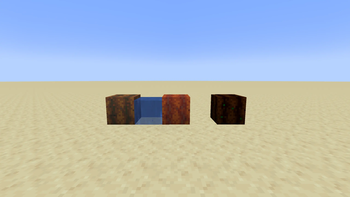
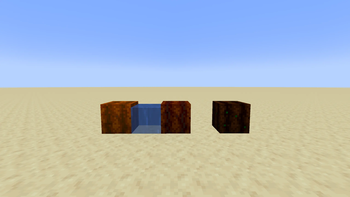
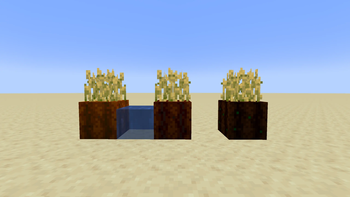
About this Mod
Fertilized Dirt is a small mod that adds three farmland dirt tiers for speeding up crop growth.
Features
Fertilized Dirt Tier 1: gives plants 50% faster growth.
Fertilized Dirt Tier 2: gives plants 70% faster growth.
Fertilized Dirt Tier 3: gives plants 100% faster growth and does not need water to stay moist.
Fertilized Dirt blocks do not turn back into dirt when jumped on.
Fertilized Dirt blocks do not disappear or turn into normal dirt when there is no water nearby.
Crafting
Tier 1:
Place 1 Dirt in the center of the crafting table.
Place 8 Bone Meal in each of the 8 surrounding slots.
Total cost: 64 Bone Meal.
Tier 2:
Place 1 Fertilized Dirt Tier 1 in the center of the crafting table.
Place 16 Bone Meal in each of the 8 surrounding slots.
Total cost: 128 Bone Meal.
Tier 3:
Place 1 Fertilized Dirt Tier 2 in the center of the crafting table.
Place 32 Bone Meal in each of the 8 surrounding slots.
Total cost: 256 Bone Meal.
Important Water Note !
Tier 1 and Tier 2 need to be wet in order to grow plants. Place water nearby to hydrate them. Without water, stay as Fertilized Dirt, and will not turn into normal dirt, but crops will not grow properly until the block is hydrated again.
Tier 3 is always treated as moist, so crops can grow without nearby water.
How To Use
Place the Fertilized Dirt like farmland, then plant crops on top of it. The block will automatically give extra random growth ticks to the plant above it based on its tier.
Recommended: Install JEI to see the custom recipes in-game.
Available Versions
How to Install Fertilized Dirt on Your Server
Order Server
Order a Minecraft Java server with at least 3 GB RAM (4 GB recommended).
Set neoforge Loader
In the panel under "Egg", select the neoforge loader and matching Minecraft version (1.21.11).
Install Mod
Open the mod browser in the dashboard and search for "Fertilized Dirt". Click "Install" – done! Alternatively, upload the .jar via SFTP to the /mods folder.
Compatibility
Mod Loaders
Minecraft Versions
1.21.11, 1.21.1
Server-side
✓ RequiredRecommended RAM
4 GB(min. 3 GB)Frequently Asked Questions
Fertilized Dirt server crashes on startup – what to do?
Most common cause: wrong neoforge version or insufficient RAM. Check the server log (latest.log) for "OutOfMemoryError" or "Mixin" errors. With Mado Hosting: ensure at least 3 GB RAM is allocated and the loader matches the mod version (1.21.11). You can switch loaders with one click in the panel.
Is Fertilized Dirt compatible with neoforge?
Fertilized Dirt officially supports neoforge for Minecraft 1.21.11, 1.21.1. The Mado dashboard automatically detects incompatible loader combinations.
Server lagging with Fertilized Dirt – how to optimize performance?
Recommended RAM: 4 GB (per 8 players). Use /spark profiler to check if Fertilized Dirt consumes the most tick time. Common fixes: reduce server view-distance to 8-10, install "performant" or "starlight" as supplementary mods on Forge. With Mado Hosting, your server runs on NVMe SSDs with dedicated CPU cores for minimal latency.
Rent Modded Server
Install Fertilized Dirt with just one click on your server.
Details
- License
- Creative Commons Attribution Share Alike 4.0 International
- Server-side
- Required