
Final Destination HUD
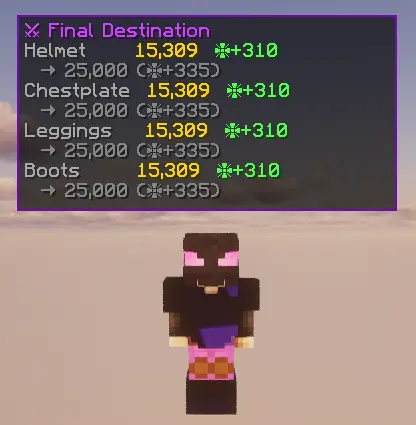
It adds a kill tracker for final destination armor in hypixel skyblock, visible on the HUD
Screenshots

About this Mod
⚔ Armor FD Tracker
A lightweight Fabric client mod for Hypixel SkyBlock that displays a real-time HUD showing the kill count and tier progress for each piece of your Final Destination armor.
Features
- Per-piece kill tracker — shows kills for Helmet, Chestplate, Leggings and Boots separately (top-to-bottom order)
- Defense bonus display — shows your current ❈ defense bonus per piece based on your kill tier
- Next tier progress — shows how many kills until the next Enderman Bulwark tier upgrade
- Auto-hide — HUD only appears when you have at least one FD piece equipped
- Toggle keybind — press
H(rebindable in Options → Controls) to show/hide the HUD - Draggable HUD — run
/fdtracker guito drag the HUD anywhere on screen - Resizable HUD — scroll up/down in the GUI to scale the HUD between 50% and 200%
- Chat-friendly — HUD stays visible when the chat is open
- Hypixel-only — HUD is hidden on any other server
HUD Preview
⚔ Final Destination
Helmet       14,018  ❈+310
  → 25,000 (❈+335)
Chestplate   14,018  ❈+310
  → 25,000 (❈+335)
Leggings     14,018  ❈+310
  → 25,000 (❈+335)
Boots        14,018  ❈+310
  → 25,000 (❈+335)
HUD preview
Tier Table
| Tier | Total Kills | ❈ Defense |
|---|---|---|
| 1 | 100 | +20 |
| 2 | 200 | +40 |
| 3 | 300 | +60 |
| 4 | 500 | +90 |
| 5 | 800 | +120 |
| 6 | 1,200 | +150 |
| 7 | 1,750 | +180 |
| 8 | 2,500 | +210 |
| 9 | 3,500 | +240 |
| 10 | 5,000 | +270 |
| 11 | 10,000 | +310 |
| 12 | 25,000 | +335 |
| 13 | 50,000 | +355 |
| 14 | 75,000 | +370 |
| 15 | 100,000 | +380 |
| 16 | 125,000 | +390 |
| 17 | 150,000 | +395 |
| 18 | 200,000 | +400 |
Commands
| Command | Description |
|---|---|
/fdtracker gui |
Open the HUD position/scale editor |
/fdtracker kills |
Print kill counts in chat |
/fdtracker debug |
Dump raw NBT of the item in your hand |
Installation
- Install Fabric Loader and Fabric API
- Drop the
.jarinto your.minecraft/mods/folder - Join Hypixel and equip your Final Destination armor
Requirements
- Minecraft 1.21.11
- Fabric Loader ≥ 0.18.5
- Fabric API
Available Versions
How to Install Final Destination HUD on Your Server
Order Server
Order a Minecraft Java server with at least 3 GB RAM (4 GB recommended).
Set fabric Loader
In the panel under "Egg", select the fabric loader and matching Minecraft version (1.21.11).
Install Mod
Open the mod browser in the dashboard and search for "Final Destination HUD". Click "Install" – done! Alternatively, upload the .jar via SFTP to the /mods folder.
Compatibility
Mod Loaders
Minecraft Versions
1.21.11
Server-side
✗ UnsupportedRecommended RAM
4 GB(min. 3 GB)Frequently Asked Questions
Final Destination HUD server crashes on startup – what to do?
Most common cause: wrong fabric version or insufficient RAM. Check the server log (latest.log) for "OutOfMemoryError" or "Mixin" errors. With Mado Hosting: ensure at least 3 GB RAM is allocated and the loader matches the mod version (1.21.11). You can switch loaders with one click in the panel.
Is Final Destination HUD compatible with fabric?
Final Destination HUD officially supports fabric for Minecraft 1.21.11. The Mado dashboard automatically detects incompatible loader combinations.
Server lagging with Final Destination HUD – how to optimize performance?
Recommended RAM: 4 GB (per 8 players). Use /spark profiler to check if Final Destination HUD consumes the most tick time. Common fixes: reduce server view-distance to 8-10, install "performant" or "starlight" as supplementary mods on Forge. With Mado Hosting, your server runs on NVMe SSDs with dedicated CPU cores for minimal latency.
Similar Mods




![[TaCZ] Timeless and Classics Zero](https://cdn.modrinth.com/data/SzzJttH8/fd27766d2bb8390d284696b1dbd358f87e081439_96.webp)

Rent Modded Server
Install Final Destination HUD with just one click on your server.