
Find me
Find me is a Minecraft Forge 1.20.1 mod that allows players to quickly summon, recall, and rescue mounts and companion creatures.
About this Mod
Find me User Guide
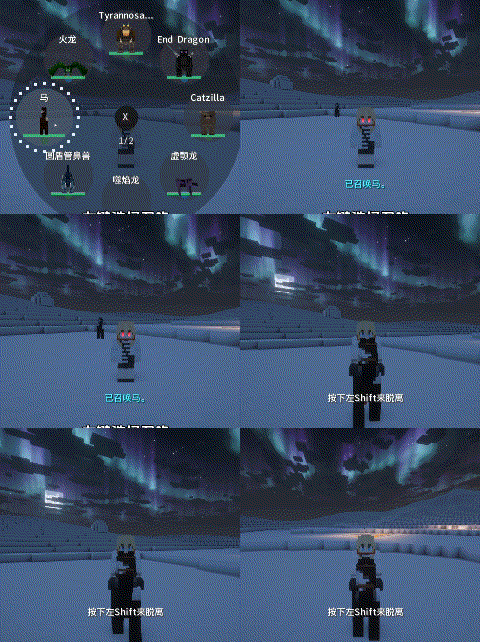
Find me is a companion and mount management mod for Minecraft Forge 1.20.1. It lets you quickly store, summon, and protect your tamed creatures.
Quick Start
- Tame a creature.
- Ride it once so the mod remembers it as a mount; if you don’t ride it, it becomes a companion.
- Short-press
Rto summon/dismiss your current mount; short-pressVfor your current companion. - Hold
RorV(~0.25s) to open the selection wheel. - Press
Gto open the management screen.
All keybinds can be changed in the vanilla controls menu.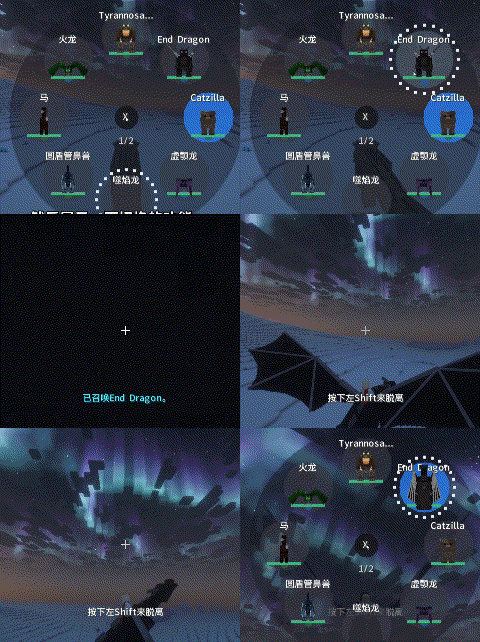

Core Controls
Using the Wheels
| Action | Effect |
|---|---|
Hold R / V |
Open Mount / Companion Wheel |
| Hover over an entry | Select that entry |
| Release the key | Close wheel, keep hovered entry selected |
| Left-click an unstored entry | Summon it |
| Left-click an active/deployed entry | Dismiss/store it |
| Scroll while wheel is open | Switch wheel pages |
| Click the center ✕ | Close without switching creature |
Management Screen (G)
- Left-click a name → View details / 3D preview (drag to rotate, scroll to zoom).
- Right-click an entry → Rename (add a note) or delete.
- Drag an entry → Reorder, or drag it to the other list (Mounts ↔ Companions) to move creatures between categories.
- Search box → Filter visible entries.
- Deceased button → View and manage fallen creatures.
- Ignore List button → Manage entities excluded from auto-binding.
Key Features at a Glance
Fall Rescue
When falling more than 5 blocks (configurable), press the mount summon key. The mod will attempt to catch you with a flying or ground mount. If the area is too confined, the creature is safely stored instead.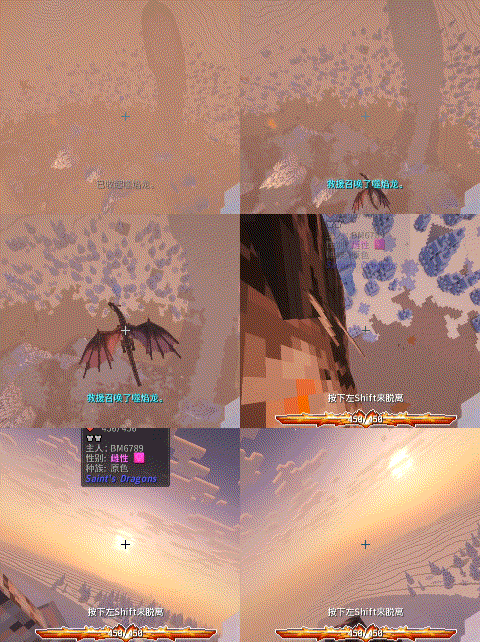
Mount Swap Protection
When switching mounts, the old mount is kept until the new one arrives and accepts you, preventing falls into the void.
Deceased Creatures & Revival
- Registered creatures that die move to the Deceased List, with a preview and removed from active wheels.
- If Sleep Revival is enabled, each time you wake up there is a chance (default 70%, 10-min cooldown) that a deceased companion respawns nearby.
- Creatures can also be recovered via the Emergency Vault or Auto-Backups.
Emergency Vault & Auto-Backups
- Vault: Automatically saves a creature snapshot before dangerous operations. Holds up to 30 snapshots.
- Auto-Backups: Periodically saves your full mount, companion, and deceased lists (default every 30 min, keeping 6 copies).
- Restore with commands:
/findme vault list
/findme vault restore <index>
/findme backup list
/findme backup restore <index>
Command Reference
All commands use the prefix /findme.
| Command | Description |
|---|---|
/findme mount list |
List all mounts and their indices |
/findme mount summon |
Summon / dismiss current mount |
/findme mount return |
Send current mount back to its saved position |
/findme mount remove <index> |
Remove a mount |
/findme companion list |
List all companions and their indices |
/findme companion summon |
Summon / dismiss current companion |
/findme companion return |
Send current companion back to its saved position |
/findme companion remove <index> |
Remove a companion |
/findme vault list / restore <index> |
Manage emergency vault snapshots |
/findme backup list / restore <index> |
Manage full list backups |
Common Configuration
Config file: config/find_me-common.toml (requires restart after changes).
Safety & Backups
enableVault = true
vaultCapacity = 30
enableAutoBackups = true
backupIntervalMinutes = 30
backupCapacity = 6
postTeleportInvulnerabilitySeconds = 1.5  # Invulnerability after forced teleport
Revival
enableSleepRevive = true
sleepReviveCooldownMinutes = 10
sleepReviveChance = 0.7
sleepReviveSpawnEntity = true   # Set to false for modpacks with giant creatures
Summon Cooldowns (20 ticks = 1 second)
mountCooldownTicks = 60
companionCooldownTicks = 40
combatMountCooldownTicks = 40   # During combat
returnCooldownTicks = 40
rescueMinFallDistance = 5
safeSearchRadius = 12           # Increase for large creatures
Combat
enablePvpSummon = true
enableCombatSpeedBoost = true
combatSpeedBoostPercent = 0.2
combatSpeedBoostTicks = 60
Compatibility Overrides
If a modded creature is not recognized correctly as a mount/companion, or its movement type is wrong:
customMounts = ["modid:entity_id"]
customCompanions = ["modid:entity_id"]
customMoveTypes = ["modid:entity_id=fly"]   # Valid: walk, swim, companion
previewScaleOverrides = ["modid:entity_id=0.75"]  # Adjust GUI preview size
Troubleshooting Checklist
- Press
Gand check which list the creature is in (Mounts / Companions / Deceased). - Use
/findme mount listorcompanion listto verify the server-side lists. - Creature died? Try sleep revival, or check
/findme vault listand/findme backup listto restore. - Creature in wrong list? Dismiss it first, then drag it to the other list in the management screen.
- Modded creature behaves oddly? Add a
customMountsorcustomMoveTypesoverride. - When testing modpacks, always keep
enableVaultandenableAutoBackupsenabled to prevent accidental loss.
Available Versions
How to Install Find me on Your Server
Order Server
Order a Minecraft Java server with at least 3 GB RAM (4 GB recommended).
Set forge Loader
In the panel under "Egg", select the forge loader and matching Minecraft version (1.20.1).
Install Mod
Open the mod browser in the dashboard and search for "Find me". Click "Install" – done! Alternatively, upload the .jar via SFTP to the /mods folder.
Compatibility
Mod Loaders
Minecraft Versions
1.20.1
Server-side
✓ RequiredRecommended RAM
4 GB(min. 3 GB)Frequently Asked Questions
Find me server crashes on startup – what to do?
Most common cause: wrong forge version or insufficient RAM. Check the server log (latest.log) for "OutOfMemoryError" or "Mixin" errors. With Mado Hosting: ensure at least 3 GB RAM is allocated and the loader matches the mod version (1.20.1). You can switch loaders with one click in the panel.
Is Find me compatible with forge?
Find me officially supports forge for Minecraft 1.20.1. The Mado dashboard automatically detects incompatible loader combinations.
Server lagging with Find me – how to optimize performance?
Recommended RAM: 4 GB (per 8 players). Use /spark profiler to check if Find me consumes the most tick time. Common fixes: reduce server view-distance to 8-10, install "performant" or "starlight" as supplementary mods on Forge. With Mado Hosting, your server runs on NVMe SSDs with dedicated CPU cores for minimal latency.
Rent Modded Server
Install Find me with just one click on your server.