
Fine Tuned Calibration
Expands Calibrated Sculk Sensors output from 15 frequencies to 100+ frequencies!
Screenshots
About this Mod




📖 About
This mod gives extra functionality to Calibrated Sculk Sensors which allow them to output a variable Redstone signal based on Vibrational differences within the same Frequency, meaning you can make your Sculk contraptions even more specifc! This mod increases the number of Frequencies that result from a Calibrated Sculk Sensor + Comparator from 15 Frequencies to 100+ Frequencies! Some things you can detect with this mod:
- Which Goat Horn type was blown ("Ponder", "Sing", ...)?
- Which Music Disc was played in a Jukebox ("Block", "13", ...)?
- Which slot of a Chiseled Bookshelf was interacted with (1-6)?
- What type of boots is the player wearing (none, leather, ...)?
- Was the Entity Damage a Player Death?
- What's the tune of the Note Block?
- Was a Redstone Lever just activated?
- And much more!
📃 Changelog
Changelogs are available at the GitHub Releases section
📸 Media

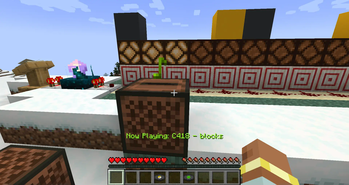
This is the Music Disc Blocks being detected as Frequency 3 for a Calibrated Sculk Sensor set to Page 11 in a Lectern (see Table below). Under vanilla mechanics, all Music Discs have the same Frequency - 11.
Demo of Comparator output Calibrated to Freq 1, which includes player armor frequencies (1 - no boots, 2 - leather boots, ...).
📋 Full Table
| Output | Vibration type, id, description | Calibrated Outputs |
|---|---|---|
| 1 | Step minecraft:step Player or entity step Swim minecraft:swim Player or entity swim Flap minecraft:flap Entity flaps (bat) |
1 - player stepping no boots 2 - player stepping leather boots 3 - player stepping golden boots 4 - player stepping chainmail boots 5 - player stepping iron boots 6 - player stepping diamond boots 7 - player stepping netherite boots 8 - entity stepping 9 - player swimming 10 - entity swimming 11 - entity flap |
| 2 | Projectile Land minecraft:projectile_land Projectile lands (snowball) Hit Ground minecraft:hit_ground Player or entity hits ground post-jump or fall Splash minecraft:splash Player or entity splashes. Bubble Column, water surface, boat paddles |
1 - projectile land 2 - player falls 3 - entity falls 4 - player splashes 5 - entity spashes |
| 3 | Item Interact Finish minecraft:item_interact_finish Item Interaction (Shield, Spyglass) Projectile Shoot minecraft:projectile_shoot Projectile Shoots (arrow) Instrument Play minecraft:instrument_play Goat Horn Plays |
1 - Goat Horn "Ponder 2 - Goat Horn "Sing", 3 - Goat Horn "Seek" 4 - Goat Horn "Feel", 5 - Goat Horn "Admire 6 - Goat Horn "Call", 7 - Goat Horn "Yearn" 8 - Goat Horn "Dream" 9 - shield interaction, snowball shoot 10 - bow interact/shoot 11 - crossbow interact/shoot 12 - fishing rod interact/shoot 13 - spyglass interaction, firework shoot |
| 4 | Entity Roar minecraft:entity_roar Entity Roars (Ravager) Entity Shake minecraft:entity_shake Entity Shakes (wolf after swimming) Elytra Glide minecraft:elytra_glide Player glides |
1- entity roar 2 - entity shake 3 - elytra glide |
| 5 | Entity Dismount minecraft:entity_dismount Player Dismount Equip minecraft:equip Armor equip in armor slot or stand |
1 - Player dismount 2 - Entity dismount 3 - Player equip 4 - Entity equip |
| 6 | Entity Mount minecraft:entity_mount Player Mount (horse) Entity Interact minecraft:entity_interact Player interaction with entity (breeding) Shear minecraft:shear Shears a sheep |
1 - Player entity mount 2 - Entity entity mount 3 - entity interact 4 - shear |
| 7 | Entity Damage minecraft:entity_damage Damage or death to entities (except armor stand) | 1 - Player damage 2 - Entity damage 3 - Player death 4 - Entity death |
| 8 | Drink minecraft:drink Player or entity drinks Eat minecraft:eat Player or entity eats |
1 - Player drinks 2 - Entity drinks 3- Player eats 4- Entity eats |
| 9 | Container Close minecraft:container_close Close container (Chest, shulkerbox, hopper) Block Close minecraft:block_close Door Close (trapdoor and fencegate) Block Deactivate minecraft:block_deactivate Lever or button deactivation Block Detach minecraft:block_detach Tripwire detachment |
1 - Container close 2 - Block close 3 - Block deactivate 4 - Block detach |
| 10 | Block Open minecraft:block_open Open Door Block Activate minecraft:block_activate Activate Blocks Block Attach minecraft:block_attach Attachment of Tripwire hook Prime Fuse minecraft:prime_fuse TNT or creeper activation Note Block Play minecraft:note_block_play Note Block Sounds |
1 - Container open, Note block [0-1] 2 - Block open, Note block [2-3] 3 - Block activate, Note block [4-5] 4 - Block attach, Note block [6-7] 5 - Prime fuse, Note block [8-9] 6 - Note block [10-11] 7 - Note block [12-13] 8 - Note block [14-15] 9 - Note block [16-17] 10 - Note block [18-19] 11 - Note block [20-21] 12 - Note block [22-23] 13 - Note block [24] |
| 11 | Block Change minecraft:block_change Block Change (Chiseled Bookshelf, Lectern) | 1 - Music Disc 13, chiseled bookshelf slot 1 use 2 - Music Disc Cat, chiseled bookshelf slot 2 use 3 - Music Disc Blocks, chiseled bookshelf slot 3 use 4 - Music Disc Chirp, chiseled bookshelf slot 4 use 5 - Music Disc Far, chiseled bookshelf slot 5 use 6 - Music Disc Mall, chiseled bookshelf slot 6 use 7 - Music Disc Mellohi, lectern use 8 - Music Disc Stal, composter use 9 - Music Disc Strad 10 - Music Disc Ward 11 - Music Disc 11 12 - Music Disc Wait 13 - Music Disc Otherside 14 - Music Disc 5 15 - Music Disc Pigstep |
| 12 | Block Destroy minecraft:block_destroy Block Destruction Fluid Pickup minecraft:fluid_pickup Gathered Fluid (Water, honey bottle, powdered snow) |
1 - Block destroy 2 - Fluid pickup |
| 13 | Block Place minecraft:block_place Block Placement Fluid Place minecraft:fluid_place Fluid Placement |
1 - Block place 2 - Fluid place |
| 14 | Entity Place minecraft:entity_place Entity Placement via Spawn-egg or Mob Spawner Lightning Strike minecraft:lightning_strike Lightning Strike Teleport minecraft:teleport Endermen, Chorus Fruit, Shulker, or Enderpearl Teleportation |
1 - Entity place 2 - Lightning strike 3 - Teleport |
| 15 | Entity Die minecraft:entity_die Armor Stand Dies Explode minecraft:explode TNT, End Crystal, Bed/Respawn Anchor, Creeper Explosion |
1 - Entity die 2 - Explode |
Available Versions
How to Install Fine Tuned Calibration on Your Server
Order Server
Order a Minecraft Java server with at least 3 GB RAM (4 GB recommended).
Set fabric Loader
In the panel under "Egg", select the fabric loader and matching Minecraft version (1.21.11).
Install Mod
Open the mod browser in the dashboard and search for "Fine Tuned Calibration". Click "Install" – done! Alternatively, upload the .jar via SFTP to the /mods folder.
Compatibility
Mod Loaders
Minecraft Versions
1.21.11, 1.20.4, 1.20.1 (+1 more)
Server-side
✓ RequiredRecommended RAM
4 GB(min. 3 GB)Frequently Asked Questions
Fine Tuned Calibration server crashes on startup – what to do?
Most common cause: wrong fabric version or insufficient RAM. Check the server log (latest.log) for "OutOfMemoryError" or "Mixin" errors. With Mado Hosting: ensure at least 3 GB RAM is allocated and the loader matches the mod version (1.21.11). You can switch loaders with one click in the panel.
Is Fine Tuned Calibration compatible with fabric?
Fine Tuned Calibration officially supports fabric for Minecraft 1.21.11, 1.20.4, 1.20.1. The Mado dashboard automatically detects incompatible loader combinations.
Server lagging with Fine Tuned Calibration – how to optimize performance?
Recommended RAM: 4 GB (per 8 players). Use /spark profiler to check if Fine Tuned Calibration consumes the most tick time. Common fixes: reduce server view-distance to 8-10, install "performant" or "starlight" as supplementary mods on Forge. With Mado Hosting, your server runs on NVMe SSDs with dedicated CPU cores for minimal latency.
Similar Mods




![[TaCZ] Timeless and Classics Zero](https://cdn.modrinth.com/data/SzzJttH8/fd27766d2bb8390d284696b1dbd358f87e081439_96.webp)

Rent Modded Server
Install Fine Tuned Calibration with just one click on your server.