
Fire Expansion
A small Datapack/Mod to add some new items like a new weapon.
Screenshots

About this Mod
About 🛠️
STICKMAN API IS REQUIRED ON VERSION 1.2.1+. GET STICKMAN API HERE.
If you are using the datapack, please also use the downloaded file as a resource pack.
The textures are integrated in the mod version. The item "Borcher" is Inspired by the item "Scorcher" from the Mod "Dungeon now Loading". This Pack adds some useful items and Advancements.
For more info, click through this:
DO NOT use Mods like JEI - They Wont work, because the Mod is just a Packaged Datapack!
Huge thanks to Shadowwalker145 for the amazing music disc Escape to Death! Please note: Escape to Death is only available in version B1.1+.
FOR DATAPACK USERS: THE DATAPACK IS THE RESOURCEPACK TOO
INCOMPATIBLE WITH LEXTER'S CATACLYSM
Content ✨
Visit a Trail Chambers, and with a small Chance you will optain the "Bucket of Ministrosity" (3,25%). Hold it in your main/offhand and right-click to get a 27-Slot space for your loot. Get the "Monstrous" Enchantment out of an vault too and Enchant it on your leggings. If any entity attacks you they will get launched up into the air (Level 1 = 33% Boosted in air, Level 2 = 66%, Level 3 = 99%) and If you have a second Heavy Core... just craft it into a "Combustion Cell":
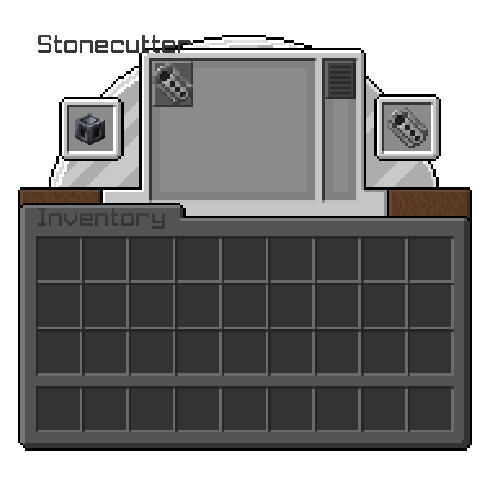
Use this cell to craft the "Borcher" like this:
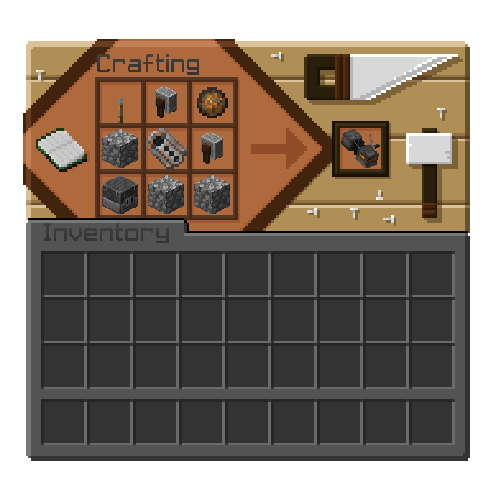
The Borcher consumes one coal every 1.5 Seconds. It can fire 8 Seconds, before going into "overheat" mode. Just wait until the bar in your actionbar if full white.
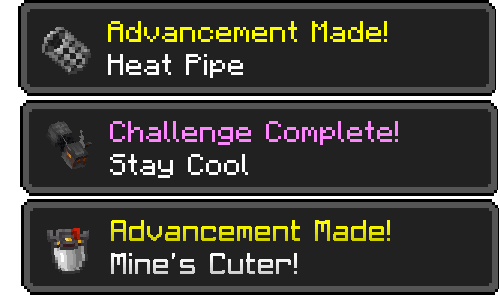
Here are the 2 Advancements for Collecting those 3 Items:
Available Versions
How to Install Fire Expansion on Your Server
Order Server
Order a Minecraft Java server with at least 3 GB RAM (4 GB recommended).
Set datapack Loader
In the panel under "Egg", select the datapack loader and matching Minecraft version (1.21.10).
Install Mod
Open the mod browser in the dashboard and search for "Fire Expansion". Click "Install" – done! Alternatively, upload the .jar via SFTP to the /mods folder.
Compatibility
Mod Loaders
Minecraft Versions
1.21.10, 1.21.9, 1.21.8 (+3 more)
Server-side
✓ RequiredRecommended RAM
4 GB(min. 3 GB)Frequently Asked Questions
Fire Expansion server crashes on startup – what to do?
Most common cause: wrong datapack version or insufficient RAM. Check the server log (latest.log) for "OutOfMemoryError" or "Mixin" errors. With Mado Hosting: ensure at least 3 GB RAM is allocated and the loader matches the mod version (1.21.10). You can switch loaders with one click in the panel.
Is Fire Expansion compatible with datapack and fabric and forge and neoforge and quilt?
Fire Expansion officially supports datapack, fabric, forge, neoforge, quilt for Minecraft 1.21.10, 1.21.9, 1.21.8. Note: Forge and Fabric mods are NOT cross-compatible – pick one loader and stick with it. The Mado dashboard automatically detects incompatible loader combinations.
Server lagging with Fire Expansion – how to optimize performance?
Recommended RAM: 4 GB (per 8 players). Use /spark profiler to check if Fire Expansion consumes the most tick time. Common fixes: reduce server view-distance to 8-10, install "performant" or "starlight" as supplementary mods on Forge. With Mado Hosting, your server runs on NVMe SSDs with dedicated CPU cores for minimal latency.
Similar Mods




![[TaCZ] Timeless and Classics Zero](https://cdn.modrinth.com/data/SzzJttH8/fd27766d2bb8390d284696b1dbd358f87e081439_96.webp)

Rent Modded Server
Install Fire Expansion with just one click on your server.
Details
- License
- Creative Commons Attribution Non Commercial No Derivatives 4.0 International
- Server-side
- Required