
Firearms
Resident Evil 4 inspired Firearms for Minecraft.
Screenshots
About this Mod
Description
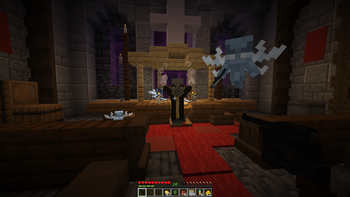
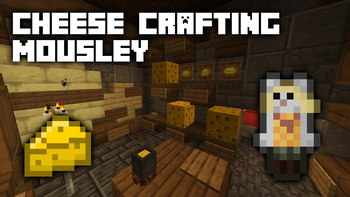
Firearms is a Resident Evil 4 inspired datapack. Craft and upgrade guns from the original game, find Mousley and feed her Cheese to unlock bonus content, and delve into a large, procedurally generated castle to acquire pesetas!
 Firearms
There are 7 Firearms in total, and a Rocket Launcher. Hold a Firearm in your mainhand and right click to fire. Below is an explanation of all mechanics relevant to Firearms, as well as a breakdown of each one.
Deadeye Mode
Sneaking while holding a Firearm will activate deadeye mode after some time, allowing bullets fired to deal critical hits.
Ammo Usage
All Firearms use some kind of ammo to fire. You must have the correct ammo type in your inventory to load a clip. The ammo type for each Firearm is detailed in the breakdown table below. Ammo recipes are unlocked automatically when a Firearm enters your inventory.
Reloading
Firearms can be manually reloaded by pressing F while in your mainhand. Reloading happens automatically when ammo reaches 0.
Damage Falloff
Bullets fired experience damage falloff over certain ranges, particular to each Firearm. Some Firearms will require a close range to be effective, whereas others (such as the sniper rifle) can be used over any range without falloff. Deadeye critical hits can make up for some of that falloff.
Maximum Range
There is also a fixed maximum range for each Firearm where, after a certain range, the bullet will no longer be effective at all.
Piercing
Bullets are sometimes able to pierce multiple enemies with one shot, the number specific to each Firearm.
Upgrading & Special Upgrades
Firearms can be upgraded at the Firearms Workshop (more on that below). Each Firearm can have its maximum ammo extended with an Extended Mag. Some Firearms can have damage falloff reduced with a Stabiliser. Every Firearm has a special upgrade that visually and uniquely modifies that Firearm.
Breakdown

SG-09
- Ammo Type: Copper Bullets

- Damage: Low
- Deadeye Damage: Decent
- Damage Falloff: Low
- Piercing: 1 enemy
- Fire Rate: Very Fast
- Range: Close
- Magazine Capacity: 10/15 (upgraded)
- Special Upgrade: +Deadeye Speed (Reflex Sight)

A trusty pistol with a comfortable fire rate and nice magazine size. Its damage is nothing impressive, but ammo is easy to come by. Simple to craft in the early game and formidable in deadeye mode once fully upgraded.

Red9
- Ammo Type: Copper Bullets
- Damage: Decent
- Deadeye Damage: Decent
- Damage Falloff: Low
- Piercing: 1 enemy
- Fire Rate: Fast
- Range: Close
- Magazine Capacity: 8/12 (upgraded)
- Special Upgrade: +Damage (Red9 Stock)

A pistol with respectable damage, but trades off everything else. Less bullets are required to kill most mobs than the SG-09, making the Red9 a very ammo efficient choice. Can pack a punch when fully upgraded.

W-870
- Ammo Type: Gold Shells

- Damage: High
- Deadeye Damage: High
- Damage Falloff: High
- Piercing: 3 enemies
- Fire Rate: Slow
- Range: Very Close
- Magazine Capacity: 6/8 (upgraded)
- Special Upgrade: +Fire Speed (Tactical Foregrip)

A highly powerful shotgun with a tight spread. Capable of felling basic hostile mobs in one shell at close range, although it struggles to maintain damage over long distances.

AK-47
- Ammo Type: Iron Bullets

- Damage: Decent
- Deadeye Damage: Decent
- Damage Falloff: Decent
- Piercing: 2 enemies
- Fire Rate: Very Fast
- Range: Far
- Magazine Capacity: 20/40 (upgraded)
- Special Upgrade: +Max Range (Laser Sight)

An assault rifle capable of quickly gunning down mobs. A large magazine size allows for a spray'n'pray approach, although this is very ammo inefficient. Remains effective over long distances when combined with the Laser Sight.

Striker
- Ammo Type: Gold Shells
- Damage: Decent
- Deadeye Damage: High
- Damage Falloff: High
- Piercing: 3 enemies
- Fire Rate: Fast
- Range: Very Close
- Magazine Capacity: 12/20 (upgraded)
- Special Upgrade: +Deadeye Speed (Reflex Sight)
A fast firing shotgun with a big magazine. The wide spread makes it easy to hit multiple enemies with one shell, but overall damage suffers. Deadeye mode is required to one shot basic hostile mobs.

SR M1903
- Ammo Type: Large Iron Bullet

- Damage: High
- Deadeye Damage: Very High
- Damage Falloff: N/A
- Piercing: 10 enemies
- Fire Rate: Very Slow
- Range: Very Far
- Magazine Capacity: 5/7 (upgraded)
- Special Upgrade: +Deadeye Speed (Large Scope)

A sniper rifle with an extremely long range and no damage falloff. When in deadeye mode it can one shot most mobs. However, its very slow to fire and has a small magazine capacity.

Broken Butterfly
- Ammo Type: Diamond Round

- Damage: Very High
- Deadeye Damage: Very High
- Damage Falloff: High
- Piercing: 3 enemies
- Fire Rate: Slow
- Range: Close
- Magazine Capacity: 6/8 (upgraded)
- Special Upgrade: +Reload Speed (Quick Reloader)

A magnum that's devastating at close range. Suffers from bad damage falloff which can be remedied by firing in deadeye mode. Although it can easily one shot most mobs, its ammo type is difficult to come by.

Rocket Launcher
- Ammo Type: Rocket

- Damage: High
- Deadeye Damage: N/A
- Damage Falloff: N/A
- Piercing: 1 enemy
- Fire Rate: Slow
- Range: Very Far
- Magazine Capacity: 1
- Special Upgrade: N/A
A rocket launcher that fires powerful, explosive rockets. Does good damage and has impressive range, but splash damage makes it dangerous to use in close combat.
 Firearms Workshop
The Firearms Workshop is a new block that's used to craft and upgrade Firearms.

Firearms are crafted in a 3x1 table, with a set ordering of each part. Firearms parts are crafted inside a normal crafting table, with the recipes unlocking automatically after placing a Firearms Workshop.
Firearms can also be upgraded at the Workshop. Place a Firearm in the first slot and an upgrade in the adjacent slot. Buy upgrades from the Firearms Merchant with pesetas (details below).
Here's a list of every Firearm recipe craftable in the Workshop:


Note: You can type any Firearm's name into the recipe book to bring up the parts used to craft it.
Ammo
There are 6 ammo types. Ammo recipes are unlocked when a Firearm enters your inventory. All ammo types use gunpowder in their recipes. To account for this, the difficulty of acquiring gunpowder has been reduced. Creepers can rarely drop extra gunpowder, and it can be found in the Castle inside of chests. It can also be bought from the Firearms Merchant for pesetas.
See the crafting recipes below:


 Firearms Merchant
The Firearms Merchant can be summoned by placing a Merchant Brazier. See the recipe below:

The Merchant sells various upgrades for Firearms, as well as First Aid Spray, gunpowder and a map to the Castle - all for a new currency called pesetas. Pesetas can be found in the new Castle dungeon. (A Castle Map can also be bought for an emerald in case you haven't found a Castle naturally).
 The Castle
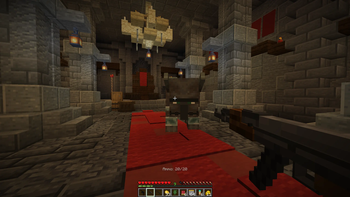
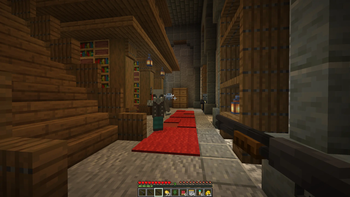
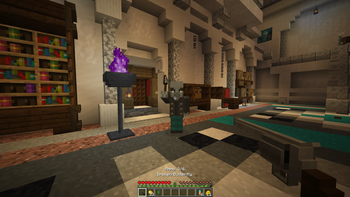
The Castle is a large, procedurally generated dungeon that contains difficult challenges as well as a new currency, pesetas. You can also find various hidden treasures that the Merchant will exchange for pesetas. Every Castle also comes equipped with a Firearms Merchant and Workshop located in the Grand Hall.
Valid biomes the Castle can spawn in:
- Meadow
- Grove
- Stony Peaks
- Snowy Slopes
- Wooded Badlands
The Merchant sells an explorer map that leads to a nearby Castle.
 Mousley
Mousley is a little inventory companion who's eager to accompany you on your journey! She'll eat Cheese out of your inventory which will level up her Love Meter. Every 25% of the meter, she'll grant you an extra half heart and a piece of bonus content (a cosmetic). The health bonus stacks to 2 extra hearts at 100%, although you'll lose the bonus if she's not in your inventory.
Find Mousley by placing a Cheese Block. She'll eventually start eating it, indicated by a quiet nibbling sound. Break the Cheese Block while in this state to find Mousley! Failing to break it in time will result in Mousley running away and the Cheese Block being consumed.
 Cheese
Cheese is a new food item that's used to level up Mousley, but can also be eaten on its own. Acquire Cheese by curdling milk in a Curdling Pot. See the recipe for a Curdling Pot below:

The Curdling Pot is filled by right clicking it with a milk bucket. Right click again with coal once filled to start curdling! The Cheese will then be ready in about 30 seconds.
Cheese can also be crafted into a Cheese Wheel or Cheese Block. Cheese Wheels are better for saturation efficiency, whereas Cheese Blocks are good for long-term storage and for finding Mousley.


 Bonus Content
Bonus content is granted by Mousley, and includes four new cosmetics. Each cosmetic has its own special effect when worn. If you ever lose a cosmetic, it can be re-obtained by purchasing the Gift Box from the Firearms Merchant.

Mouse Ears
+Cheese Potency
Causes a regeneration effect upon eating Cheese or Cheese Wheels.

Red Beret
+Combat Knife Speed
Causes the Combat Knife to have no attack cooldown.

Gas Mask
+20% Firearms Damage
Grants +20% damage to all Firearms (excludes Rocket Launcher).

Cat Ears
+Infinite Ammo
No ammo usage when reloading Firearms.
 Miscellaneous
There are a few other items that don't fall under the other categories.
Green Herbs
Green Herbs are a new healing item that drops from basic hostile mobs (zombies, skeletons, creepers, spiders) as well as mobs in the Castle. They can also rarely drop from fully grown crops. Consume Green Herbs to heal 4 hearts.
First Aid Spray
A more powerful version of a Green Herb. Instantly consumed and fully heals. Crafted as follows:

Combat Knife
A new combat option for close range. Faster than an iron sword but not very durable. Very effective when combined with the Red Beret.

Creative Mode
Any item in the datapack can be obtained by entering /function firearms:give/x into chat.
Here's a few shortcuts:
- /function firearms:give/all_firearms
- /function firearms:give/all_parts
- /function firearms:give/all_upgrades
- /function firearms:give/all_gifts
- /function firearms:give/all_treasures
Credits
catbreadloaf, M1dnightAsh
M1dnightAsh made:
- The entire Castle
- Ornate Necklace
- Elegant Crown
TechnoGhosty, whose Leon S. Kennedy skin is featured in the thumbnail (see here).
Thanks for playing with this datapack!
Available Versions
How to Install Firearms on Your Server
Order Server
Order a Minecraft Java server with at least 3 GB RAM (4 GB recommended).
Set datapack Loader
In the panel under "Egg", select the datapack loader and matching Minecraft version (1.21.11).
Install Mod
Open the mod browser in the dashboard and search for "Firearms". Click "Install" – done! Alternatively, upload the .jar via SFTP to the /mods folder.
Compatibility
Mod Loaders
Minecraft Versions
1.21.11
Server-side
✓ RequiredRecommended RAM
4 GB(min. 3 GB)Frequently Asked Questions
Firearms server crashes on startup – what to do?
Most common cause: wrong datapack version or insufficient RAM. Check the server log (latest.log) for "OutOfMemoryError" or "Mixin" errors. With Mado Hosting: ensure at least 3 GB RAM is allocated and the loader matches the mod version (1.21.11). You can switch loaders with one click in the panel.
Is Firearms compatible with datapack and fabric and forge and neoforge and quilt?
Firearms officially supports datapack, fabric, forge, neoforge, quilt for Minecraft 1.21.11. Note: Forge and Fabric mods are NOT cross-compatible – pick one loader and stick with it. The Mado dashboard automatically detects incompatible loader combinations.
Server lagging with Firearms – how to optimize performance?
Recommended RAM: 4 GB (per 8 players). Use /spark profiler to check if Firearms consumes the most tick time. Common fixes: reduce server view-distance to 8-10, install "performant" or "starlight" as supplementary mods on Forge. With Mado Hosting, your server runs on NVMe SSDs with dedicated CPU cores for minimal latency.
Similar Mods




Rent Modded Server
Install Firearms with just one click on your server.