
Firewall
Filters sent/received packets
Screenshots
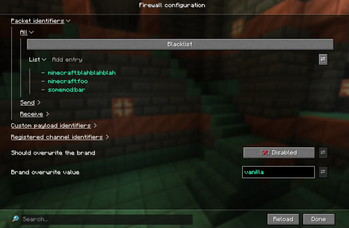

About this Mod
This is a Minecraft Fabric mod that allows you to configure what packets are sent/received.
Installation
- Fabric API (required);
- owo-lib (required);
- Mod Menu (or some other mod to change the mod's config) (very much recommended).
Usage
The mod filters the sent/received packets, by default (default config) it does nothing.
⚠️ Note that since it directly rejects/filters the sent/received packets (as configured), it may break some mods or vanilla systems, especially if you filter the packet identifiers (the first option), changing the other options probably won't break the vanilla game. Configure carefully!
The entire mod is configured through the Mod Menu UI with helpful tooltips; note that each change to the packets (rejecting or filtering them) is logged to the console. Below is a short description of every option currently there:
Packet identifiers
Control which packet identifiers are allowed.
For a list of all of them see the Minecraft Wiki article on Java Edition packets, specifically resouce in the Packet ID field of any packet. Note that you need to prefix the id with minecraft: namespace, for example minecraft:custom_payload.
Custom payload identifiers
Control which custom payload packet (aka plugin message or channel) identifiers are allowed, sent by most of the mod/plugin loaders and some of mods/plugins.
You can select the setting Use from "Registered channel identifiers" option below to also apply the filters from the respective option.
For a list of some of the identifiers see the Minecraft Wiki article on plugin channels, or the respective mod/plugin documentation for the sent packets. Again, like the packet identifiers, don't forget the minecraft: or some other namespace.
The Respond to rejected received query requests should probably be enabled, as to not break the handshaking flow.
Registered channel identifiers
Control which channel identifiers in minecraft:register, minecraft:unregister (used by Bukkit, BungeeCord, Velocity and Fabric API) and c:register packets (used by FabricMC, NeoForged, PaperMC and SpongePowered team) are allowed.
You can select the setting Use from "Custom payload identifiers" option above to also apply the filters from the respective option.
You can deselect the Send/Receive empty channel lists options to not send/receive empty channel lists.
For a list of some of the identifiers, again, see the Minecraft Wiki article on plugin channels.
Identifiers of logged packets
What packets should be logged - regardless of if they're rejected or not. By default none are logged.
Identifiers of logged custom payloads
What custom payloads should be logged - regardless of if they're rejected or not. By default none are logged.
I have a problem/suggestion/translation
Available Versions
How to Install Firewall on Your Server
Order Server
Order a Minecraft Java server with at least 3 GB RAM (4 GB recommended).
Set fabric Loader
In the panel under "Egg", select the fabric loader and matching Minecraft version (1.21.11).
Install Mod
Open the mod browser in the dashboard and search for "Firewall". Click "Install" – done! Alternatively, upload the .jar via SFTP to the /mods folder.
Compatibility
Mod Loaders
Minecraft Versions
1.21.11, 1.21.10, 1.21.9 (+9 more)
Server-side
~ OptionalRecommended RAM
4 GB(min. 3 GB)Frequently Asked Questions
Firewall server crashes on startup – what to do?
Most common cause: wrong fabric version or insufficient RAM. Check the server log (latest.log) for "OutOfMemoryError" or "Mixin" errors. With Mado Hosting: ensure at least 3 GB RAM is allocated and the loader matches the mod version (1.21.11). You can switch loaders with one click in the panel.
Is Firewall compatible with fabric?
Firewall officially supports fabric for Minecraft 1.21.11, 1.21.10, 1.21.9. The Mado dashboard automatically detects incompatible loader combinations.
Server lagging with Firewall – how to optimize performance?
Recommended RAM: 4 GB (per 8 players). Use /spark profiler to check if Firewall consumes the most tick time. Common fixes: reduce server view-distance to 8-10, install "performant" or "starlight" as supplementary mods on Forge. With Mado Hosting, your server runs on NVMe SSDs with dedicated CPU cores for minimal latency.
Similar Mods






Rent Modded Server
Install Firewall with just one click on your server.