
First Gate
It allow player to read the rules, get a starter kit, get protected and others that are set by the owner or admin.
Screenshots
About this Mod
FirstGate
FirstGate is a first-join onboarding plugin for Minecraft servers. It helps server owners guide new players through a clean welcome flow with rules acceptance, starter kits, tutorial spawn, main spawn teleport, temporary new-player protection, player tracking, database storage, and a built-in web panel.
This release is for Paper, Purpur, Spigot, and Bukkit-compatible servers.
Features
First-Join Onboarding
FirstGate detects new players when they join and can guide them through your server before they enter the main world.
- First-join player detection
- Tutorial spawn support
- Main spawn support
- Rules acceptance system
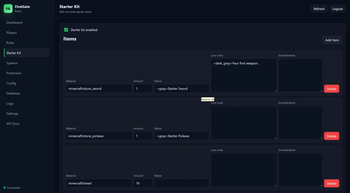
- Starter kit after accepting rules
- Automatic onboarding completion tracking
- Admin reset and completion controls
Rules GUI
FirstGate includes a clean rules system for new players.
/rulescommand- Rules GUI
- Accept rules button
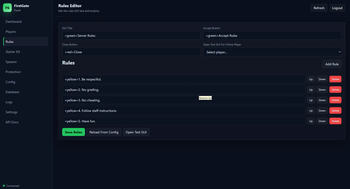
- Configurable rules text
- Tracks who accepted the rules
- Prevents players from taking items from the GUI
Starter Kit
Give new players a configurable starter kit after they accept the rules.
- One-time starter kit delivery
- Configurable item list
- Supports item names and lore
- Prevents duplicate starter kits
- Drops leftover items safely if inventory is full
New Player Protection
Protect new players while they are starting out.
- Temporary protection timer
- Blocks PvP damage
- Blocks mob damage
- Optional fall, fire, and lava protection
- Admin protect/unprotect commands
- Protection state saved through restarts
Built-In Web Panel
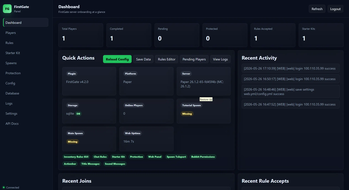
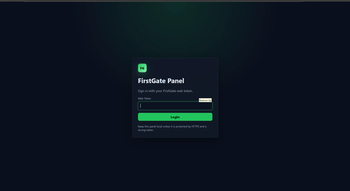
FirstGate includes a browser-based web panel for managing the plugin without using only commands.
Default web panel address:
http://127.0.0.1:8087 or http://0.0.0.0:8087 or http://
Important:
127.0.0.1means the panel is only accessible from the server machine itself.- To access it from another device, change the host in
web.ymlto your server IP or0.0.0.0. - If you use
0.0.0.0, keep your token private and do not expose the panel publicly without protection. - FirstGate generates a secure web token automatically.
- There is no fixed default token.
- Use
/fg web tokento view your current web panel token.
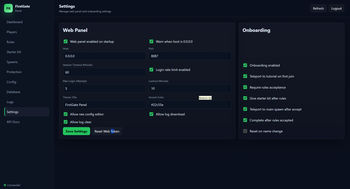
The web panel can manage:
- Dashboard stats
- Player onboarding status
- Rules
- Starter kit
- Tutorial and main spawns
- Protection
- Config
- Database status
- Logs
- Web settings
Commands
Player Commands
| Command | Description |
|---|---|
/rules |
Opens the server rules GUI. |
/rules accept |
Accepts the rules directly. |
/firstgate rules |
Opens the rules GUI using the main command. |
/firstgate accept |
Accepts the rules using the main command. |
/fg rules |
Short version of /firstgate rules. |
/fg accept |
Short version of /firstgate accept. |
Main Admin Commands
| Command | Description |
|---|---|
/fg help |
Shows the FirstGate help menu. |
/fg reload |
Reloads the plugin configuration. |
/fg version |
Shows plugin and server version information. |
/fg settutorial |
Sets the tutorial spawn to your current location. |
/fg setmainspawn |
Sets the main spawn to your current location. |
/fg status <player> |
Shows onboarding status for a player. |
/fg reset <player> |
Resets a player's onboarding progress. |
/fg complete <player> |
Marks a player as fully onboarded. |
/fg sendrules <player> |
Sends or opens the rules for a player. |
Example setup:
/fg settutorial
/fg setmainspawn
/fg reload
---

### Protection Commands

| Command                          | Description                          |
| -------------------------------- | ------------------------------------ |
| `/fg protect <player> <minutes>` | Gives a player temporary protection. |
| `/fg unprotect <player>`         | Removes protection from a player.    |

Examples:

/fg protect Steve 10
/fg unprotect Steve
Protection behavior can be configured in config.yml.
Starter Kit Commands
| Command | Description |
|---|---|
/fg kit give <player> |
Gives the configured starter kit to a player manually. |
Example:
/fg kit give Steve
Starter kits are normally given automatically after a player accepts the rules.

---

### Web Panel Commands

| Command               | Description                              |
| --------------------- | ---------------------------------------- |
| `/fg web status`      | Shows whether the web panel is running.  |
| `/fg web start`       | Starts the web panel.                    |
| `/fg web stop`        | Stops the web panel.                     |
| `/fg web restart`     | Restarts the web panel.                  |
| `/fg web token`       | Shows the current web panel login token. |
| `/fg web reset-token` | Generates a new web panel token.         |
| `/fg web url`         | Shows the current web panel URL.         |

Examples:
/fg web status
/fg web token
/fg web url
Default web panel URL:

http://127.0.0.1:8087
For LAN or remote access, edit web.yml:
web:
  host: "0.0.0.0"
  port: 8087
Then open:
---

### Database Commands

FirstGate uses local database storage by default.

| Command                | Description                                                 |
| ---------------------- | ----------------------------------------------------------- |
| `/fg database status`  | Shows database connection and storage status.               |
| `/fg database migrate` | Migrates old YAML player data to the database if available. |
| `/fg database backup`  | Creates a database backup.                                  |

Examples:
/fg database status
/fg database backup
Default storage:
SQLite
No external database is required for normal use.

---

## Permissions

| Permission                   | Description                                              |
| ---------------------------- | -------------------------------------------------------- |
| `firstgate.admin`            | Gives access to all FirstGate admin features.            |
| `firstgate.reload`           | Allows reloading the plugin.                             |
| `firstgate.setup`            | Allows setting tutorial and main spawn.                  |
| `firstgate.status`           | Allows checking player onboarding status.                |
| `firstgate.reset`            | Allows resetting or completing player onboarding.        |
| `firstgate.protect`          | Allows protect and unprotect commands.                   |
| `firstgate.rules`            | Allows using `/rules`.                                   |
| `firstgate.bypass`           | Allows bypassing onboarding.                             |
| `firstgate.notify`           | Receives admin warnings and notices.                     |
| `firstgate.web`              | Allows web panel management commands.                    |
| `firstgate.web.token`        | Allows viewing or resetting the web token.               |
| `firstgate.web.start`        | Allows starting, stopping, and restarting the web panel. |
| `firstgate.database`         | Allows viewing database status.                          |
| `firstgate.database.migrate` | Allows database migration.                               |
| `firstgate.database.backup`  | Allows database backup.                                  |
| `firstgate.kit.give`         | Allows manually giving starter kits.                     |

Most admin permissions default to operators. Normal players can use `/rules`.

---

## Installation

1. Download the Bukkit/Paper jar.
2. Put the jar into your server’s `plugins` folder.
3. Restart the server.
4. Set the tutorial spawn:
/fg settutorial
5. Set the main spawn:
/fg setmainspawn
6. View the web panel token:
/fg web token
7. Open the web panel:
8.
http://127.0.0.1:8087
- Edit
config.ymlandweb.ymlif needed. - Reload the plugin:
/fg reload
---

## Supported Platforms

This release supports:

* Paper
* Purpur
* Spigot
* Bukkit-compatible servers

Paper or Purpur is recommended for the best experience.

---

## Java Requirement

FirstGate requires:

Java 21+
The plugin is designed for modern Minecraft server environments running Java 21 or newer.
Notes
Fabric, Forge, and NeoForge builds are not included in this release unless they are fully tested. This Bukkit release is the recommended production version.
FirstGate does not use telemetry and does not require an external database by default.
**Short Modrinth summary:**

First-join onboarding, rules GUI, starter kits, new-player protection, database storage, and a built-in web panel for Paper/Purpur/Spigot/Bukkit servers.
Available Versions
How to Install First Gate on Your Server
Order Server
Order a Minecraft Java server with at least 3 GB RAM (4 GB recommended).
Set bukkit Loader
In the panel under "Egg", select the bukkit loader and matching Minecraft version (26.1.2).
Install Mod
Open the mod browser in the dashboard and search for "First Gate". Click "Install" – done! Alternatively, upload the .jar via SFTP to the /mods folder.
Compatibility
Mod Loaders
Minecraft Versions
26.1.2, 26.1.1, 26.1 (+12 more)
Server-side
✗ UnsupportedRecommended RAM
4 GB(min. 3 GB)Frequently Asked Questions
First Gate server crashes on startup – what to do?
Most common cause: wrong bukkit version or insufficient RAM. Check the server log (latest.log) for "OutOfMemoryError" or "Mixin" errors. With Mado Hosting: ensure at least 3 GB RAM is allocated and the loader matches the mod version (26.1.2). You can switch loaders with one click in the panel.
Is First Gate compatible with bukkit and fabric and folia and forge and neoforge and paper and spigot?
First Gate officially supports bukkit, fabric, folia, forge, neoforge, paper, spigot for Minecraft 26.1.2, 26.1.1, 26.1. Note: Forge and Fabric mods are NOT cross-compatible – pick one loader and stick with it. The Mado dashboard automatically detects incompatible loader combinations.
Server lagging with First Gate – how to optimize performance?
Recommended RAM: 4 GB (per 8 players). Use /spark profiler to check if First Gate consumes the most tick time. Common fixes: reduce server view-distance to 8-10, install "performant" or "starlight" as supplementary mods on Forge. With Mado Hosting, your server runs on NVMe SSDs with dedicated CPU cores for minimal latency.
Similar Mods



Rent Modded Server
Install First Gate with just one click on your server.