
Flashlight
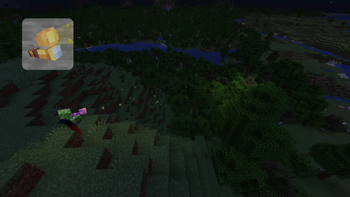
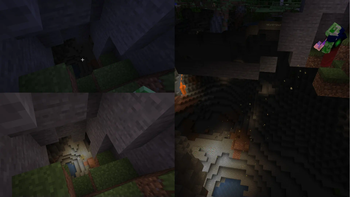
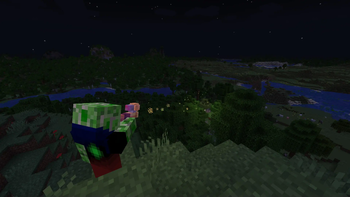
Adds a new Utility Item! The Flashlight!
Screenshots
About this Mod
Flashlight By CreepermeYT
A native datapack and resource-pack (packaged as a mod by modrinth) that will add a Flashlight to your world!
The datapack/mod works server-side: Install it once, works for everyone on the server!
Due to Minecraft Datapack Limitations in 1.20.1,
some features are not the same in 1.21.4 and 1.20.1
These will be marked [1.21.4 only] & [1.20.1 only]
Features
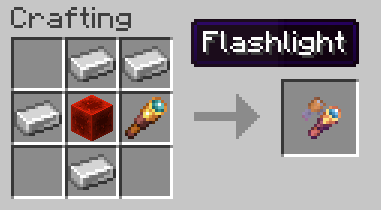
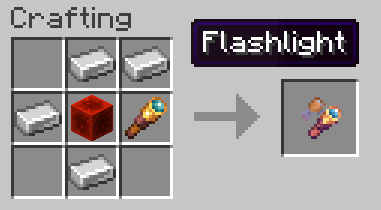
- Flashlight crafting recipe:
made of 4 iron, 1 redstone block, 1 spyglass,
the Crafting Recipe will give a knowledge book instead: [1.20.1 only]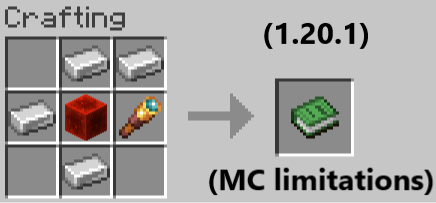
- Flashlight item (When held in the mainhand):
- Turns 'on' or 'off' by right clicking
- Summons particles to show the light path while 'on'
- Works as a spyglass accessory: you can use it to zoom as well
- Adapts its focus/width depending on how far you aim it at
- Decreases its durability while 'on' and breaks in 5 minutes [1.21.4 only]
- Decreases its durability at a random moment depending on its focus distance: [1.20.1 only]
[1.20.1 only]
| Focus Distance | 75% of flashlights will last | 50% of flashlights will last | 25% of flashlights will last |
|---|---|---|---|
| <50 blocks | 3.1 mins | 7.5 mins | 15 mins |
| >50 blocks | 2.1 mins | 5 mins | 10 mins |
Flashlight custom model (not included in datapack UNLESS resource pack is installed)
Changes texture depending on state: 'on' or 'off'

Embedded: the dynamic lights datapack: Dynamic Lights By CreepermeYT, which adds dynamic lights. The Flashlight requires it to work. [1.21.4 only]
Installation
Two options:
- Install as mod:
- The mod (.jar) should be installed on the /mods/ folder to work.
- You're good to go :]
- Install as datapack + resource pack:
- The resource pack (.zip) should be installed on the /resourcepacks/ folder to work.
- The datapack (.zip) should be installed on the /saves/
/datapacks/ folder to work. - resource pack (.zip) and datapack (.zip) are the same .zip file available for download in versions
Limitations
- Performance: placing and removing over 100 light blocks when you move the flashlight is inevitably demanding on the server.
- Distance limit: the flashlight has a maximum distance of 100 blocks.
Available Versions
How to Install Flashlight on Your Server
Order Server
Order a Minecraft Java server with at least 3 GB RAM (4 GB recommended).
Set datapack Loader
In the panel under "Egg", select the datapack loader and matching Minecraft version (1.21.4).
Install Mod
Open the mod browser in the dashboard and search for "Flashlight". Click "Install" – done! Alternatively, upload the .jar via SFTP to the /mods folder.
Compatibility
Mod Loaders
Minecraft Versions
1.21.4, 1.20.1
Server-side
✓ RequiredRecommended RAM
4 GB(min. 3 GB)Frequently Asked Questions
Flashlight server crashes on startup – what to do?
Most common cause: wrong datapack version or insufficient RAM. Check the server log (latest.log) for "OutOfMemoryError" or "Mixin" errors. With Mado Hosting: ensure at least 3 GB RAM is allocated and the loader matches the mod version (1.21.4). You can switch loaders with one click in the panel.
Is Flashlight compatible with datapack and fabric and forge and neoforge and quilt?
Flashlight officially supports datapack, fabric, forge, neoforge, quilt for Minecraft 1.21.4, 1.20.1. Note: Forge and Fabric mods are NOT cross-compatible – pick one loader and stick with it. The Mado dashboard automatically detects incompatible loader combinations.
Server lagging with Flashlight – how to optimize performance?
Recommended RAM: 4 GB (per 8 players). Use /spark profiler to check if Flashlight consumes the most tick time. Common fixes: reduce server view-distance to 8-10, install "performant" or "starlight" as supplementary mods on Forge. With Mado Hosting, your server runs on NVMe SSDs with dedicated CPU cores for minimal latency.
Similar Mods




Rent Modded Server
Install Flashlight with just one click on your server.