
Flat Dimensions
Datapack that caps the world terrain at sea-level for the Overworld, Nether, and End.
Screenshots
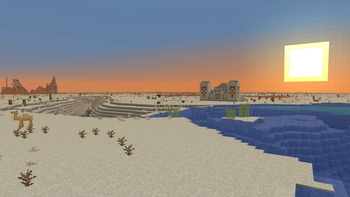
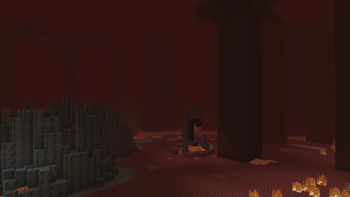
About this Mod
Flat Dimensions
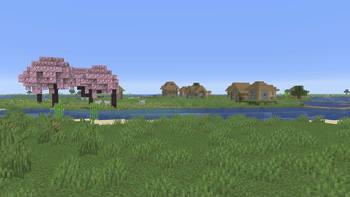
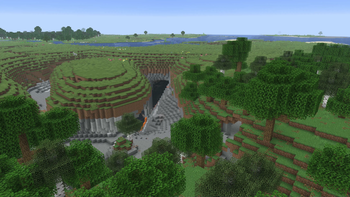
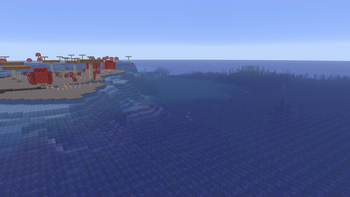
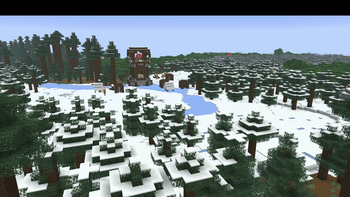
This is a datapack that overrides the default world generation to cap the terrain at sea-level for the Overworld, Nether, and End, so its kind of like having the "Overworld" Superflat preset applied to all dimensions, with all biomes and structures. Except it also has caves, oceans, rivers, and ponds.
"Aw I wish it was just like the 'Overworld' Superflat Preset, where it doesn't have caves..."
Check out my No Caves pack! It now has support for this pack, meaning you can have a caveless overworld and nether for a true superflat experience!
Please note when using this, just add the datapack on the world creation screen and create a world like normal. You should not to use the Superflat Preset.
Why does it replace the default overworld, and why can't it use a preset?
Datapacks allow creators to edit many things in Minecraft, but some things are hardcoded, meaning they require a mod to change. Datapacks do allow for custom superflat presets, but unfortunately they only allow for single-biome worlds. Datapacks also allow for custom world presets, but unfortunately, any changes outside of the terrain must be done globally, meaning anytime I need to change the structure or feature generation to get it to fit, it would change it for all presets. If I made a preset and someone was using the mod version of this pack, then they could easily be unknowingly altering vanilla worldgen!Superflat Version
If you wish it was more like the Classic Superflat with 4 blocks of terrain...
Checkout Superflat Dimensions
Compatibility Notes:
This pack should work with biome mods (although there may be some weirdness, depending on how the mod was made).
If you've never used terrain mods together, you should know that they generally override each other. The same case is for this mod.
Generation Notes:
Pre-1.21
- Nether Fossils will spawn below lava in the Nether, for technical reasons, a solution to this wasn't available until 1.21.
Available Versions
How to Install Flat Dimensions on Your Server
Order Server
Order a Minecraft Java server with at least 4 GB RAM (6 GB recommended).
Set datapack Loader
In the panel under "Egg", select the datapack loader and matching Minecraft version (1.21.10).
Install Mod
Open the mod browser in the dashboard and search for "Flat Dimensions". Click "Install" – done! Alternatively, upload the .jar via SFTP to the /mods folder.
Compatibility
Mod Loaders
Minecraft Versions
1.21.10, 1.21.9, 1.21.8 (+15 more)
Server-side
✓ RequiredRecommended RAM
6 GB(min. 4 GB)Frequently Asked Questions
Flat Dimensions server crashes on startup – what to do?
Most common cause: wrong datapack version or insufficient RAM. Check the server log (latest.log) for "OutOfMemoryError" or "Mixin" errors. With Mado Hosting: ensure at least 4 GB RAM is allocated and the loader matches the mod version (1.21.10). You can switch loaders with one click in the panel.
Is Flat Dimensions compatible with datapack and fabric and forge and neoforge and quilt?
Flat Dimensions officially supports datapack, fabric, forge, neoforge, quilt for Minecraft 1.21.10, 1.21.9, 1.21.8. Note: Forge and Fabric mods are NOT cross-compatible – pick one loader and stick with it. The Mado dashboard automatically detects incompatible loader combinations.
Server lagging with Flat Dimensions – how to optimize performance?
Recommended RAM: 6 GB (per 5 players). Use /spark profiler to check if Flat Dimensions consumes the most tick time. Common fixes: reduce server view-distance to 8-10, install "performant" or "starlight" as supplementary mods on Forge. With Mado Hosting, your server runs on NVMe SSDs with dedicated CPU cores for minimal latency.
Similar Mods





Rent Modded Server
Install Flat Dimensions with just one click on your server.