
FloodWorld
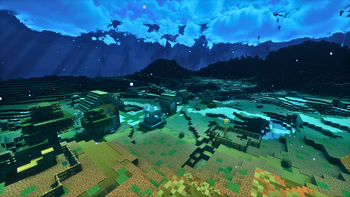
Replaces all air with water during chunk generation.
Screenshots
About this Mod


Features
FloodWorld is a Fabric mod that replaces all air with water during chunk generation.
- Water is by default placed directly during chunk generation, and only then. Air created after a chunk is generated is preserved even if the chunk is reloaded.
- Fully configurable (ModMenu + Cloth Config)
- Cave flooding by default
- Server compatible, Works on multiplayer servers. Clients do not need the mod installed.
Configuration
Requires ModMenu and Cloth Config for in-game configuration
Replace Air - Fills regular air blocks with water
Replace Cave Air -Fills cave air blocks with water
Max Water Height - The Y level below which air becomes water
Native Flooding - Places water during generation (fast) vs post-processing tick queue (compatible)
Dependencies
Required:
- Fabric Loader
- Fabric API
Optional (for config screen):
- ModMenu
- Cloth Config

Minecraft 1.21.x (Fabric)
Should work on fabric multiplayer servers,
server-side only, no client installation required

Settings only apply to newly generated chunks. Existing chunks will not be retroactively flooded or un-flooded.
On first world creation there may be a brief loading screen delay while Minecraft locates a valid spawn point above the waterline.
Changing the Native Flooding setting requires a world restart to take effect on new chunks.
RyzenUp — MIT Licensed
Available Versions
How to Install FloodWorld on Your Server
Order Server
Order a Minecraft Java server with at least 4 GB RAM (6 GB recommended).
Set fabric Loader
In the panel under "Egg", select the fabric loader and matching Minecraft version (1.21.11).
Install Mod
Open the mod browser in the dashboard and search for "FloodWorld". Click "Install" – done! Alternatively, upload the .jar via SFTP to the /mods folder.
Compatibility
Mod Loaders
Minecraft Versions
1.21.11, 1.21.10, 1.21.9 (+9 more)
Server-side
✓ RequiredRecommended RAM
6 GB(min. 4 GB)Frequently Asked Questions
FloodWorld server crashes on startup – what to do?
Most common cause: wrong fabric version or insufficient RAM. Check the server log (latest.log) for "OutOfMemoryError" or "Mixin" errors. With Mado Hosting: ensure at least 4 GB RAM is allocated and the loader matches the mod version (1.21.11). You can switch loaders with one click in the panel.
Is FloodWorld compatible with fabric?
FloodWorld officially supports fabric for Minecraft 1.21.11, 1.21.10, 1.21.9. The Mado dashboard automatically detects incompatible loader combinations.
Server lagging with FloodWorld – how to optimize performance?
Recommended RAM: 6 GB (per 5 players). Use /spark profiler to check if FloodWorld consumes the most tick time. Common fixes: reduce server view-distance to 8-10, install "performant" or "starlight" as supplementary mods on Forge. With Mado Hosting, your server runs on NVMe SSDs with dedicated CPU cores for minimal latency.
Similar Mods




Rent Modded Server
Install FloodWorld with just one click on your server.