
Food Additions
Makes some Vanilla items edible (Glistering Melon +6) and adds 11 new foods (ex. Boiled Eggs, Cooked Carrot and Tropical Fish). Some features are configurable
Screenshots
About this Mod
About
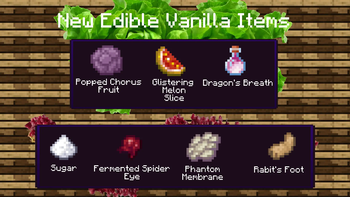
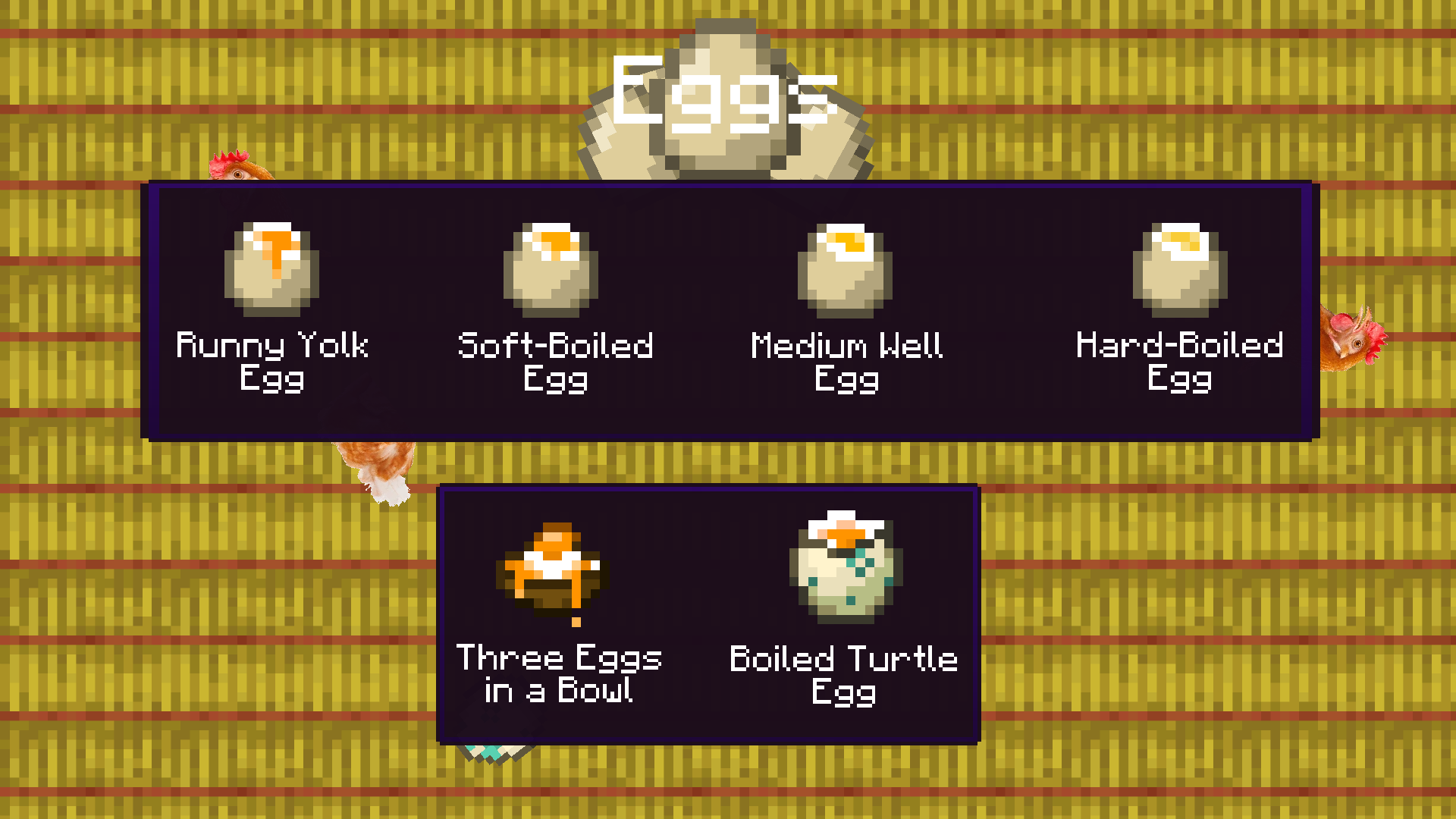
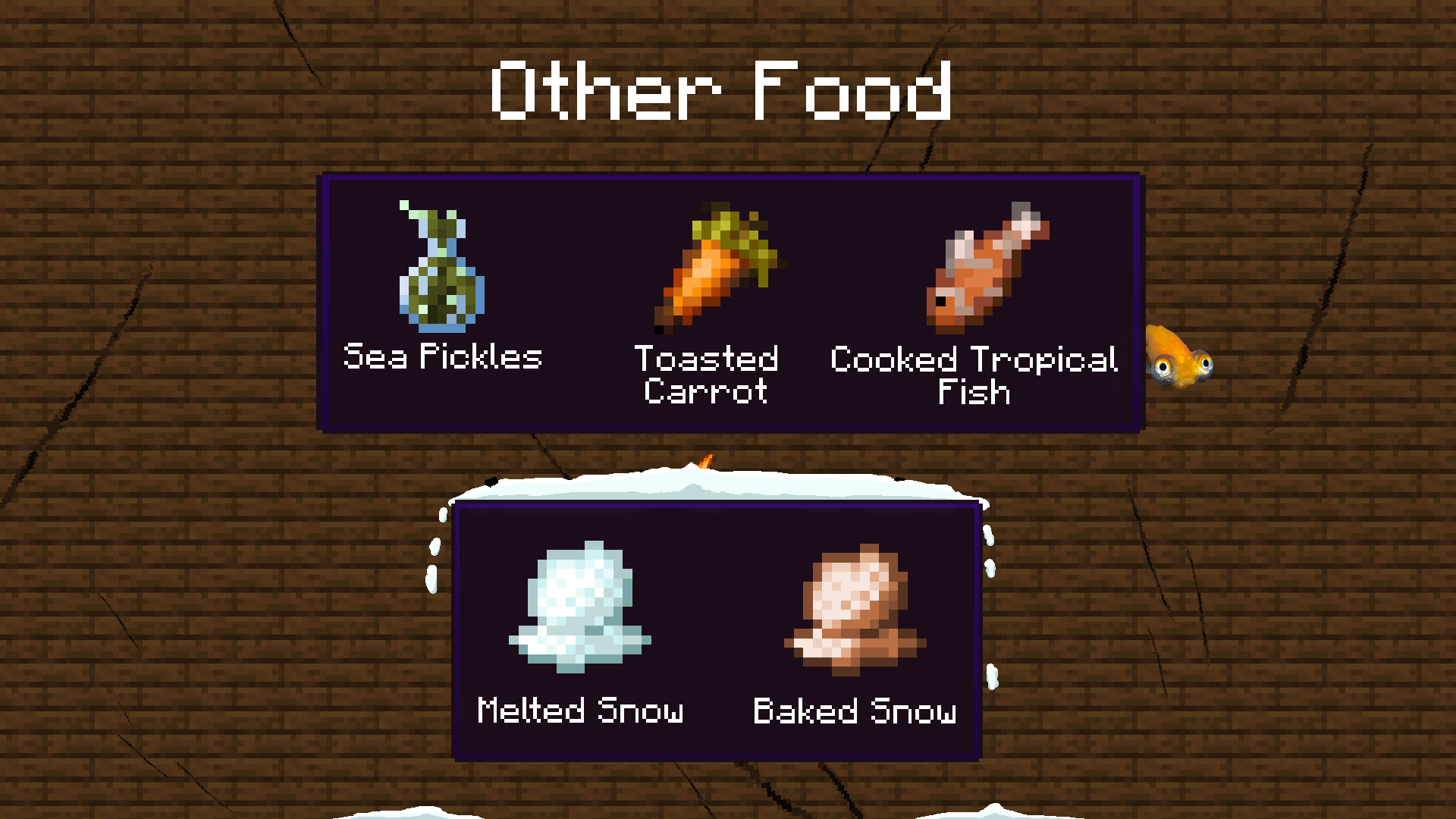
Food Additions makes 7 vanilla items edible and adds 11 new foods that are obtainable through smelting or crafting regular vanilla items (Egg, Sea Pickle, Carrot, etc.). Some items do something upon eating, they have special effects or can give you something. Also adds recipes to get rid of poison from Poisonous Potatoes using Milk and Honey Bottle.
Versions for 1.20.1 and higher have additional feature: adds new edible items to the Foods and Drinks tab.
🍉 Items
Vanilla items:
| Name | Nutrition | Saturation | Custom Effect |
|---|---|---|---|
| Glistering Melon Slice | 5 | 7.4 | Heals 1 HP upon eating (also edible if player has full hungerbar) |
| Fermented Spider Eye | 4 | 3.8 | |
| Dragon's Breath | 8 | 8.4 | Gives effect Invincibility for 10s |
| Sugar | 1 | 0.4 | |
| Rabbit's Foot | 2 | 0.8 | Can be fed to animals that can eat meat (cats, dogs...) |
| Phantom Membrane | 3 | 1.8 | Can be fed to animals that can eat meat (cats, dogs...) |
| Popped Chorus Fruit | 6 | 5.2 | Doesn't teleport you after eating it |
New items:
| Name | Nutrition | Saturation | Custom Effect / Note |
|---|---|---|---|
| Toasted (Cooked) Carrot | 6 | 10.2 | |
| Cooked Tropical Fish | 5 | 4.8 | Can be fed to animals that can eat meat (cats, dogs...) |
| Sea Pickles | 5 | 3.2 | |
| Melted Snow | 1 | 0.1 | Obtained through smelting Snow in the Furnace |
| Baked Snow | 2 | 1.4 | Obtained through smelting Snow in the Smoker or through Campfire cooking |
| Runny Yolk Egg | 4 | 2.4 | If config is true -> player has a 25% chance to get 1 - 4 Bonemeal |
| Soft-Boiled Egg | 6 | 3.6 | Same as Runny Yolk Egg |
| Medium Well Egg | 7 | 5.2 | Same as Runny Yolk Egg |
| Hard-Boiled Egg | 9 | 8.2 | Same as Runny Yolk Egg |
| Three Eggs in a Bowl | 12 | 9.6 | If config is true -> player has a 25% chance to get 3 - 12 Bonemeal |
| Boiled Turtle Egg | 8 | 5.6 | Same as Runny Yolk Egg |
『』Commands
/hungerbar - modyfies nutrition (meats) and saturation (highlighted meats when you have Apple Skin installed)
Detailed description:
/hungerbar (nutrition || saturation || both) (add || set) <target> <value(s)>
- nutrition -> food level („meats“ you see above XP bar)
- saturation -> food saturation level - determines how fast food level depletes, can’t be seen without AppleSkin mod
- both -> adds/sets both values
- ex. /hungerbar both set @p 5 10 -> 1st value: nutrition
2nd value: saturation
- while using this command, you can set target’s hunger values above 20 (maximum food (saturation) level) (PS: when rejoining the world, values reset to maximum (if higher than 20))
꩜ Effects
Invincibility: you can't take any damage and mobs don't attack you
❓How it works
When you hold vanilla item in your main or off hand it changes the item to another one that looks the same as the vanilla one and is edible. When you switch to different slot it changes it back to vanilla one.
⇄ Compatibility
Apple Skin: incompatible - You CAN'T see nutrition/saturation stats of edited vanilla items in GUI, but you CAN see highlighted "meats" when holding the item (edited vanilla)
Placeable Items: I added button (default NUM 9) that makes new edible items unedible. When they are unedible you can place items. When pressed again it switches back to edible mode.
Recipes of any kind (modded or vanilla): When you can't craft something with the new edible item just place it in your inventory and wait for 1s (wait time depends on game's load).
📜 Config
Currently there are 4 features that you can configure in this mod. You can see them in the list below:
| Name | Default value (boolean) | Note |
|---|---|---|
| Eating new edible vanilla items | true | |
| Hungerbar command functionality | true | |
| Get Bonemeal upon eating boiled Eggs | false | |
| Replace edible items (ex. food_additions:sugar) with vanilla (ex. minecraft:sugar) | true | Don't turn off this option if you don't know what are you doing (may result in compatibility issues) |
🐛 Bugs and Issues
If you find some please contact me on Discord: whiterm OR through CurseForge
FA-0
When edited vanilla item is held in main-hand and taken from that slot straight into container (chest/crafting table...) the item is still edible and can't be used in crafting recipes or other possible interactions.
Possible solutions:
For you: place the item into your inventory (not hotbar - could also work but inventory is better)
For me (didn't came up with anything better): check every single container for this item and converting it back -> may cause performance issues
FA-1
If /hungerbar is executed from command block it doesn't display the info message in chat (info message = how many nutrition points has been added to the player)
Possible solutions:
¯\_(ツ)_/¯
Planned Features
- Add option to turn on/off crafting custom items like Boiled Eggs in config.
- Maybe I'll add some new Alex's Mobs meats.
You CAN'T copy this project and say that YOU created it!!! If you want to use any assets or use some core features please contact me. I'll be glad if you will use this mod in modpacks, but don't forget to leave some credits.
My other useful projects:
Texture packs: Clear Lava and Water: https://www.curseforge.com/minecraft/texture-packs/clear-water-and-lava
Mr. Totem (Antimated Totem of Undying): https://www.curseforge.com/minecraft/texture-packs/mr-totem
Mods: Shatr (Adds a lots of funny things, 1.16.5): https://www.curseforge.com/minecraft/mc-mods/shatr
Available Versions
How to Install Food Additions on Your Server
Order Server
Order a Minecraft Java server with at least 3 GB RAM (4 GB recommended).
Set forge Loader
In the panel under "Egg", select the forge loader and matching Minecraft version (1.20.1).
Install Mod
Open the mod browser in the dashboard and search for "Food Additions". Click "Install" – done! Alternatively, upload the .jar via SFTP to the /mods folder.
Compatibility
Mod Loaders
Minecraft Versions
1.20.1, 1.18.2
Server-side
✓ RequiredRecommended RAM
4 GB(min. 3 GB)Frequently Asked Questions
Food Additions server crashes on startup – what to do?
Most common cause: wrong forge version or insufficient RAM. Check the server log (latest.log) for "OutOfMemoryError" or "Mixin" errors. With Mado Hosting: ensure at least 3 GB RAM is allocated and the loader matches the mod version (1.20.1). You can switch loaders with one click in the panel.
Is Food Additions compatible with forge?
Food Additions officially supports forge for Minecraft 1.20.1, 1.18.2. The Mado dashboard automatically detects incompatible loader combinations.
Server lagging with Food Additions – how to optimize performance?
Recommended RAM: 4 GB (per 8 players). Use /spark profiler to check if Food Additions consumes the most tick time. Common fixes: reduce server view-distance to 8-10, install "performant" or "starlight" as supplementary mods on Forge. With Mado Hosting, your server runs on NVMe SSDs with dedicated CPU cores for minimal latency.
Rent Modded Server
Install Food Additions with just one click on your server.