
FoodBundler
Mod that allows user to compress food and seed items. So far, datapack compatibility and 1.21.5.
Screenshots
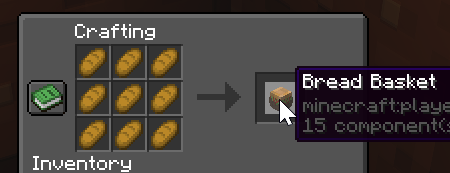

About this Mod

History
FoodBundler was inspired by efeketket's Stackraft. I wanted to change a few things, and of course, bring it up to date with 1.21.5. I was also looking for a good place to sink my teeth into this whole datapack thing, so off I went. This is the result. My first datapack (so be gentle), and basically a complete rewrite of the original. In the spirit of the good will of modding and all that, I've maintained the original license in this datapack as well.
Description
So what does it do? It allows you to compress most food related items into a 9:1 stackable block. Think, basically, exactly like a hay bale, but for all the remaining food items as well. Removed from the original are the non-food items, like gunpowder, that Stackraft gave recipes for as well. I wanted to stick to food items, so those have been removed. I've also added some that were notably missing from the original as well, and included most seeds too.
Instructions
- Getting a full stack of the compress-able items will give you an advancement and the recipe.
- Uncompress an item by holding it in your hand and right click (use) to pop the uncompressed items into your inventory
Support
Thanks so much to NiceRon and the crew at the Explorer's Eden for kindly allowing me to use their Discord as a place to park my butt and provide chat support for this datapack. They've been incredibly helpful and patient as I learn how this stuff all works and providing mentoring!
Credits
Inspiration from efeketket's Stackraft
Logo generated by Text Studio Font Generator
Available Versions
How to Install FoodBundler on Your Server
Order Server
Order a Minecraft Java server with at least 3 GB RAM (4 GB recommended).
Set datapack Loader
In the panel under "Egg", select the datapack loader and matching Minecraft version (1.21.8).
Install Mod
Open the mod browser in the dashboard and search for "FoodBundler". Click "Install" – done! Alternatively, upload the .jar via SFTP to the /mods folder.
Compatibility
Mod Loaders
Minecraft Versions
1.21.8, 1.21.7, 1.21.6 (+1 more)
Server-side
✓ RequiredRecommended RAM
4 GB(min. 3 GB)Frequently Asked Questions
FoodBundler server crashes on startup – what to do?
Most common cause: wrong datapack version or insufficient RAM. Check the server log (latest.log) for "OutOfMemoryError" or "Mixin" errors. With Mado Hosting: ensure at least 3 GB RAM is allocated and the loader matches the mod version (1.21.8). You can switch loaders with one click in the panel.
Is FoodBundler compatible with datapack and fabric and forge and neoforge and quilt?
FoodBundler officially supports datapack, fabric, forge, neoforge, quilt for Minecraft 1.21.8, 1.21.7, 1.21.6. Note: Forge and Fabric mods are NOT cross-compatible – pick one loader and stick with it. The Mado dashboard automatically detects incompatible loader combinations.
Server lagging with FoodBundler – how to optimize performance?
Recommended RAM: 4 GB (per 8 players). Use /spark profiler to check if FoodBundler consumes the most tick time. Common fixes: reduce server view-distance to 8-10, install "performant" or "starlight" as supplementary mods on Forge. With Mado Hosting, your server runs on NVMe SSDs with dedicated CPU cores for minimal latency.
Similar Mods



Rent Modded Server
Install FoodBundler with just one click on your server.