
Foods+
A Mod Expanding The Food Category, Adding Meals, Treats, Ect.
Screenshots

About this Mod
IMPORTANT NOTE:
Cancelled
This project was cancelled due to file being accidentally deleted, the current downloadable files on this page will stay here though.
Remaster
I will be remastering this mod eventually, adding way more items, foods, guis, and possibly cross-mod compatibilty with other mods :3
Description
Main
The main subject of this mod is too expand the food category, adding full meals, treats and more. With fun new ways to make food, you'll be having an entire salad on your trip across the world!
This mod is just a simple yet effective mod that adds simple mechanics, items, and blocks that change the way you see the edible items side of minecraft. My idea of this mod is that it will bring your favorite snacks and treats into a whole other world! giving certain effects depending on what your eating, give more ways to create food, and so much more! You should honestly at least give it a try. I put a lot of work into it, and don't want that to go to someone who's just going to ignore it. And if you don't like anything in it, give feedback! I'd love to hear your thoughts.
Foods & Drinks
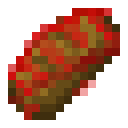
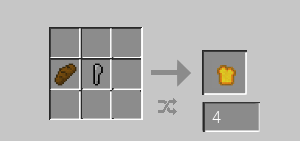
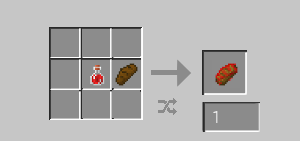
Jelly Bread:
Jelly Bread is made from putting a Jelly bottle and Bread in a crafting table. Jelly bread gives you 3 1/2 hearts and has a saturation of 0.25!
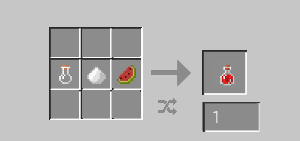
Jelly Bottle:
A Jelly bottle is made from putting either a piece of watermelon, an apple, or apple pie in a crafting table with sugar and a bottle. A Jelly bottle gives you 2 1/2 hearts and has a saturation of 0.3!
Blocks/Specials
Blender:
No Detail Image Provided.
A Blender is a small block that looks, well like a blender but blocky. To work it you must place 1 or more items in the 3 top item slots and a bottle in the bottom 4th, Then once you click blend, it should fill the glass with a drink (smoothie, slushi, ect.) depending on what you put in there, There is only 1 recipe for it so far, but I'm planning to make it very customizable in the future
No Recipe Image Provided
The Rest Are Either Secretive Or Not Finished...
Available Versions
How to Install Foods+ on Your Server
Order Server
Order a Minecraft Java server with at least 3 GB RAM (4 GB recommended).
Set forge Loader
In the panel under "Egg", select the forge loader and matching Minecraft version (1.20.1).
Install Mod
Open the mod browser in the dashboard and search for "Foods+". Click "Install" – done! Alternatively, upload the .jar via SFTP to the /mods folder.
Compatibility
Mod Loaders
Minecraft Versions
1.20.1
Server-side
✓ RequiredRecommended RAM
4 GB(min. 3 GB)Frequently Asked Questions
Foods+ server crashes on startup – what to do?
Most common cause: wrong forge version or insufficient RAM. Check the server log (latest.log) for "OutOfMemoryError" or "Mixin" errors. With Mado Hosting: ensure at least 3 GB RAM is allocated and the loader matches the mod version (1.20.1). You can switch loaders with one click in the panel.
Is Foods+ compatible with forge?
Foods+ officially supports forge for Minecraft 1.20.1. The Mado dashboard automatically detects incompatible loader combinations.
Server lagging with Foods+ – how to optimize performance?
Recommended RAM: 4 GB (per 8 players). Use /spark profiler to check if Foods+ consumes the most tick time. Common fixes: reduce server view-distance to 8-10, install "performant" or "starlight" as supplementary mods on Forge. With Mado Hosting, your server runs on NVMe SSDs with dedicated CPU cores for minimal latency.
Similar Mods




![[TaCZ] Timeless and Classics Zero](https://cdn.modrinth.com/data/SzzJttH8/fd27766d2bb8390d284696b1dbd358f87e081439_96.webp)

Rent Modded Server
Install Foods+ with just one click on your server.