
Food Spoiling
Checks for food items in any configurable inventory and increases the spoilage over time until they are considered rotten
Screenshots
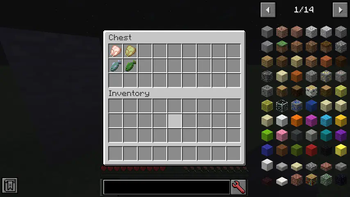
About this Mod
Food Spoiling
Spoiled for choice!
A simple mod that checks for food items in any configurable inventory and increases the spoilage over time until they are considered rotten. Foul play!
Technical details
- Whenever a player first views an item, it gets a creation time applied to it. After that, the creation time is only compared to the current world time periodically. This way, it's as performance-friendly as it can get because nothing is ticked continuously and most rot indication is client-sided.
- If spoilage is paused via preserving containers or players logging off on multiplayer servers, a remaining lifetime value is applied to the item which gets calculated into a new creation time once spoilage is allowed to resume.
- Two or more stacks of food with different spoilage values can be combined in the crafting grid akin to damaged tools for convenience, applying the highest spoilage of all items to the combined stack.
Configuration
The mod is highly configurable. The default config file looks like this:
##########################################################################################################
# general
#--------------------------------------------------------------------------------------------------------#
# General settings for the Food Spoiling mod
##########################################################################################################

general {
	# How often player food items are evaluated in ticks
	# Increase this value to allow for easier stacking
	I:"Check Interval"=100

	# Length of each day in ticks
	I:"Day Length"=24000

	# Prints the class name of any container upon opening
	B:"Debug Container Class Printing"=false
}

##########################################################################################################
# rotting
#--------------------------------------------------------------------------------------------------------#
# Settings for rotting food items
##########################################################################################################

rotting {
	# Include dropped items in rot calculations
	B:"Affect Item Entities"=true

	# Special conditions for containers to rot food in
	# Format: 'container_class,lifetime_factor'
	# The higher the lifetime factor, the slower the food will rot
	# Use a negative lifetime factor to prevent food from rotting
	S:"Container Conditions" <
		net.minecraft.inventory.ContainerChest,1.2
		com.mrcrayfish.furniture.gui.containers.ContainerEski,1.8
		com.mrcrayfish.furniture.gui.containers.ContainerFridge,1.8
		net.blay09.mods.cookingforblockheads.container.ContainerFridge,1.8
		sweetmagic.init.tile.container.ContainerFreezer,1.8
		noppes.npcs.containers.ContainerNPCTrader,-1
		noppes.npcs.containers.ContainerNPCTraderSetup,-1
	 >

	# Food items with unique rotting behavior
	# Format: 'modid:food_item[:meta],modid:rotten_item[:rotten_meta],days' |OR| 'modid:food_item[:meta],-1' for explicit tooltip to state "Does not rot"
	# Instead of 'modid', 'ore' can be used as a namespace for ore dictionary names
	# Any item added here will be given a tooltip that says "Good for % days" when unspoiled
	S:"Days To Rot" <
		minecraft:apple,minecraft:air,5
		minecraft:baked_potato,minecraft:poisonous_potato,5
		minecraft:beef,minecraft:rotten_flesh,3
		minecraft:beetroot,minecraft:air,10
		minecraft:beetroot_soup,minecraft:bowl,4
		minecraft:bread,minecraft:air,7
		minecraft:cake,minecraft:air,3
		minecraft:carrot,minecraft:air,10
		minecraft:chicken,minecraft:rotten_flesh,3
		minecraft:cooked_beef,minecraft:rotten_flesh,4
		minecraft:cooked_chicken,minecraft:rotten_flesh,4
		minecraft:cooked_fish,minecraft:rotten_flesh,4
		minecraft:cooked_mutton,minecraft:rotten_flesh,4
		minecraft:cooked_porkchop,minecraft:rotten_flesh,4
		minecraft:cooked_rabbit,minecraft:rotten_flesh,4
		minecraft:cookie,minecraft:air,5
		minecraft:fish,minecraft:rotten_flesh,3
		minecraft:golden_apple,-1
		minecraft:golden_carrot,-1
		minecraft:melon,minecraft:air,3
		minecraft:mushroom_stew,minecraft:bowl,3
		minecraft:mutton,minecraft:rotten_flesh,3
		minecraft:poisonous_potato,-1
		minecraft:porkchop,minecraft:rotten_flesh,3
		minecraft:potato,minecraft:poisonous_potato,10
		minecraft:pumpkin_pie,minecraft:air,4
		minecraft:rabbit,minecraft:rotten_flesh,3
		minecraft:rabbit_stew,minecraft:bowl,4
		minecraft:rotten_flesh,-1
		minecraft:spider_eye,-1
	 >

	# Allows all items that extend from ItemFood.class to rot when not specified in 'Days To Rot'
	B:"Default Food Rotting"=true

	# Specified days for all items that extend from ItemFood.class to rot when not specified in 'Days To Rot'
	# Requires 'Default Food Rotting' to be enabled
	I:"Default Food Rotting Days"=7

	# Applies an increasing green tint on items as they rot
	B:"Render Rotten Overlay"=true

	# When 'Render Rotten Overlay' is enabled, it only applies on items that extend from ItemFood.class
	B:"Render Rotten Overlay Food Only"=true

	# Allows items specified in 'Days To Rot' to rot in creative mode
	# Already rotting items will continue to rot nonetheless
	B:"Rot In Creative Mode"=false

	# Allows items to rot in the player's inventory only
	B:"Rot In Player Inventory Only"=false
}

##########################################################################################################
# warning_message
#--------------------------------------------------------------------------------------------------------#
# Settings for warning messages to alert the player about rotting food
##########################################################################################################

warning_message {
	# The cooldown for sending a warning message in minutes
	I:"Message Cooldown"=1

	# The remaining food percentage for warning messages to send
	# Min: 1
	# Max: 100
	I:"Message Percentage"=10

	# Randomly chosen warning messages
	S:"Random Warning Messages" <
		Something in my inventory smells...
		My food is about to go bad!
		My food is about to rot...
	 >

	# If false, sends as a chat message instead of the action bar
	B:"Send As Action Bar Messages"=true

	# Sends warning messages to players when one or more food items spoilage is above 'Message Percentage'
	B:"Send Warning Messages"=true
}

##########################################################################################################
# tooltips
#--------------------------------------------------------------------------------------------------------#
# Settings for tooltips on food items indicating spoilage status
##########################################################################################################

tooltips {
	# Shows a status tooltip on food items
	B:"Show Food Tooltip"=true

	# Shows remaining days until rotten
	B:"Show Remaining Days"=true

	# Shows remaining percentage until rotten
	B:"Show Remaining Percentage"=true
}
This mod was commissioned for Minecraft 1.12.2.
Available Versions
How to Install Food Spoiling on Your Server
Order Server
Order a Minecraft Java server with at least 3 GB RAM (4 GB recommended).
Set forge Loader
In the panel under "Egg", select the forge loader and matching Minecraft version (1.12.2).
Install Mod
Open the mod browser in the dashboard and search for "Food Spoiling". Click "Install" – done! Alternatively, upload the .jar via SFTP to the /mods folder.
Compatibility
Mod Loaders
Minecraft Versions
1.12.2
Server-side
✓ RequiredRecommended RAM
4 GB(min. 3 GB)Frequently Asked Questions
Food Spoiling server crashes on startup – what to do?
Most common cause: wrong forge version or insufficient RAM. Check the server log (latest.log) for "OutOfMemoryError" or "Mixin" errors. With Mado Hosting: ensure at least 3 GB RAM is allocated and the loader matches the mod version (1.12.2). You can switch loaders with one click in the panel.
Is Food Spoiling compatible with forge?
Food Spoiling officially supports forge for Minecraft 1.12.2. The Mado dashboard automatically detects incompatible loader combinations.
Server lagging with Food Spoiling – how to optimize performance?
Recommended RAM: 4 GB (per 8 players). Use /spark profiler to check if Food Spoiling consumes the most tick time. Common fixes: reduce server view-distance to 8-10, install "performant" or "starlight" as supplementary mods on Forge. With Mado Hosting, your server runs on NVMe SSDs with dedicated CPU cores for minimal latency.
Similar Mods



Rent Modded Server
Install Food Spoiling with just one click on your server.