
FortniteBuildMod
Add Fortnite build system and some items!
Screenshots
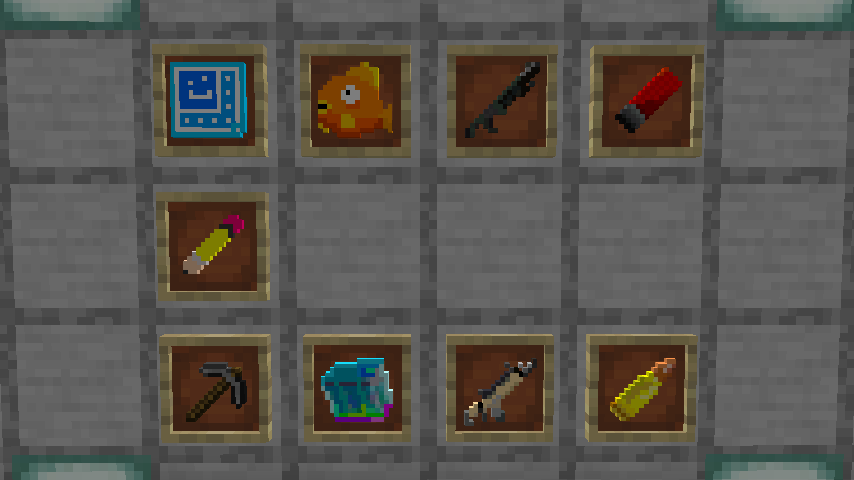
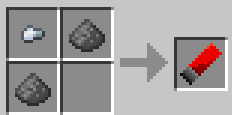
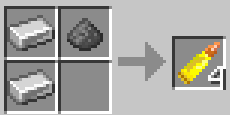
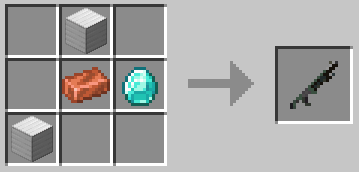
About this Mod
日本語
フォトナの建築とアイテムをマイクラで再現したModです。 ZXCVキーをマイクラで使わないと思ったんで作り始めましたが、XCキーはホットバー関連で使われているので他のキーに設定してください(Tabキーも)。 ちなみにキー設定は自分好みにできます。初期のキー設定
Z:壁、建築モードの開始
X:床、建築モードの開始
C:階段、建築モードの開始
V:屋根、建築モードの開始
Tab:建築モードの開始、終了
R:建築の回転、リロード
O:建築UIの表示の有無
追加される内容
- 建築に関係する要素
- 銃
- 回復アイテム
補足
建築モード中に鉛筆右クリックで素材変更できます。
なお鉛筆以外ではプレビューが表示されません。
それぞれのアイテムの入手方法は
チャグスプラッシュは自然生成されるチェストから、
フロッパーは釣りから入手できます。
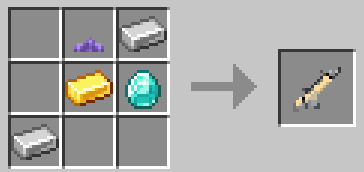
それ以外はクラフトです。なおギャラリーの所にクラフトレシピが載ってます。
また身長変えるMod導入したり、コマンドで身長変えて(1.21.11~、大きさは0.85がおすすめ)建築しやすくするのもいいですね!
登録してね(゜-゜)
https://youtube.com/channel/UC7DGSVEgrreHJThpIW6sy1A?si=hTQhW5EJtJLGxITO
Please change any overlapping settings.
(However, reloading and building rotation can be the same.)
FabricAPI is also required.
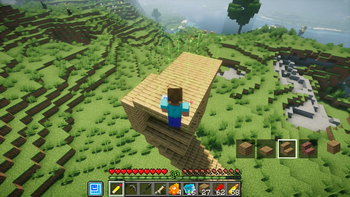
This mod add Fortnite build system in minecraft.
And many other things added.(gun,food)
Initial key settings
Z:Start building mode,Place a wall
X:Start building mode,Place a floor
C:Start building mode,Place a stair
V:Start building mode,Place a roof
R:Architectural rotation,reload of gun
O:Turn ON/OFF Build UI
Tab:Start/End building mode
(You can also customize the settings to your liking.)
Added Content
- Building-related elements
- Guns
- Healing items
Notes
You can change materials by right-clicking the pencil while in building mode.
Note that previews are not displayed for anything other than the pencil.
How to obtain each item:
Chug Splashes are obtained from naturally generated chests.
Floppers are obtained by fishing.
Everything else is crafted. Crafting recipes are listed in the gallery.
If it becomes popular, I'll propably update it...
Code : ChatGPT
(and so on)
Available Versions
How to Install FortniteBuildMod on Your Server
Order Server
Order a Minecraft Java server with at least 3 GB RAM (4 GB recommended).
Set fabric Loader
In the panel under "Egg", select the fabric loader and matching Minecraft version (1.21.11).
Install Mod
Open the mod browser in the dashboard and search for "FortniteBuildMod". Click "Install" – done! Alternatively, upload the .jar via SFTP to the /mods folder.
Compatibility
Mod Loaders
Minecraft Versions
1.21.11, 1.21.1, 1.21
Server-side
✓ RequiredRecommended RAM
4 GB(min. 3 GB)Frequently Asked Questions
FortniteBuildMod server crashes on startup – what to do?
Most common cause: wrong fabric version or insufficient RAM. Check the server log (latest.log) for "OutOfMemoryError" or "Mixin" errors. With Mado Hosting: ensure at least 3 GB RAM is allocated and the loader matches the mod version (1.21.11). You can switch loaders with one click in the panel.
Is FortniteBuildMod compatible with fabric?
FortniteBuildMod officially supports fabric for Minecraft 1.21.11, 1.21.1, 1.21. The Mado dashboard automatically detects incompatible loader combinations.
Server lagging with FortniteBuildMod – how to optimize performance?
Recommended RAM: 4 GB (per 8 players). Use /spark profiler to check if FortniteBuildMod consumes the most tick time. Common fixes: reduce server view-distance to 8-10, install "performant" or "starlight" as supplementary mods on Forge. With Mado Hosting, your server runs on NVMe SSDs with dedicated CPU cores for minimal latency.
Similar Mods



![[TaCZ] Timeless and Classics Zero](https://cdn.modrinth.com/data/SzzJttH8/fd27766d2bb8390d284696b1dbd358f87e081439_96.webp)


Rent Modded Server
Install FortniteBuildMod with just one click on your server.