
廢土豆丨FOUtil
一個專門設計給廢土伺服器的模組丨A Utility Mod for mcFallout.net Server
Screenshots

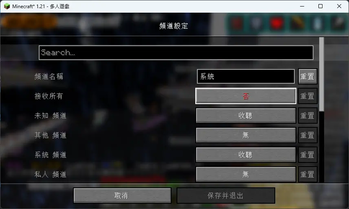
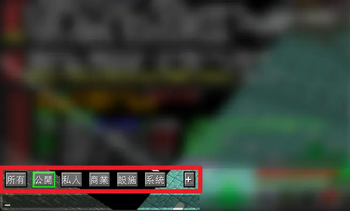
About this Mod



 English
About
- This mod is mainly designed for mcFallout.net server
- Sorting and categorizing chat channels in the server
- Some tweaks for capture/release mob
- Make some inventory item tweak mod like Item Scroller can function normally
關於本模組
- 本模組主要適用於 mcFallout.net 伺服器
- 伺服器內聊天頻道分類
- 生物收納器優化
- 使模組如 Item Scroller,能正常移動含有相同內容的界伏盒
Available Versions
How to Install 廢土豆丨FOUtil on Your Server
Order Server
Order a Minecraft Java server with at least 3 GB RAM (4 GB recommended).
Set fabric Loader
In the panel under "Egg", select the fabric loader and matching Minecraft version (1.21.11).
Install Mod
Open the mod browser in the dashboard and search for "廢土豆丨FOUtil". Click "Install" – done! Alternatively, upload the .jar via SFTP to the /mods folder.
Compatibility
Mod Loaders
Minecraft Versions
1.21.11, 1.21.8, 1.21.4 (+1 more)
Server-side
✗ UnsupportedRecommended RAM
4 GB(min. 3 GB)Frequently Asked Questions
廢土豆丨FOUtil server crashes on startup – what to do?
Most common cause: wrong fabric version or insufficient RAM. Check the server log (latest.log) for "OutOfMemoryError" or "Mixin" errors. With Mado Hosting: ensure at least 3 GB RAM is allocated and the loader matches the mod version (1.21.11). You can switch loaders with one click in the panel.
Is 廢土豆丨FOUtil compatible with fabric?
廢土豆丨FOUtil officially supports fabric for Minecraft 1.21.11, 1.21.8, 1.21.4. The Mado dashboard automatically detects incompatible loader combinations.
Server lagging with 廢土豆丨FOUtil – how to optimize performance?
Recommended RAM: 4 GB (per 8 players). Use /spark profiler to check if 廢土豆丨FOUtil consumes the most tick time. Common fixes: reduce server view-distance to 8-10, install "performant" or "starlight" as supplementary mods on Forge. With Mado Hosting, your server runs on NVMe SSDs with dedicated CPU cores for minimal latency.
Similar Mods






Rent Modded Server
Install 廢土豆丨FOUtil with just one click on your server.