
Foxglove Comics Emoji
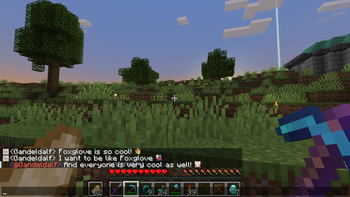
Unofficial Emoji Mod that provides support for Foxglove Comics' Discord emoji.
Screenshots
About this Mod
Description
Unofficial Emoji Mod that provides support for Foxglove Comics' Discord emoji.
Dependencies
Features List
- Displays Discord emoji in game chat
- Supports all Foxglove Comics emoji
- as of the release date of the mod jar file
- Supports all default Discord emoji
- these can be turned off in the config file
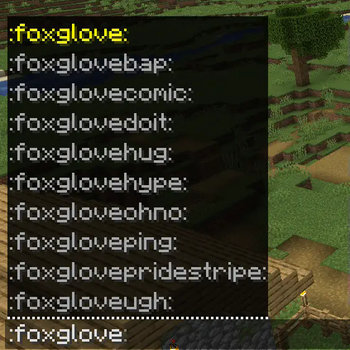
- Emoji suggestions / auto complete while you type
How To Use
The functionality is the same as from Discord.
- Open In-Game chat
- Type in
: - Type emoji name (for example
foxglovehype) - You can press TAB to get suggestions (example:
:foxgloveand pressing TAB will show every foxglove emoji) - End with
:(example::foxglovehype:) - Press enter
Missing
- Only the Foxglove Comics' Discord chat bridge (#minecraft) can render the emoji in Discord. Other servers' chat bridges can not do so. This is a custom feature provided by the Foxglove Comics Minecraft server owner, Gunny. Anyone can send emoji to the Discord chat from Minecraft's chat, with or without this mod.
- Animated emoji are not animated. Instead, the first frame is shown.
- The emoji suggestor in chat is not as robust as Discord's. You must type every letter from the start of the emoji name. eg:
hypedoes not suggestfoxglovehype.
Known issues
If any of these issues happen to you, please contact me directly on Discord.
- Foxglove Comics emoji not showing in game chat, or displaying as unicode characters.
- Please make sure the vanilla resource pack is first in your resource pack list. Either in the game's menu or by editing your options.txt file directly.
- Hovering over emoji is offset or doesn't appear while having Player Heads mod installed.
Disclaimer
This mod is a fan project for the Foxglove Comics Minecraft server, developed and provided with permission from Foxglove Comics. It is not maintained, developed, nor funded by Foxglove Comics staff. If you require support or wish to report a bug, contact Gandeldalf (mod author), not Foxglove Comics staff.
Available Versions
How to Install Foxglove Comics Emoji on Your Server
Order Server
Order a Minecraft Java server with at least 3 GB RAM (4 GB recommended).
Set fabric Loader
In the panel under "Egg", select the fabric loader and matching Minecraft version (1.21.5).
Install Mod
Open the mod browser in the dashboard and search for "Foxglove Comics Emoji". Click "Install" – done! Alternatively, upload the .jar via SFTP to the /mods folder.
Compatibility
Mod Loaders
Minecraft Versions
1.21.5, 1.21.4, 1.21.3 (+3 more)
Server-side
✗ UnsupportedRecommended RAM
4 GB(min. 3 GB)Frequently Asked Questions
Foxglove Comics Emoji server crashes on startup – what to do?
Most common cause: wrong fabric version or insufficient RAM. Check the server log (latest.log) for "OutOfMemoryError" or "Mixin" errors. With Mado Hosting: ensure at least 3 GB RAM is allocated and the loader matches the mod version (1.21.5). You can switch loaders with one click in the panel.
Is Foxglove Comics Emoji compatible with fabric?
Foxglove Comics Emoji officially supports fabric for Minecraft 1.21.5, 1.21.4, 1.21.3. The Mado dashboard automatically detects incompatible loader combinations.
Server lagging with Foxglove Comics Emoji – how to optimize performance?
Recommended RAM: 4 GB (per 8 players). Use /spark profiler to check if Foxglove Comics Emoji consumes the most tick time. Common fixes: reduce server view-distance to 8-10, install "performant" or "starlight" as supplementary mods on Forge. With Mado Hosting, your server runs on NVMe SSDs with dedicated CPU cores for minimal latency.
Similar Mods






Rent Modded Server
Install Foxglove Comics Emoji with just one click on your server.