
First Person Model Compat
Fix First-Person Model mod issues when using mods like Better Combat, Curios, accessories, and more!
Screenshots
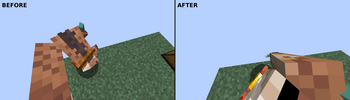
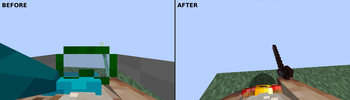
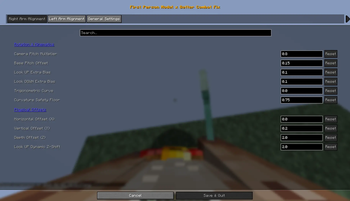
About this Mod
FPModel x Compat
A technical compatibility mod designed to fix model issues when using First Person Model (FPM) alongside mods like Better Combat, Curios, accessories, etc...
🤝 Compatibility & Integrations
This mod acts as a technical bridge, harmonizing interactions between several major mods. Below is the list of currently supported integrations and what we've implemented for each:
⚔️ Combat & Gameplay
- Better Combat
- Kinematic Alignment: Synchronizes arm rotations and body offsets with the camera pitch during complex attack animations.
- Attack State Dispatcher: Detects active combat phases to apply smooth rendering transitions.
- Spell Engine
- Casting Synchronization: Extends kinematic fixes to spell-casting poses, ensuring your hands and staves point where you look.
- Combat Roll
- Movement Stabilization: Smooths out body rendering during rolls to prevent camera clipping and jitter.
🎒 Accessories & Equipment
- Accessories & Curios API
- Universal Slot Hiding: Automatically hides head-related accessory slots (Head, Hat, Face, etc.) in first-person while showing your accessories to other players.
- Configurable Filter: Includes an
ignoredAccessorySlotsoption to allow users to customize which equipment slots are hidden in first person.
- Relics
- Custom Renderer Support: Specific fixes for Relics items that use unique rendering systems, such as the Piglin Mask and Chef's Hat, ensuring they don't block the player's vision.
- Artifacts
- Scarf Visibility Logic: Implementation of a specialized texture-based filter to hide Scarves in first-person while allowing other necklaces and amulets to render normally.
💡 Compatibility Recommendations
If you are experiencing animation conflicts when using Better Combat alongside EMF-based texture packs (like Fresh Animations Player or Fresh Moves), we strongly recommend installing the Entity Player Compat mod. This bridge mod effectively synchronizes animation states, preventing the visual "glitching" or "stuttering" of caused by conflicting animation systems.
🎯 Our Mission
Initially born to bridge the gap within the Better Combat ecosystem, this project aims to evolve into a universal integration hub for First Person Model.
We want to ensure that FPM works seamlessly with every major gameplay and animation mod in the Minecraft community. While our current focus is maintaining absolute stability for our existing integrations, we are eager to expand our horizons.
Have a mod you want to see integrated?
Please open an Issue and tell us which mod integration you're looking for! We will evaluate and work on bringing it to life.
Contributions
Contributions are highly welcome! Whether it's a bug fix, a new mod integration, or improved math for the kinematics util, feel free to open an Issue or submit a Pull Request.
Available Versions
How to Install First Person Model Compat on Your Server
Order Server
Order a Minecraft Java server with at least 3 GB RAM (4 GB recommended).
Set neoforge Loader
In the panel under "Egg", select the neoforge loader and matching Minecraft version (1.21.1).
Install Mod
Open the mod browser in the dashboard and search for "First Person Model Compat". Click "Install" – done! Alternatively, upload the .jar via SFTP to the /mods folder.
Compatibility
Mod Loaders
Minecraft Versions
1.21.1
Server-side
✗ UnsupportedRecommended RAM
4 GB(min. 3 GB)Frequently Asked Questions
First Person Model Compat server crashes on startup – what to do?
Most common cause: wrong neoforge version or insufficient RAM. Check the server log (latest.log) for "OutOfMemoryError" or "Mixin" errors. With Mado Hosting: ensure at least 3 GB RAM is allocated and the loader matches the mod version (1.21.1). You can switch loaders with one click in the panel.
Is First Person Model Compat compatible with neoforge?
First Person Model Compat officially supports neoforge for Minecraft 1.21.1. The Mado dashboard automatically detects incompatible loader combinations.
Server lagging with First Person Model Compat – how to optimize performance?
Recommended RAM: 4 GB (per 8 players). Use /spark profiler to check if First Person Model Compat consumes the most tick time. Common fixes: reduce server view-distance to 8-10, install "performant" or "starlight" as supplementary mods on Forge. With Mado Hosting, your server runs on NVMe SSDs with dedicated CPU cores for minimal latency.
Rent Modded Server
Install First Person Model Compat with just one click on your server.