
Fractal
Library for item subgroups for the creative menu
Screenshots
About this Mod
About Fractal
This repo is a fork of lib39/fractal by unascribed, with added support for styled groups. I will take care of this repo while unascribed is busy.
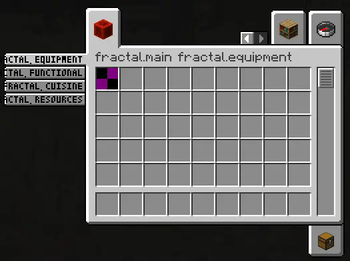
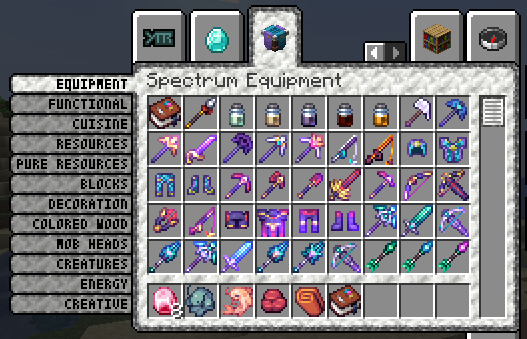
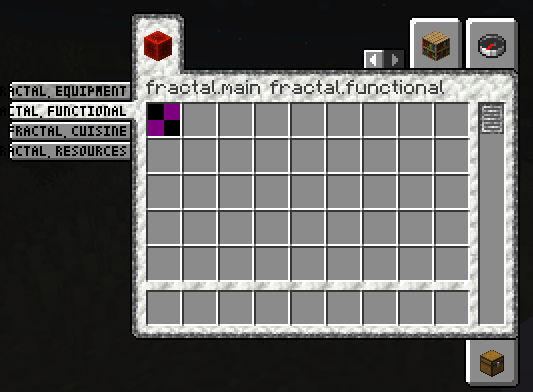
Fractal introduces item subgroups for the creative menu.
Why Fractal?
- Fractals Subgroups are very condensed, allowing you to add up to 12 subgroups for each of your tabs
- Creating a new ItemSubGroup only takes one line of code and no changes in the way you assign your items to groups. Just pass them the ItemSubGroup instead of your main item group
Limitations
- More than 12 subgroups per item group, while fully functional, will look weird.
- The tiny font used for the labels does not support full unicode
Examples
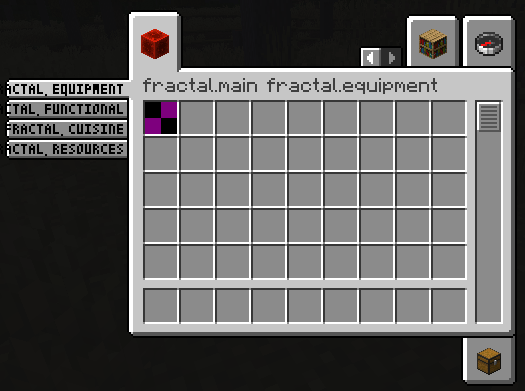
Vanilla Style Subgroups
public static final Identifier GROUP_ID = new Identifier("mymod", "main");

public static final ItemGroup MAIN = FabricItemGroup.builder()
		.icon(() -> new ItemStack(Blocks.REDSTONE_BLOCK))
		.entries((displayContext, entries) -> entries.add(Items.APPLE))
		.displayName(Text.translatable("mymod.1"))
		.noRenderedName()
		.build();

public static final ItemGroup EQUIPMENT = new ItemSubGroup.Builder(MAIN, Text.translatable("itemGroup.mymod.equipment")).entries((displayContext, entries) -> entries.add(Items.APPLE)).build();
public static final ItemGroup FUNCTIONAL = new ItemSubGroup.Builder(MAIN, Text.translatable("itemGroup.mymod.functional")).styled(STYLE).entries((displayContext, entries) -> entries.add(Items.BAKED_POTATO)).build();
public static final ItemGroup CUISINE = new ItemSubGroup.Builder(MAIN, Text.translatable("itemGroup.mymod.cuisine")).entries((displayContext, entries) -> entries.add(Items.CACTUS)).build();
public static final ItemGroup RESOURCES = new ItemSubGroup.Builder(MAIN, Text.translatable("itemGroup.mymod.resources")).styled(STYLE).entries((displayContext, entries) -> entries.add(Items.DANDELION)).build();

@Override
public void onInitialize() {
    Registry.register(Registries.ITEM_GROUP, GROUP_ID, MAIN);
}
Applying a custom style
You are also able to apply a style to your ItemSubGroups, by supplying custom background, tab, subtab and scrollbar textures. You can even mix and match!
In this example, the first two ItemSubGroups use a custom style by supplying texture files that are being shipped with your mod. The latter two tabs use the vanilla style.
// Texture (put into \resources\assets\fractal\textures\gui\container\creative_inventory)
public static final Identifier BACKGROUND_TEXTURE = new Identifier("fractal", "textures/gui/container/creative_inventory/custom_background.png");

// Sprites (put into \resources\assets\fractal\textures\gui\sprites\container\creative_inventory)
public static final Identifier SCROLLBAR_ENABLED_TEXTURE = new Identifier("fractal", "container/creative_inventory/custom_scrollbar_enabled");
public static final Identifier SCROLLBAR_DISABLED_TEXTURE = new Identifier("fractal", "container/creative_inventory/custom_scrollbar_disabled");

public static final Identifier SUBTAB_SELECTED_TEXTURE = new Identifier("fractal", "container/creative_inventory/custom_subtab_selected");
public static final Identifier SUBTAB_UNSELECTED_TEXTURE = new Identifier("fractal", "container/creative_inventory/custom_subtab_unselected");

public static final Identifier TAB_TOP_FIRST_SELECTED_TEXTURE = new Identifier("fractal", "container/creative_inventory/custom_tab_top_first_selected");
public static final Identifier TAB_TOP_SELECTED_TEXTURE = new Identifier("fractal", "container/creative_inventory/custom_tab_top_selected");
public static final Identifier TAB_TOP_LAST_SELECTED_TEXTURE = new Identifier("fractal", "container/creative_inventory/custom_tab_top_last_selected");
public static final Identifier TAB_TOP_FIRST_UNSELECTED_TEXTURE = new Identifier("fractal", "container/creative_inventory/custom_tab_top_first_unselected");
public static final Identifier TAB_TOP_UNSELECTED_TEXTURE = new Identifier("fractal", "container/creative_inventory/custom_tab_top_unselected");
public static final Identifier TAB_TOP_LAST_UNSELECTED_TEXTURE = new Identifier("fractal", "container/creative_inventory/custom_tab_top_last_unselected");
public static final Identifier TAB_BOTTOM_FIRST_SELECTED_TEXTURE = new Identifier("fractal", "container/creative_inventory/custom_tab_bottom_first_selected");
public static final Identifier TAB_BOTTOM_SELECTED_TEXTURE = new Identifier("fractal", "container/creative_inventory/custom_tab_bottom_selected");
public static final Identifier TAB_BOTTOM_LAST_SELECTED_TEXTURE = new Identifier("fractal", "container/creative_inventory/custom_tab_bottom_last_selected");
public static final Identifier TAB_BOTTOM_FIRST_UNSELECTED_TEXTURE = new Identifier("fractal", "container/creative_inventory/custom_tab_bottom_first_unselected");
public static final Identifier TAB_BOTTOM_UNSELECTED_TEXTURE = new Identifier("fractal", "container/creative_inventory/custom_tab_bottom_unselected");
public static final Identifier TAB_BOTTOM_LAST_UNSELECTED_TEXTURE = new Identifier("fractal", "container/creative_inventory/custom_tab_bottom_last_unselected");

public static final ItemSubGroup.Style STYLE = new ItemSubGroup.Style.Builder()
        .background(BACKGROUND_TEXTURE)
        .scrollbar(SCROLLBAR_ENABLED_TEXTURE, SCROLLBAR_DISABLED_TEXTURE)
        .subtab(SUBTAB_SELECTED_TEXTURE, SUBTAB_UNSELECTED_TEXTURE)
        .tab(TAB_TOP_FIRST_SELECTED_TEXTURE, TAB_TOP_SELECTED_TEXTURE, TAB_TOP_LAST_SELECTED_TEXTURE, TAB_TOP_FIRST_UNSELECTED_TEXTURE, TAB_TOP_UNSELECTED_TEXTURE, TAB_TOP_LAST_UNSELECTED_TEXTURE,
                TAB_BOTTOM_FIRST_SELECTED_TEXTURE, TAB_BOTTOM_SELECTED_TEXTURE, TAB_BOTTOM_LAST_SELECTED_TEXTURE, TAB_BOTTOM_FIRST_UNSELECTED_TEXTURE, TAB_BOTTOM_UNSELECTED_TEXTURE, TAB_BOTTOM_LAST_UNSELECTED_TEXTURE)
        .build();

public static final ItemGroup EQUIPMENT = new ItemSubGroup.Builder(MAIN, Text.translatable("itemGroup.mymod.equipment")).styled(STYLE).entries((displayContext, entries) -> entries.add(Items.APPLE)).build();
public static final ItemGroup FUNCTIONAL = new ItemSubGroup.Builder(MAIN, Text.translatable("itemGroup.mymod.functional")).styled(STYLE).entries((displayContext, entries) -> entries.add(Items.BAKED_POTATO)).build();
public static final ItemGroup CUISINE = new ItemSubGroup.Builder(MAIN, Text.translatable("itemGroup.mymod.cuisine")).entries((displayContext, entries) -> entries.add(Items.CACTUS)).build();
public static final ItemGroup RESOURCES = new ItemSubGroup.Builder(MAIN, Text.translatable("itemGroup.mymod.resources")).entries((displayContext, entries) -> entries.add(Items.DANDELION)).build();
Available Versions
How to Install Fractal on Your Server
Order Server
Order a Minecraft Java server with at least 3 GB RAM (4 GB recommended).
Set fabric Loader
In the panel under "Egg", select the fabric loader and matching Minecraft version (26.1.2).
Install Mod
Open the mod browser in the dashboard and search for "Fractal". Click "Install" – done! Alternatively, upload the .jar via SFTP to the /mods folder.
Compatibility
Mod Loaders
Minecraft Versions
26.1.2, 26.1.1, 26.1 (+16 more)
Server-side
✓ RequiredRecommended RAM
4 GB(min. 3 GB)Frequently Asked Questions
Fractal server crashes on startup – what to do?
Most common cause: wrong fabric version or insufficient RAM. Check the server log (latest.log) for "OutOfMemoryError" or "Mixin" errors. With Mado Hosting: ensure at least 3 GB RAM is allocated and the loader matches the mod version (26.1.2). You can switch loaders with one click in the panel.
Is Fractal compatible with fabric and neoforge and quilt?
Fractal officially supports fabric, neoforge, quilt for Minecraft 26.1.2, 26.1.1, 26.1. The Mado dashboard automatically detects incompatible loader combinations.
Server lagging with Fractal – how to optimize performance?
Recommended RAM: 4 GB (per 8 players). Use /spark profiler to check if Fractal consumes the most tick time. Common fixes: reduce server view-distance to 8-10, install "performant" or "starlight" as supplementary mods on Forge. With Mado Hosting, your server runs on NVMe SSDs with dedicated CPU cores for minimal latency.
Similar Mods



Rent Modded Server
Install Fractal with just one click on your server.