
FreeCam
Client-side free camera with F6 follow view.
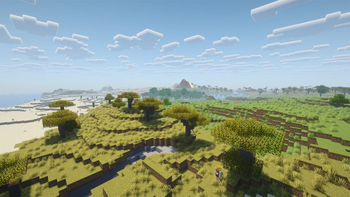
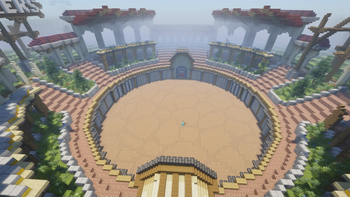
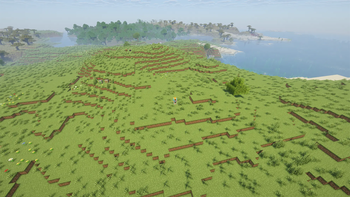
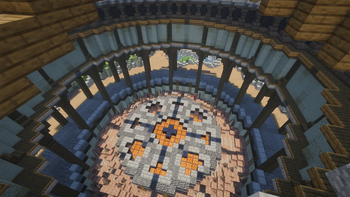
Screenshots

About this Mod
FreeCam 🎥
Detach your camera. Your player stays. No freezing, no limits within loaded chunks.
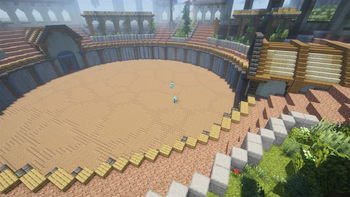
FreeCam gives you a separate camera entity you can fly through your world with — inspect builds, scout areas, get a perfect screenshot angle — while your player stands still and stays visible. Disable it and you're instantly back.
The F6 follow camera locks a high, wide-angle view behind you. Full player control, camera just follows along.
⚠️ Client-side only — no server installation required. The server does not need the mod installed.
At a Glance 📌
| Loaders | Fabric · Forge |
| Type | Client-side |
| License | MIT |
| Dependencies | Fabric API (Fabric only) |
Features ✨
- Separate camera entity — player stays visible and unfrozen
- Fly through blocks freely within render distance
- F6 follow camera — high and far behind the player, auto-pulls back at walls
- Full player control in F6 mode (run, jump, look around normally)
- Configurable distance, height, and collision behavior for the follow cam
- Full brightness option while FreeCam is active
- Optional hand, player model, and fog visibility toggles
- Multiplayer-unsafe interactions removed
Keybinds ⌨️
| Key | Action |
|---|---|
F4 |
Toggle free camera |
F6 |
Toggle follow camera |
F4 + 1–9 |
Tripod mode — save and switch camera positions (Fabric only) |
| Unbound | Config screen · Reset tripod |
Settings ⚙️
| Category | Options |
|---|---|
| Movement | Flight mode, horizontal speed, vertical speed |
| Collision | Transparent blocks, openable blocks, all collision |
| Visual | Perspective, show player, show hand, full brightness, submersion fog |
| F6 Camera | Distance, height, wall occlusion |
| Utility | Disable on damage, notifications |
Available Versions ✅
| Minecraft | Fabric | Forge |
|---|---|---|
| 26.1.x | ✅ | — |
| 1.21.x | ✅ | — |
| 1.20.x | ✅ | — |
| 1.19.x | ✅ | — |
| 1.18.x | ✅ | — |
| 1.17.x | ✅ | — |
| 1.8.9 | — | ✅ |
Requirements 📦
| Loader | Requirements |
|---|---|
| Fabric | Fabric API |
| Fabric (optional) | Mod Menu for the settings screen |
| Forge | None |
📜 License
This project is licensed under the MIT License.
Copyright (c) 2026 Yannis_
Permission is granted to use, copy, modify, merge, publish, distribute, sublicense, and/or sell copies of this software, as long as the copyright notice and permission notice are included in all copies or substantial portions of the software.
The software is provided "as is", without warranty of any kind.
📦 Usage & Permissions
You may use FreeCam in:
- Modpacks
- Videos
- Screenshots
- Personal Minecraft setups
- Local worlds and private testing setups
Please check server rules before using any camera mod in multiplayer. Even client-side camera mods may be against the rules on some servers.
Available Versions
How to Install FreeCam on Your Server
Order Server
Order a Minecraft Java server with at least 3 GB RAM (4 GB recommended).
Set fabric Loader
In the panel under "Egg", select the fabric loader and matching Minecraft version (26.1.2).
Install Mod
Open the mod browser in the dashboard and search for "FreeCam". Click "Install" – done! Alternatively, upload the .jar via SFTP to the /mods folder.
Compatibility
Mod Loaders
Minecraft Versions
26.1.2, 26.1.1, 26.1 (+49 more)
Server-side
✗ UnsupportedRecommended RAM
4 GB(min. 3 GB)Frequently Asked Questions
FreeCam server crashes on startup – what to do?
Most common cause: wrong fabric version or insufficient RAM. Check the server log (latest.log) for "OutOfMemoryError" or "Mixin" errors. With Mado Hosting: ensure at least 3 GB RAM is allocated and the loader matches the mod version (26.1.2). You can switch loaders with one click in the panel.
Is FreeCam compatible with fabric and forge?
FreeCam officially supports fabric, forge for Minecraft 26.1.2, 26.1.1, 26.1. Note: Forge and Fabric mods are NOT cross-compatible – pick one loader and stick with it. The Mado dashboard automatically detects incompatible loader combinations.
Server lagging with FreeCam – how to optimize performance?
Recommended RAM: 4 GB (per 8 players). Use /spark profiler to check if FreeCam consumes the most tick time. Common fixes: reduce server view-distance to 8-10, install "performant" or "starlight" as supplementary mods on Forge. With Mado Hosting, your server runs on NVMe SSDs with dedicated CPU cores for minimal latency.
Similar Mods



![[TaCZ] Timeless and Classics Zero](https://cdn.modrinth.com/data/SzzJttH8/fd27766d2bb8390d284696b1dbd358f87e081439_96.webp)


Rent Modded Server
Install FreeCam with just one click on your server.