
Fresh Flesh(FF)
Make rotten flesh useful, balanced and automated.
Screenshots

About this Mod
Welcome to Fresh Flesh(FF)
You've built a zombie farm to gather XP, but now you're left with tons of useless rotten flesh. So, you install a mod to turn flesh into leather, but eventually, you realize you don’t need it anymore. Not wanting to waste the resource, you add a mod to convert flesh into food, but then you build a golden carrot farm, making that mod obsolete too. Next, you think, "What if I compost the flesh?" but Minecraft doesn't support that feature, and every mod you find either lacks it or comes with a bunch of unnecessary extras.
Autorack(1.0.4.0 + ):
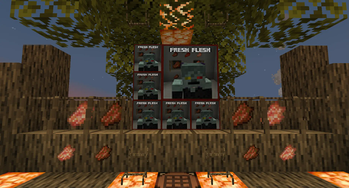
Well, guess what? We've got you covered! Fresh Flesh (FF) introduces a brand-new block: the Flesh Rack. Simply place your rotten flesh on this sleek block, then right-click it with your axe—just like stripping bark. This removes all that zombie gunk and leaves you with a clean, usable piece of flesh.
To remove the freshly cleaned flesh from the rack, simply right-click it with an empty hand. Once you've collected your clean flesh, you're ready to start crafting your
To remove the freshly cleaned flesh from the rack, simply right-click it with an empty hand. Once you've collected your clean flesh, you're ready to start crafting your items!
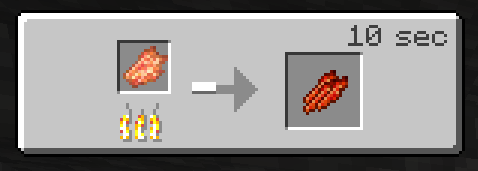
Jerky
Cooked on a Campfire
Bone Meal
Crafting Table
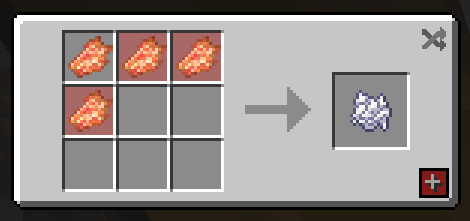
- Composter, Clean Flesh 30% chance to add a stage.
- Composter, Rotten Fless 15% chance to add a stage.
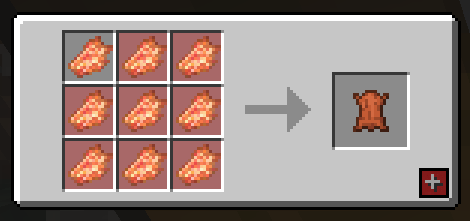
Leather
Crafting Table
As a little bonus I also included 2 paintings a 1 block and 4 block versions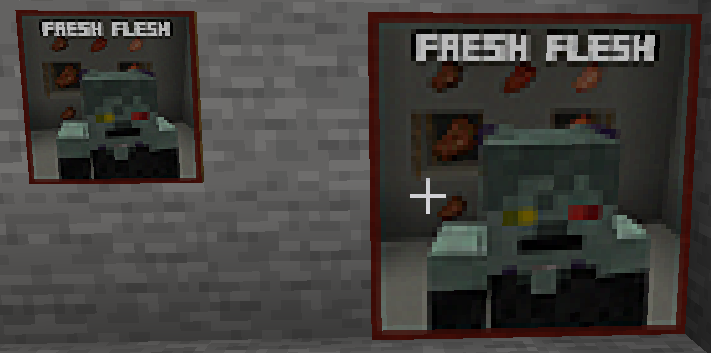 )
)
Features of the Fresh Flesh Mod (FF)
-Flesh Rack Block
A new block where you can hang and clean your rotten flesh. Perfect for converting zombie drops into usable resources.
-Rotten Flesh Cleaning Mechanic
- Place rotten flesh on the Flesh Rack.
- Right-click with an axe (similar to stripping bark) to remove the zombie gunk, leaving you with clean flesh.
-Easy Item Retrieval
- Right-click the Flesh Rack with an empty hand to remove the cleaned flesh.
- Right-click the Flesh Rack with you axe to also remove your clean flesh(1.0.3.0).
- If you need that Rotten Flesh back you can also just Right-click it with a empty hand and it will return the Rotten Flesh(1.0.3.0).
-Crafting with Clean Flesh
Once you've collected the clean flesh, you can use it to craft various useful items:
- Rotten Flesh to Leather
- Rotten Flesh to Bone Meal
- Rotten Flesh to Jerky (Food)
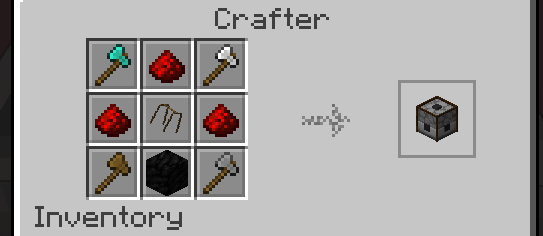
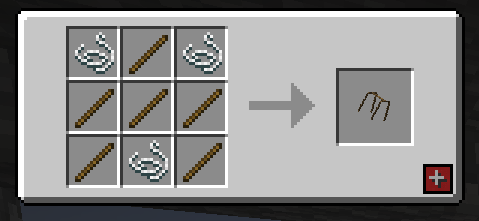
-Autorack(1.0.4.0 + )
- Image below is a 1.21.1 example
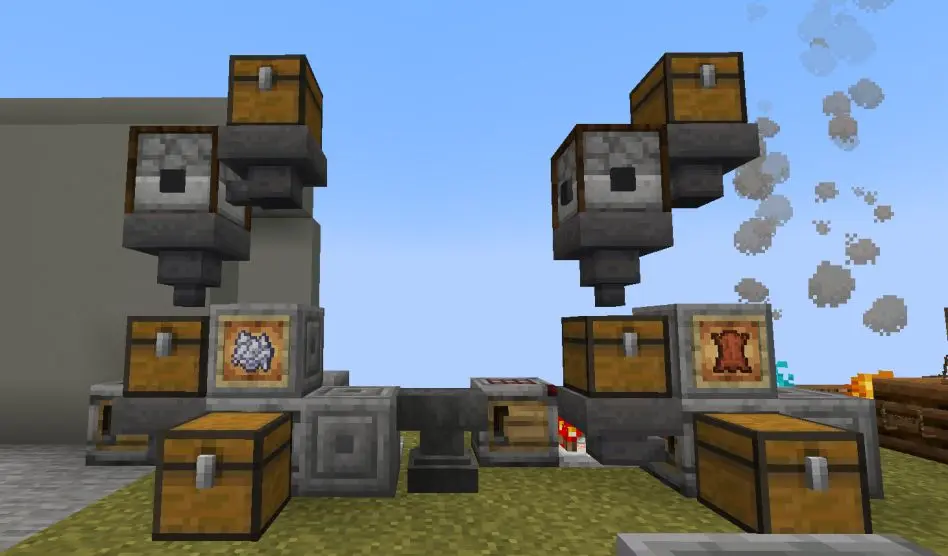
Using Autorack:
- Right click on the Autorack to open it's gui add your rotten flech and in 2 seconds you will have your clean flesh
- hoppers and chests to do this on a large scale, you can also do as the image above where you can create a farm linked to the autorack and then a crafter meaning you can make lether, bonemeal or food.
Social Media
Supporting The Mods?

Would you like to support us? consider our patreon, to help keep our lights on and our tummies full. https://www.patreon.com/TSMUK thanks guys, if you make videos and love our mods, consider making a review video, can't do these two things? then simple, Follow us on twitter, and comment on this page to tell us what you like and dislike about our work.
Most importantly ENJOY yourself.
Available Versions
How to Install Fresh Flesh(FF) on Your Server
Order Server
Order a Minecraft Java server with at least 3 GB RAM (4 GB recommended).
Set neoforge Loader
In the panel under "Egg", select the neoforge loader and matching Minecraft version (1.21.8).
Install Mod
Open the mod browser in the dashboard and search for "Fresh Flesh(FF)". Click "Install" – done! Alternatively, upload the .jar via SFTP to the /mods folder.
Compatibility
Mod Loaders
Minecraft Versions
1.21.8, 1.21.4, 1.21.1
Server-side
✓ RequiredRecommended RAM
4 GB(min. 3 GB)Frequently Asked Questions
Fresh Flesh(FF) server crashes on startup – what to do?
Most common cause: wrong neoforge version or insufficient RAM. Check the server log (latest.log) for "OutOfMemoryError" or "Mixin" errors. With Mado Hosting: ensure at least 3 GB RAM is allocated and the loader matches the mod version (1.21.8). You can switch loaders with one click in the panel.
Is Fresh Flesh(FF) compatible with neoforge?
Fresh Flesh(FF) officially supports neoforge for Minecraft 1.21.8, 1.21.4, 1.21.1. The Mado dashboard automatically detects incompatible loader combinations.
Server lagging with Fresh Flesh(FF) – how to optimize performance?
Recommended RAM: 4 GB (per 8 players). Use /spark profiler to check if Fresh Flesh(FF) consumes the most tick time. Common fixes: reduce server view-distance to 8-10, install "performant" or "starlight" as supplementary mods on Forge. With Mado Hosting, your server runs on NVMe SSDs with dedicated CPU cores for minimal latency.
Similar Mods




Rent Modded Server
Install Fresh Flesh(FF) with just one click on your server.